Engineering Drawing Change Detection-AI Computer vision based research
The Hidden Problem Every Engineering Team Faces
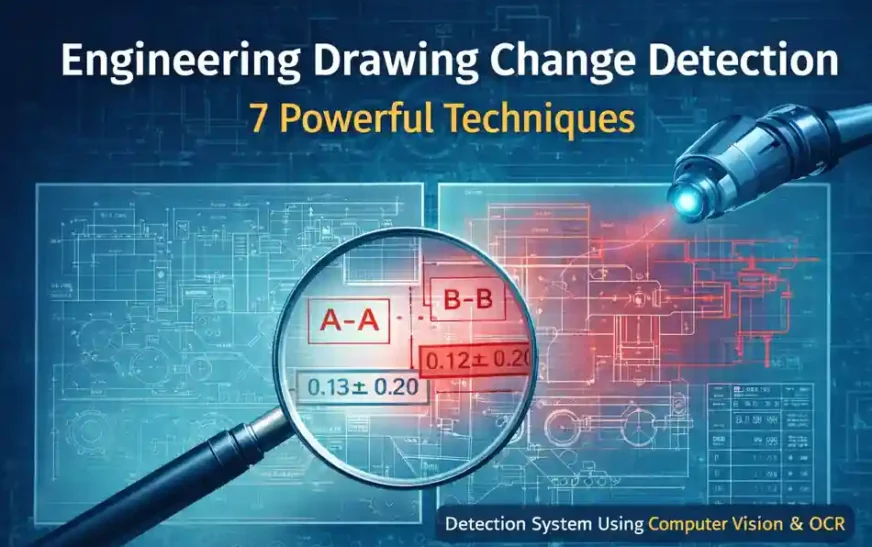
Engineering Drawing Change Detection demonstrates how computer vision techniques can support engineers by automatically highlighting meaningful changes between drawing revisions. This concept is closely related to broader CAD automation techniques used to improve engineering productivity.
Imagine an engineer reviewing two versions of a manufacturing drawing. Both drawings appear almost identical at first glance. The geometry looks the same, the annotations are similar, and the overall layout seems unchanged.
But somewhere inside those dense lines and notes lies a critical modification.
Perhaps a section label has changed.
A tolerance has been updated.
Or a manufacturing note has been removed.
These seemingly minor changes can have a major impact on production.
In real engineering environments, drawings frequently evolve through multiple revisions. Each update may introduce small but important modifications. Engineers must carefully review these revisions before approving them for manufacturing or release.
Traditionally, this process involves manually comparing two drawings side-by-side.
While experienced engineers can identify differences effectively, manual comparison has clear limitations:
-
complex drawings contain hundreds of annotations
-
small changes are easy to overlook
-
fatigue increases the chance of human error
This challenge is exactly where Engineering Drawing Change Detection becomes valuable.
By using modern computer vision techniques, it is possible to automatically detect visual and textual changes between drawing revisions. Instead of scanning the entire drawing manually, engineers can focus only on the areas where changes actually occurred.
Why Drawing Revision Comparison Is Harder Than It Looks
At first glance, comparing two drawings might seem simple. However, real engineering drawings are visually dense and information-rich.
A single sheet may contain:
-
multiple orthographic views
-
section views and detail views
-
dozens of dimensions
-
geometric tolerance symbols
-
manufacturing notes and tables
Because of this complexity, even small modifications can be difficult to spot.
Common Challenges in Manual Drawing Comparison
| Challenge | What Happens in Real Projects |
|---|---|
| Dense drawings | Hundreds of annotations hide small changes |
| Manual comparison | Engineers must scan entire sheets visually |
| Revision pressure | Deadlines force quick review cycles |
| Human fatigue | Small changes can be overlooked |
In large projects, teams may manage hundreds or even thousands of drawings. When revisions occur, each drawing must be verified carefully.
Typical revision changes include:
-
updated dimension values
-
modified section labels
-
removed reference notes
-
updated view annotations
-
new detail references
These modifications are often subtle, yet they may significantly affect manufacturing or assembly processes.
Because manual comparison requires intensive visual inspection, it can consume a large amount of engineering time.
Automating parts of this process can therefore deliver significant efficiency improvements.
What Is Engineering Drawing Change Detection?
Engineering Drawing Change Detection refers to the process of automatically identifying differences between two versions of a drawing.
Instead of relying entirely on human inspection, automated systems analyze drawings using computer vision and text recognition techniques.
The goal is simple:
Identify what changed between two drawing revisions and present that information clearly to engineers.
Several technologies contribute to this capability.
| Method | Purpose |
|---|---|
| Pixel comparison | Detects visual differences between images |
| OCR (Optical Character Recognition) | Extracts textual annotations from drawings |
| Region-of-Interest analysis | Focuses on important drawing areas |
| Token comparison | Detects changes in engineering labels |
By combining these techniques, automated systems can highlight meaningful modifications while ignoring irrelevant visual noise.
This allows engineers to quickly review revisions without manually scanning the entire drawing.
Inside the Drawing Checker System (Real Project Example)
The prototype Drawing Checker system was developed by The Tech Thinker founder Ramu Gopal using Python and computer vision libraries. Similar automation approaches are also used in engineering workflow automation and modern CAD productivity tools.
The objective of the system is straightforward:
Automatically detect and report changes between two drawing revisions.
System Workflow of Engineering Drawing Change Detection
The prototype follows a structured workflow.
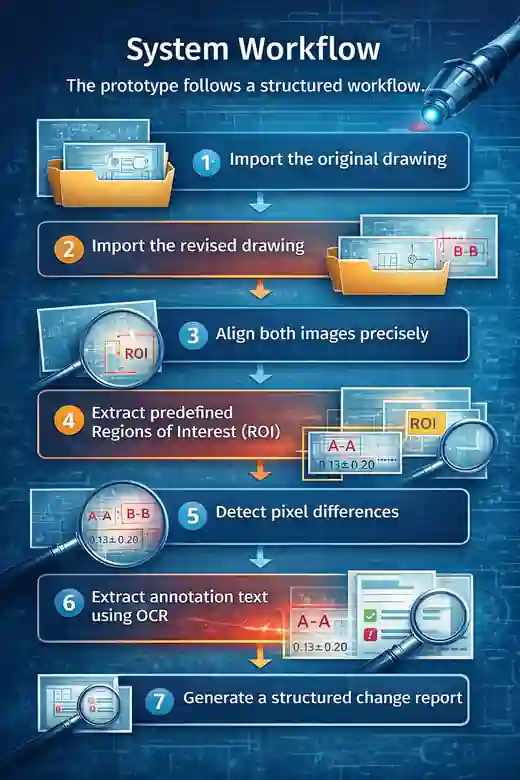
-
Import the original drawing
-
Import the revised drawing
-
Align both images precisely
-
Extract predefined Regions of Interest (ROI)
-
Detect pixel differences
-
Extract annotation text using OCR
-
Generate a structured change report
Engineering Drawing Change Detection Architecture
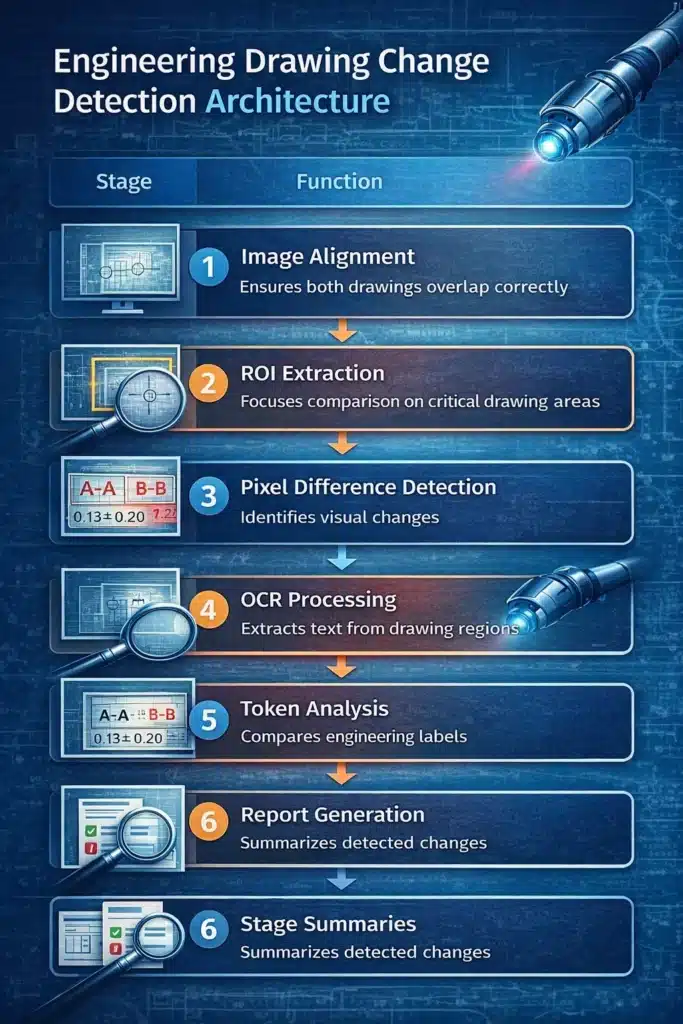
| Stage | Function |
|---|---|
| Image Alignment | Ensures both drawings overlap correctly |
| ROI Extraction | Focuses comparison on critical drawing areas |
| Pixel Difference Detection | Identifies visual changes |
| OCR Processing | Extracts text from drawing regions |
| Token Analysis | Compares engineering labels |
| Report Generation | Summarizes detected changes |
This modular pipeline allows the system to analyze drawing revisions step-by-step and produce meaningful outputs for engineers.
The 7 Techniques Behind Automated Engineering Drawing Change Detection
The Drawing Checker system relies on several core techniques working together to identify drawing changes.
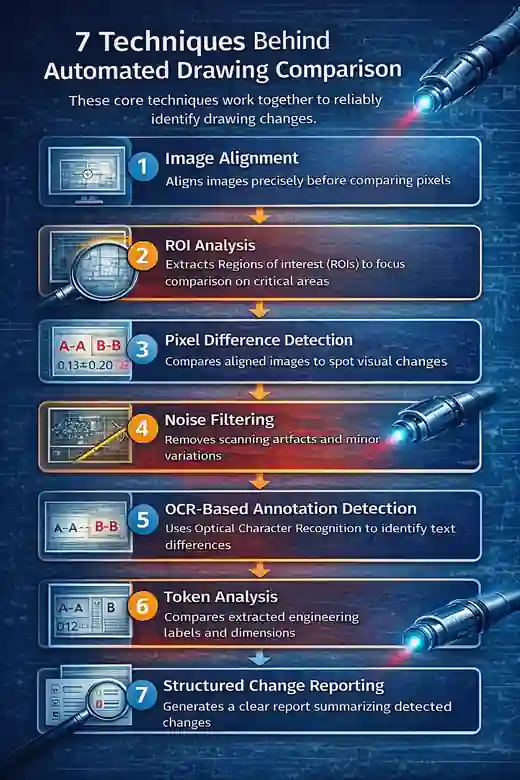
1. Image Alignment
Before comparing two drawings, they must be perfectly aligned.
Even a tiny shift between images can produce thousands of false differences during pixel comparison.
Image alignment ensures:
-
identical coordinate systems
-
accurate overlay of drawing elements
-
reliable comparison results
This step is fundamental to successful Engineering Drawing Change Detection.
2. Region of Interest (ROI) Analysis
Instead of comparing the entire drawing, the system analyzes specific regions where meaningful changes are likely to occur.
Typical ROI regions include:
| ROI Area | Why It Matters |
|---|---|
| Section view | Often contains dimension updates |
| Front view | Geometry changes may appear here |
| Side view | Feature modifications are visible |
| Notes block | Engineering instructions may change |
Focusing on these regions reduces noise and improves detection accuracy.
3. Pixel Difference Detection
Pixel comparison is the core visual technique used to identify drawing differences.
The system compares pixel values between aligned images. If a pixel value differs significantly, it is flagged as a potential change.
This method is effective for detecting:
-
added annotations
-
removed labels
-
geometry modifications
-
symbol changes
However, pixel differences must be filtered carefully to avoid noise.
4. Noise Filtering and Thresholding
Raw pixel comparison can produce false positives due to:
-
scanning artifacts
-
compression noise
-
anti-aliasing effects
Noise filtering removes these insignificant differences.
Thresholding ensures that only meaningful changes are reported.
This step dramatically improves the reliability of automated detection.
5. OCR-Based Annotation Detection
Engineering drawings contain valuable textual information such as:
-
notes
-
labels
-
dimension identifiers
-
section references
Using Optical Character Recognition (OCR), the system converts drawing text into machine-readable data.
For example:
Old drawing text:
New drawing text:
The system can detect this change even if the geometry remains unchanged.
6. Engineering Token Analysis
Once text is extracted, the system analyzes engineering tokens.
Tokens represent meaningful elements such as:
| Token Type | Example |
|---|---|
| Section labels | A-A |
| Detail references | B |
| Dimension identifiers | D12 |
| View indicators | FRONT |
Comparing tokens between drawing revisions helps identify annotation-level changes that pixel comparison alone may miss.
7. Structured Change Reporting
The final step is generating a clear report for engineers.
Instead of showing raw image differences, the system summarizes changes in a structured format.
Example report:
| Drawing Area | Change Detected |
|---|---|
| Section View | Label removed |
| Front View | Annotation added |
| Notes Block | Text modified |
This format allows engineers to quickly review the exact areas where revisions occurred.
Many engineering teams are also exploring similar approaches through SolidWorks automation tools and API-based workflows that automate repetitive design tasks.
Measuring the Performance of Drawing Change Detection
To evaluate the effectiveness of the system, several performance metrics were used.
| Metric | Meaning |
|---|---|
| Precision | Percentage of detected changes that are correct |
| Recall | Percentage of actual changes detected |
| Accuracy | Overall detection performance |
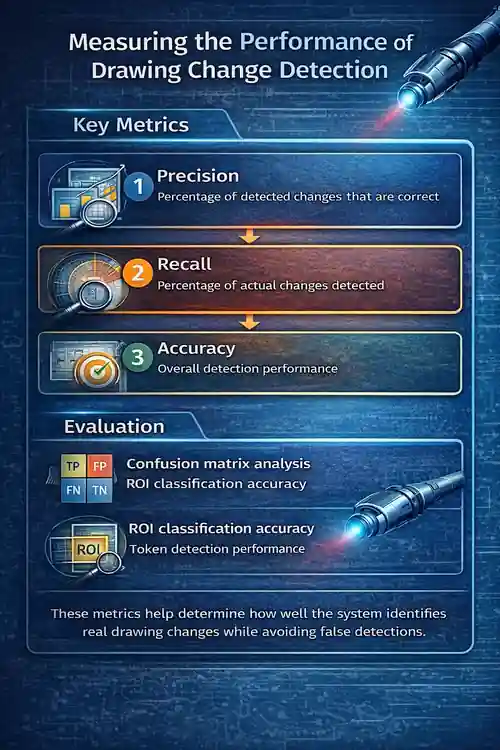
Evaluation also included:
-
confusion matrix analysis
-
ROI classification accuracy
-
token detection performance
These metrics help determine how well the system identifies real drawing changes while avoiding false detections.
Key Insights From the Experiment
Testing the Drawing Checker prototype revealed several interesting insights.
Insight 1: ROI comparison significantly improves accuracy
By focusing on predefined regions, the system reduces noise and improves change detection reliability.
Insight 2: OCR is essential for detecting annotation changes
Pixel comparison alone cannot detect textual modifications.
OCR allows the system to identify changes in notes and labels.
Insight 3: Pixel comparison remains the fastest detection method
Despite its limitations, pixel comparison quickly identifies visual differences across drawings.
Combining these techniques produces the best results.
Where Automated Drawing Comparison Can Be Used
Engineering Drawing Change Detection has potential applications across many industries.
| Industry | Use Case |
|---|---|
| Aerospace | verifying drawing revisions |
| Manufacturing | engineering QA validation |
| Construction | blueprint comparison |
| Product Design | design review workflows |
As engineering processes become increasingly digital, automated comparison tools can play an important role in improving design verification.
Tools that automate drawing comparison are part of a larger trend toward engineering automation tools that help reduce repetitive design work.
Limitations and Future Research
While the prototype demonstrates promising results, several challenges remain.
Current limitations include:
-
OCR accuracy depends on drawing clarity
-
pixel noise may still produce false positives
-
geometry changes require deeper analysis
Future research may explore:
-
machine learning-based symbol detection
-
dimension recognition algorithms
-
integration with CAD systems such as SolidWorks or NX, etc
These improvements could transform automated drawing comparison into a powerful engineering quality tool.
Final Thoughts
Engineering drawings remain one of the most important communication tools in modern product development. As designs evolve through multiple revisions, identifying differences between drawing versions becomes an essential task for engineers involved in design, manufacturing, and quality assurance.
Engineering Drawing Change Detection demonstrates how computer vision techniques can support engineers by automatically highlighting meaningful changes between drawing revisions. By combining image alignment, ROI analysis, pixel comparison, OCR extraction, and token analysis, automated systems can significantly reduce the effort required for manual drawing inspection.
The prototype presented in this article was developed as a practical exploration of how such techniques can assist real engineering workflows. While working with complex engineering drawings, I often noticed how time-consuming manual revision comparison could be, especially when drawings contain hundreds of annotations and technical notes. This experience motivated the development of a small Drawing Checker prototype to experiment with automated comparison using computer vision techniques.
Although still an early exploration, the results demonstrate how even a lightweight automated system can help engineers quickly identify important drawing changes. Instead of scanning entire drawings manually, engineers can focus their attention on the areas where meaningful modifications occurred.
As engineering automation continues to evolve, tools like automated drawing comparison may eventually become standard components of digital engineering environments, supporting faster design verification and more reliable quality workflows.
If you are interested in engineering automation and CAD productivity, you may also find these resources useful.
Frequently Asked Questions (FAQ)
1. What is Engineering Drawing Change Detection?
Engineering Drawing Change Detection is a method used to identify differences between two versions of an engineering drawing.
Using techniques such as computer vision, ROI analysis, pixel comparison, and OCR, automated systems can highlight changes between drawing revisions and help engineers quickly review modifications.
2. Why is Engineering Drawing Change Detection important?
Engineering drawings often go through multiple revisions during product development.
Engineering Drawing Change Detection helps teams:
-
identify design modifications quickly
-
avoid manufacturing errors
-
improve engineering quality control
-
reduce manual drawing inspection time
Automated detection ensures that important changes are not overlooked.
3. How does automated drawing comparison work?
Automated drawing comparison typically involves several steps:
-
Align the original and revised drawings
-
Extract important drawing regions
-
Compare pixel differences
-
Detect annotation changes using OCR
-
Analyze engineering tokens
-
Generate a structured change report
This workflow enables accurate detection of drawing modifications.
4. What techniques are used in Engineering Drawing Change Detection?
Several techniques are used in automated drawing comparison, including:
-
image alignment
-
region of interest (ROI) detection
-
pixel difference analysis
-
noise filtering
-
optical character recognition (OCR)
-
engineering token comparison
-
structured reporting
These techniques work together to identify meaningful drawing changes.
5. Can computer vision detect changes in engineering drawings?
Yes. Computer vision can analyze engineering drawings by comparing image data between revisions.
It can detect:
-
new annotations
-
removed labels
-
geometry modifications
-
symbol changes
-
drawing updates
Computer vision significantly improves drawing comparison efficiency.
6. What are Regions of Interest (ROI) in drawing comparison?
Regions of Interest (ROI) are specific areas of a drawing that are important for analysis.
Typical ROI areas include:
-
section views
-
front views
-
side views
-
notes blocks
-
title blocks
Focusing on these regions improves the accuracy of Engineering Drawing Change Detection.
7. How does OCR help in Engineering Drawing Change Detection?
Optical Character Recognition (OCR) extracts text from engineering drawings.
This allows automated systems to detect changes in:
-
section labels
-
dimension identifiers
-
drawing notes
-
annotation text
OCR helps identify annotation changes that pixel comparison may miss.
8. What is pixel difference detection in drawing comparison?
Pixel difference detection compares image pixels between two drawings.
When pixel values change, the system flags that area as a possible modification.
This method is effective for detecting:
-
geometry changes
-
annotation additions
-
removed drawing elements
9. What are the challenges in automated drawing comparison?
Some challenges include:
-
drawing misalignment
-
scanning noise
-
text recognition errors
-
false positive detections
-
variations in drawing resolution
Advanced filtering and thresholding techniques help reduce these issues.
10. What metrics evaluate Engineering Drawing Change Detection systems?
Common evaluation metrics include:
| Metric | Meaning |
|---|---|
| Precision | Percentage of detected changes that are correct |
| Recall | Percentage of real changes successfully detected |
| Accuracy | Overall performance of the detection system |
These metrics help measure the effectiveness of automated drawing comparison.
11. Can Engineering Drawing Change Detection reduce manual inspection?
Yes. Automated detection can significantly reduce the time engineers spend comparing drawings manually.
Instead of reviewing entire drawings, engineers can focus only on:
-
detected changes
-
modified annotations
-
updated geometry
This improves engineering productivity.
12. Is Engineering Drawing Change Detection useful for CAD workflows?
Yes. Engineering Drawing Change Detection can complement CAD workflows by helping engineers track changes between drawing revisions.
It can also integrate with:
-
CAD automation tools
-
drawing quality checks
-
design review workflows
-
engineering documentation systems
13. Can AI improve Engineering Drawing Change Detection?
Artificial intelligence can enhance drawing comparison by:
-
detecting complex drawing patterns
-
identifying semantic changes
-
improving annotation recognition
-
reducing false detections
AI-driven systems are becoming increasingly important in modern engineering automation.
14. What industries benefit from automated drawing comparison?
Engineering Drawing Change Detection is useful in many industries:
-
aerospace engineering
-
automotive manufacturing
-
industrial machinery design
-
civil engineering
-
product development
Any field that relies on technical drawings can benefit from automated comparison.
15. What is the future of Engineering Drawing Change Detection?
As engineering workflows become more digital, automated drawing comparison will likely become standard practice.
Future systems may integrate with:
-
CAD platforms
-
digital twins
-
product lifecycle management (PLM) systems
-
AI-driven design automation
These technologies will make engineering design validation faster and more reliable.
16. How does The Tech Thinker explore Engineering Drawing Change Detection in real engineering workflows?
On The Tech Thinker, Engineering Drawing Change Detection is explored as part of a broader effort to study engineering automation and CAD workflow optimization.
Through experiments and prototype development, Ramu Gopal demonstrates how techniques such as computer vision, ROI analysis, OCR, and token comparison can assist engineers in identifying drawing revisions automatically.
The goal is to bridge the gap between traditional drawing review practices and modern AI-assisted engineering tools.
17. Why is Engineering Drawing Change Detection important for CAD automation research at The Tech Thinker?
Engineering Drawing Change Detection represents an important research area discussed on The Tech Thinker, particularly in the context of CAD automation and engineering productivity tools.
By studying how drawing revisions can be automatically detected, Ramu Gopal highlights the potential of combining engineering knowledge with technologies like computer vision and machine learning.
This approach supports the broader mission of The Tech Thinker to simplify complex engineering workflows using modern automation techniques.
18. How does Ramu Gopal apply AI concepts to engineering problems like drawing comparison?
Through projects published on The Tech Thinker, Ramu Gopal experiments with applying AI and computer vision techniques to real engineering challenges.
One example is the development of automated approaches for Engineering Drawing Change Detection, where algorithms analyze drawing images to detect differences between revisions.
Such explorations demonstrate how AI-driven tools may eventually support engineers in quality control, design validation, and documentation review processes.