
SolidWorks Automation: 15 Powerful Ways to Save Hours

SolidWorks Automation is the fastest way to turn repetitive CAD work into reliable, repeatable engineering workflows. If you’ve ever spent an hour fixing custom properties, chasing drawing errors, exporting PDFs one-by-one, or verifying release readiness across dozens of files—this guide is written for you. The goal here is simple: reduce
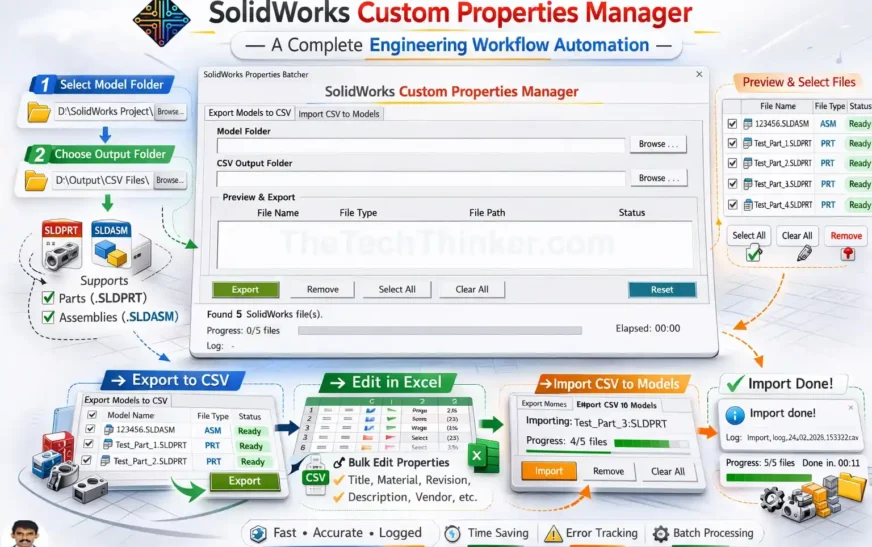
SolidWorks Custom Properties Manager Tool
Tool Overview SolidWorks Custom Properties Manager is a lightweight CAD automation tool designed to simplify the management of custom properties across multiple SolidWorks models. Developed by Ramu Gopal (The Tech Thinker), the tool allows engineers to export custom properties from PART and ASM files, edit them efficiently in Excel, and

SolidWorks API Functions: 20 Expert Commands You Must Know
SolidWorks API Functions: 20 Expert Commands You Must Know SolidWorks automation has become one of the most powerful productivity multipliers in modern CAD engineering. Whether you are building complex parametric models, processing thousands of drawings, or automating metadata across large assemblies, one thing remains constant: SolidWorks API Functions are the

DriveWorks SOLIDWORKS Automation: 9 Powerful Truths
Introduction: Why DriveWorks SOLIDWORKS Automation Is Often Misunderstood DriveWorks SOLIDWORKS automation is frequently discussed in engineering teams whenever the topic of design automation comes up. Some see it as a magic tool that removes repetitive work. Others dismiss it as a limited configurator that cannot handle real engineering logic. Both

Getting Started with SolidWorks VBA Macro: #1 Best Guide
If you’ve ever thought, “I wish I could automate this repetitive task in SolidWorks VBA Macro”, then you’re already thinking like a macro user. Macros in SolidWorks let you record or write simple code to automate design tasks. From generating features to exporting files, macros save you time, reduce clicks,
Top 5 Reasons to Use VBA in SolidWorks for Smarter CAD Automation
VBA in SolidWorks: A Complete Beginner’s Guide to Macros Want to supercharge your design workflow? VBA in SolidWorks offers one of the smartest ways to automate repetitive tasks, save time, and reduce manual errors. Whether you’re a beginner or an advanced user, learning how to use VBA macros in SolidWorks