Introduction
What is RAG? Every few years, a shift happens in the AI world that quietly changes everything. Retrieval-Augmented Generation—better known as RAG—is exactly that kind of shift. If you’ve ever noticed a chatbot giving confident but incorrect answers, or an LLM inventing facts out of thin air, you’ve already seen the problem that RAG solves.
RAG allows an AI system to look up real information before answering, instead of relying only on what the model was trained on. It keeps answers accurate, traceable, and grounded in real sources—which is increasingly important as businesses automate customer support, documentation search, compliance review, and engineering workflows.
You see RAG everywhere today:
-
Website chatbots that answer questions from real content
-
Enterprise knowledge assistants
-
Research summarizers
-
Documentation search tools
-
Helpdesk copilots
-
Medical and legal assistants
-
AI-driven engineering assistants (including CAD RAG tools)
If 2023 was the year of LLMs, 2024–2030 is the era of RAG-powered intelligence—accurate, context-aware, business-ready AI.
Let’s break down what is RAG, how it works, why it’s transforming industries, and how you can build one.
What is RAG?
Formal Definition
RAG (Retrieval-Augmented Generation) is an AI architecture that improves the accuracy of Large Language Models by allowing them to retrieve relevant information from an external knowledge source before generating an answer.
In simple terms:
LLM + Search = Accurate AI Answers
RAG Analogy
Imagine asking a colleague a question. They don’t rely only on memory—they open their laptop, search old documents, check emails, and then give you the correct answer.
RAG makes LLMs behave the same way.
Instead of “guessing,” the model:
-
Searches your documents
-
Reads the most relevant parts
-
Then replies with accurate, grounded information
That’s the magic of RAG.
Why Retrieval + Generation is powerful
Because it combines:
-
Memory (vector database)
-
Understanding (LLM)
-
Context (retrieved documents)
Most hallucinations disappear when the model is allowed to refer to trusted information, just like a human.
Why RAG Matters in 2025
AI adoption is no longer an experiment—it’s a business necessity. But standard LLMs hit a wall quickly:
-
They can’t access updated information
-
They hallucinate when unsure
-
They can’t store large private knowledge bases
-
They become expensive to fine-tune for every new domain
RAG fixes these limitations elegantly.
RAG unlocks four critical advantages:
-
Search accuracy: The model retrieves relevant documents before answering
-
Source-grounded responses: Answers cite or reflect real content
-
Zero retraining: New information becomes usable instantly
-
Safety & compliance: Critical for regulated sectors like finance, healthcare, aerospace, and engineering
Across industries, RAG has become the backbone of trustworthy AI.
How RAG Works (Step-by-Step)
Think of RAG as a clean loop:
Step 1 — Data Collection
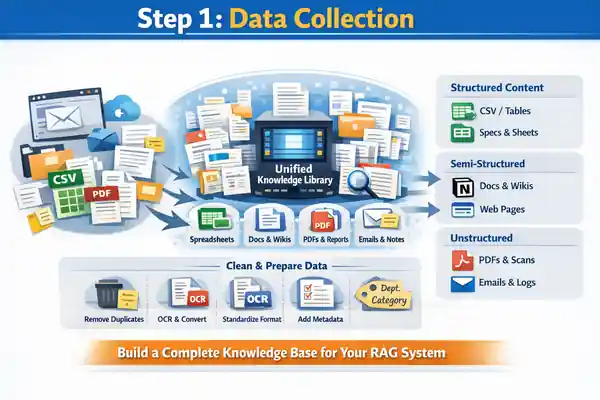
Every strong RAG system starts with one essential foundation: a complete, organized, and reliable collection of all your domain knowledge. Before embeddings, vector databases, or LLMs come into the picture, you must first bring every relevant document into one unified knowledge library. This step determines how accurate, trustworthy, and useful your final RAG assistant will be.
Most organizations store information across multiple locations—shared folders, email threads, outdated PDFs, cloud drives, wikis, website pages, engineering notes, or even screenshots saved during project rush. A high-quality RAG pipeline begins by gathering all these scattered pieces into a single, consistent repository.
Types of documents to collect
Structured content
-
Spreadsheets (CSV/XLS)
-
Databases or tables
-
Pricing sheets, BOMs, specs
-
Material or tolerance tables
Semi-structured content
-
DOCX files
-
Company wikis (Notion, Confluence)
-
WordPress pages and blog posts
-
Internal guidelines and reports
Unstructured content
-
PDFs (manuals, SOPs, catalogs)
-
Scanned documents (needs OCR)
-
Research papers
-
Emails and support logs
-
Technical drawings summaries or notes
Preparation before feeding into RAG
To make retrieval clean and accurate, each document should go through a light pre-processing stage:
-
Remove duplicates to avoid embedding confusion
-
Convert formats to text-friendly versions (PDF → text/Markdown)
-
OCR scanned PDFs for searchable content
-
Clean noise like headers, page numbers, disclaimers
-
Standardize formatting—consistent titles, version numbers, section names
-
Add metadata (department, category, document type, timestamp)
Metadata is especially powerful because it allows the retriever to filter and prioritize the right content later.
Why this step matters
A RAG system is only as reliable as the documents it learns from. A clean, consolidated knowledge base ensures:
-
Better retrieval accuracy
-
Fewer hallucinations
-
Faster indexing
-
Clear auditability
-
Domain-specific, grounded answers
A strong document foundation is the most important investment you can make in your RAG pipeline.
Step 2 — Chunking + Preprocessing
Once your documents are collected and organized, the next critical step in building a reliable RAG system is chunking and preprocessing. This stage determines how well the system can understand, retrieve, and assemble relevant information during a user query. Good chunking dramatically improves retrieval accuracy, while bad chunking almost guarantees irrelevant or fragmented responses.
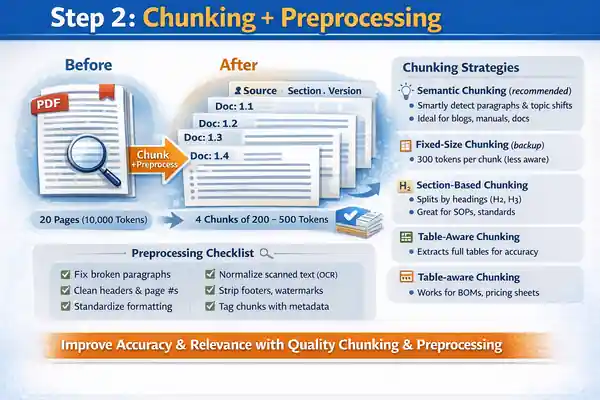
Chunking simply means breaking large documents into smaller, meaningful sections. Instead of embedding a full 20-page PDF or an entire webpage, you divide it into logical blocks—typically 200 to 500 tokens each. This allows the vector database to match the most relevant part of a document rather than the entire document itself.
Why chunking is essential
-
Large documents contain unrelated topics; chunking removes noise
-
Smaller chunks increase retrieval precision
-
Better matches lead to grounded, focused answers
-
Reduces LLM confusion and hallucination risk
-
Improves speed during similarity search
Chunking strategies (industry standard)
The best chunking approach depends on your content type:
Semantic chunking (recommended)
-
Detects natural paragraph boundaries
-
Respects topic transitions
-
Works great for blogs, manuals, documentation
Fixed-size chunking (backup method)
-
Uses equal-size token windows (e.g., 300 tokens per chunk)
-
Simple but less context-aware
Section-based chunking
-
Uses headings (H2, H3) as natural breaking points
-
Ideal for articles, SOPs, technical standards
Table-aware chunking
-
Preserves entire tables for accurate retrieval
-
Great for BOMs, pricing sheets, tolerance charts
Preprocessing tasks
Before embedding each chunk, apply cleanup steps:
-
Correct broken paragraphs or weird line breaks
-
Remove repeated headers and page numbers
-
Normalize text formatting
-
Standardize bullet points
-
Clean OCR noise (from scanned PDFs)
-
Strip decorative elements (footers, watermarks)
-
Add metadata tags like source, section, version
Result of good chunking
When chunking is done well, the RAG system becomes dramatically more accurate. Queries map to the exact portion of content that contains the answer, retrieval becomes cleaner, and the LLM produces precise, context-grounded responses with far fewer hallucinations.
Step 3 — Embeddings
After your documents are chunked and cleaned, the next step in the RAG pipeline is generating embeddings—arguably one of the most important technical components in the entire system. Embeddings convert text into numerical vectors that represent the meaning of each chunk. These vectors allow a machine to understand semantic relationships, not just keywords, which is why RAG feels intelligent rather than mechanical.
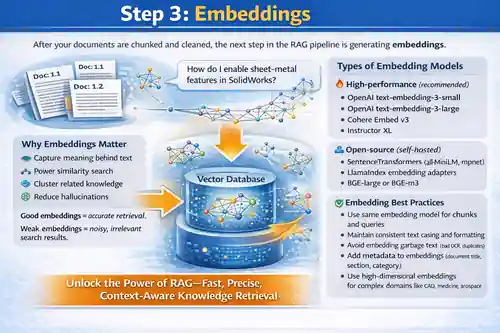
When you ask a question like “How do I enable sheet-metal features in SolidWorks?” the system doesn’t look for exact word matches. Instead, it searches for semantically similar embeddings—chunks related to sheet metal, features, design steps, or even related manufacturing rules. This semantic nature is what gives RAG systems their precision.
Why embeddings matter
-
They capture the meaning behind your text
-
They enable similarity search
-
They help cluster related knowledge
-
They significantly reduce hallucinations
-
They allow LLMs to work with large, complex datasets
Good embeddings = accurate retrieval.
Weak embeddings = noisy, irrelevant search results.
Types of embedding models
You can choose from several modern embedding models, depending on accuracy and performance requirements:
High-performance (recommended)
-
OpenAI text-embedding-3-small
-
OpenAI text-embedding-3-large
-
Cohere Embed v3
-
Instructor XL
Open-source (self-hosted)
-
SentenceTransformers (all-MiniLM, mpnet)
-
LlamaIndex embedding adapters
-
BGE-large or BGE-m3
Embedding best practices
-
Use the same embedding model for both chunks and user queries
-
Maintain consistent text casing and formatting
-
Avoid embedding garbage text (bad OCR, duplicates)
-
Add metadata to embeddings (document title, section, category)
-
Use high-dimensional embeddings for complex domains like CAD, medicine, aerospace
What happens after embedding?
All embeddings are stored inside a vector database, where each vector becomes searchable. When a user asks something, their query is also converted into an embedding and compared against all stored vectors using similarity scores. This forms the backbone of retrieval in a RAG system.
High-quality embeddings unlock the true power of RAG: fast, precise, context-aware knowledge retrieval.
Step 4 — Vector Search (Retrieval)
Once your chunks are embedded and stored, the next major step in a RAG system is Vector Search, also called Retrieval. This is the heart of RAG—the part that finds the most relevant pieces of information before the LLM generates an answer. If embeddings give the system meaning, vector search gives it memory.
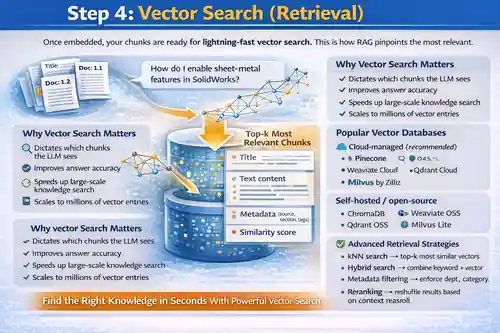
Whenever a user asks a question, the system converts that question into an embedding vector. This query vector is then compared against all stored chunk vectors to find the closest matches based on semantic similarity. Instead of scanning every document line-by-line, the system instantly narrows down to only the most relevant knowledge.
Why vector search is critical
-
It determines which chunks the LLM sees
-
Good retrieval → accurate output
-
Poor retrieval → hallucinations
-
Speeds up large-scale knowledge search
-
Scales to millions of vector entries
Popular vector databases
Industry uses specialized vector stores optimized for fast similarity search:
Cloud-managed (recommended)
Self-hosted / open-source
These are designed for extremely fast nearest-neighbor searches—even across millions of embeddings.
Retrieval strategies
Modern RAG systems use more advanced retrieval strategies for precision:
-
kNN search → top-k most similar vectors
-
Hybrid search → combines keyword + vector
-
Metadata filtering → enforce department, category, or document version rules
-
Multi-query expansion → rephrase the query for better recall
-
Reranking → reshuffle results based on contextual relevance
What retrieval sends to the LLM
The retriever returns a small set of highly relevant chunks such as:
-
Title
-
Text content
-
Metadata (source, section, tags)
-
Similarity score
These selected chunks form the context window for the LLM to generate its response.
Vector search is where RAG becomes truly smart—finding the right knowledge at the right moment with surgical precision.
Step 5 — LLM Generation (Answer Creation)
After the system retrieves the most relevant chunks, the next stage is where everything comes together: LLM Generation. This is the step where the language model reads the retrieved context and produces a final answer that is accurate, grounded, and human-like. Unlike traditional LLM responses, which rely purely on training data, RAG ensures the model always has the right information in front of it before answering.
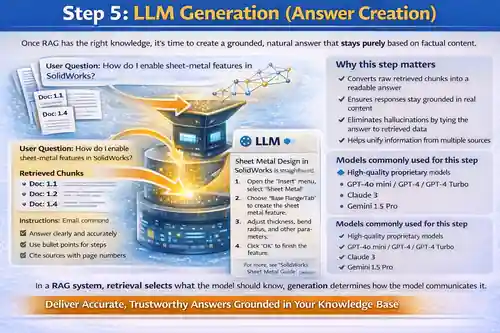
The LLM receives a tightly constructed prompt that includes:
-
the user’s original question
-
the top retrieved chunks
-
instructions on how to respond
-
formatting rules (optional)
-
citation or summarization guidelines
This combination allows the model to stay focused on verified information instead of improvising.
Why this step matters
-
Converts raw retrieved chunks into a readable answer
-
Ensures responses stay grounded in real content
-
Eliminates hallucinations by tying the answer to retrieved data
-
Helps unify information from multiple sources
-
Maintains a consistent tone and structure
A good generation step turns your scattered knowledge into a fluid, natural explanation.
What LLMs typically do in this step
-
Understand the intent behind the question
-
Read and analyze retrieved content
-
Merge insights across different chunks
-
Generate a coherent, contextual response
-
Follow constraints (e.g., professional tone, step-by-step, bullet format)
Models commonly used for this step
High-quality proprietary models
-
GPT-4o mini / GPT-4 / GPT-4 Turbo
-
Claude 3
-
Gemini 1.5 Pro
Open-source alternatives
-
Llama 3
-
Mixtral
-
DeepSeek LLMs
Best practices for accurate generation
-
Provide clear, strict instructions
-
Include retrieved context inside the prompt
-
Avoid giving the model knowledge outside retrieved documents
-
Limit creativity in factual tasks
-
Add structure requirements (bullet points, steps, tables)
In a RAG system, retrieval selects what the model should know;
generation determines how the model communicates it.
This is the step where the system finally becomes useful to real users — delivering answers that are accurate, helpful, and confidently grounded in your own knowledge base.
Step 6 — Final Output + Context
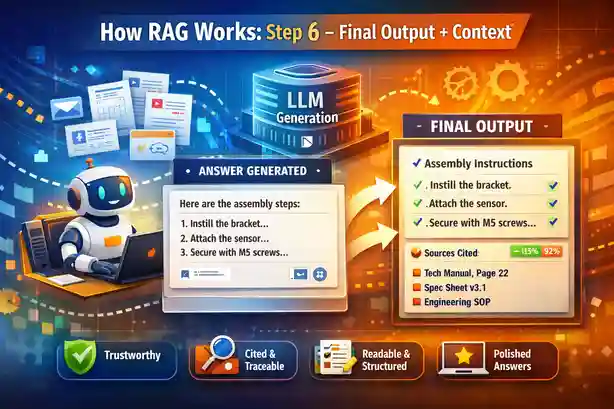
Once the LLM generates an answer using the retrieved chunks, the final step in the RAG pipeline is packaging the output in a clean, usable, and trustworthy format. This is where the system refines the response, attaches supporting context, and ensures the answer is both factually grounded and easy for the end user to consume.
A raw LLM response is rarely enough. A production-grade RAG system enhances the response with structure, clarity, and traceability—turning it into something a business or customer can trust.
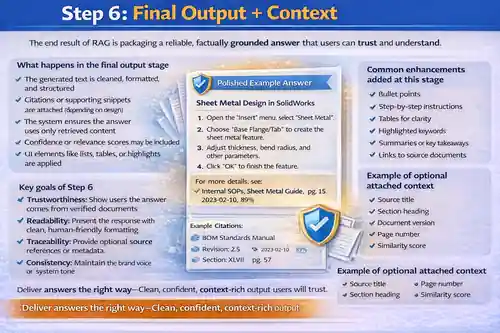
What happens in the final output stage
-
The generated text is cleaned, formatted, and structured
-
Citations or supporting snippets are attached (depending on design)
-
The system ensures the answer uses only retrieved content
-
Confidence or relevance scores may be included
-
UI elements like lists, tables, or highlights are applied
This step transforms a model output into a polished answer suitable for chatbots, internal search tools, engineering assistants, or customer-facing apps.
Key goals of Step 6
-
Trustworthiness: Show users the answer comes from verified documents
-
Readability: Present the response with clean, human-friendly formatting
-
Traceability: Provide optional source references or metadata
-
Consistency: Maintain the brand voice or system tone
-
Safety: Prevent the model from mixing hallucinated content
Common enhancements added at this stage
-
Bullet points
-
Step-by-step instructions
-
Tables for clarity
-
Highlighted keywords
-
Summaries or key takeaways
-
Links to source documents
-
Trimmed context windows
Example of optional attached context
-
Source title
-
Section heading
-
Document version
-
Page number
-
Similarity score
Why this step matters
This is the moment the system becomes truly usable. A well-designed output layer turns raw retrieval + generation into a clean, confident, fully grounded answer that users trust. It ensures your RAG assistant delivers not just correct information, but also professional, consistent communication aligned with your organization’s standards.
Core Components of a RAG System
Here’s the foundation of a modern RAG setup.
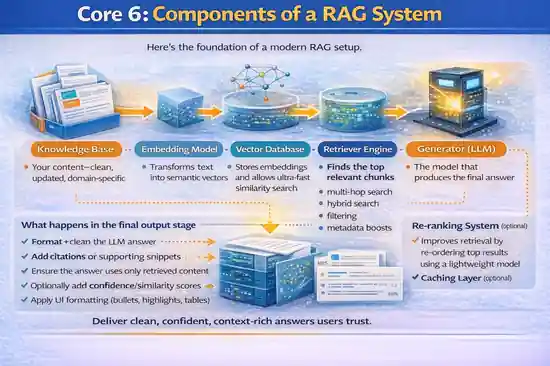
Knowledge Base
Your content—clean, updated, domain-specific.
Embedding Model
Transforms text into semantic vectors.
Vector Database
Stores embeddings and allows ultra-fast similarity search.
Retriever Engine
Finds the top relevant chunks.
Advanced retrievers support:
-
multi-hop search
-
hybrid search
-
filtering
-
metadata boosts
Generator (LLM)
The model that produces the final answer.
Re-ranking System (optional)
Improves retrieval by re-ordering top results using a lightweight model.
Caching Layer (optional)
Speeds up responses for repeated queries.
RAG vs Traditional LLMs
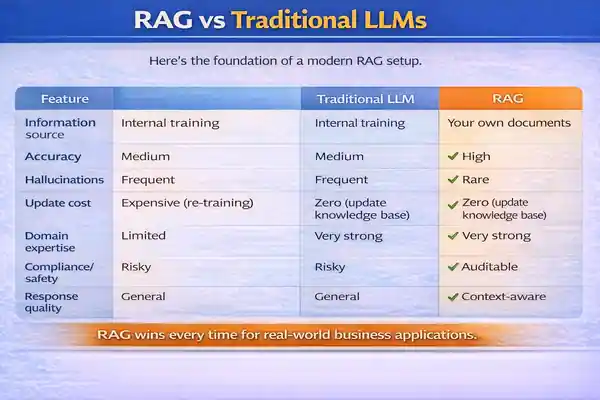
| Feature | Traditional LLM | RAG |
|---|---|---|
| Information source | Internal training | Your own documents |
| Accuracy | Medium | High |
| Hallucinations | Frequent | Rare |
| Update cost | Expensive (re-training) | Zero (update knowledge base) |
| Domain expertise | Limited | Very strong |
| Compliance/safety | Risky | Auditable |
| Response quality | General | Context-aware |
RAG wins every time for real-world business applications.
Real-World Use Cases of RAG
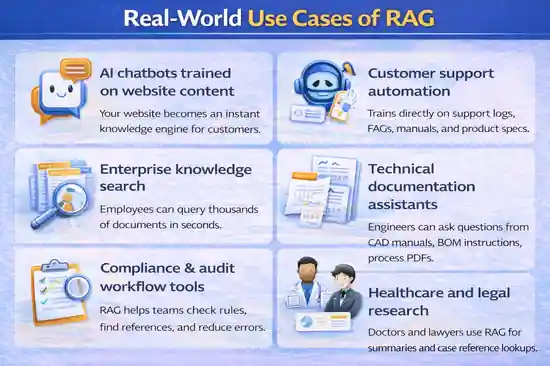
AI chatbots trained on website content
Your website becomes an instant knowledge engine for customers.
Customer support automation
Trains directly on support logs, FAQs, manuals, and product specs.
Enterprise knowledge search
Employees can query thousands of documents in seconds.
Technical documentation assistants
Engineers can ask questions from CAD manuals, BOM instructions, process PDFs.
Compliance & audit workflow tools
RAG helps teams check rules, find references, and reduce errors.
Healthcare and legal research
Doctors and lawyers use RAG for summaries and case reference lookups.
CAD/Engineering RAG
RAG can ingest:
-
documentation
-
Manufacturing standards
-
Vendor datasheets
-
PDM knowledge
-
BOM rules
-
Sheet-metal parameters
- Etc
Benefits of RAG
High accuracy
The model doesn’t guess—it retrieves facts.
Explainability
Answers can reference specific document sources.
Cost efficiency
No costly retraining or fine-tuning.
No model retraining required
Adding new knowledge = uploading new documents.
Unlimited knowledge expansion
Models can work with gigabytes of information seamlessly.
Limitations of RAG
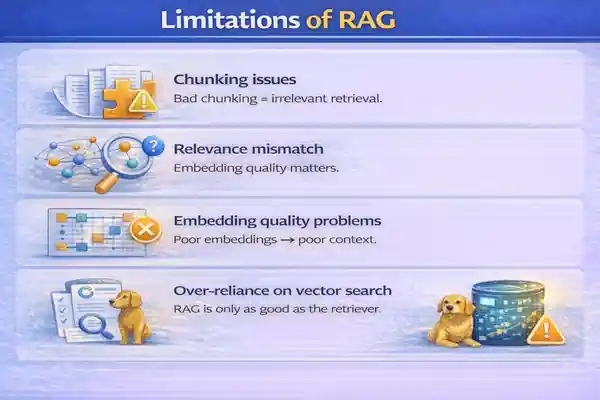
Chunking issues
Bad chunking = irrelevant retrieval.
Relevance mismatch
Embedding quality matters.
Embedding quality problems
Poor embeddings → poor context.
Over-reliance on vector search
RAG is only as good as the retriever.
RAG System Architecture (Block Diagram)
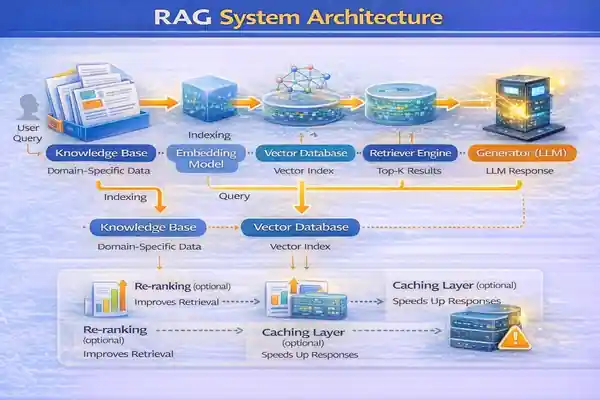
High-Level Flow
-
Load documents
-
Chunk + embed
-
Store in vector DB
-
Retrieve relevant chunks
-
LLM produces answer
Data Store + Retriever + LLM Loop
A closed loop between retrieval → generation → refinement.
Multi-hop Retrieval
Useful for complex queries requiring:
-
multiple documents
-
multi-step reasoning
-
summary + comparison
How to Build a RAG System
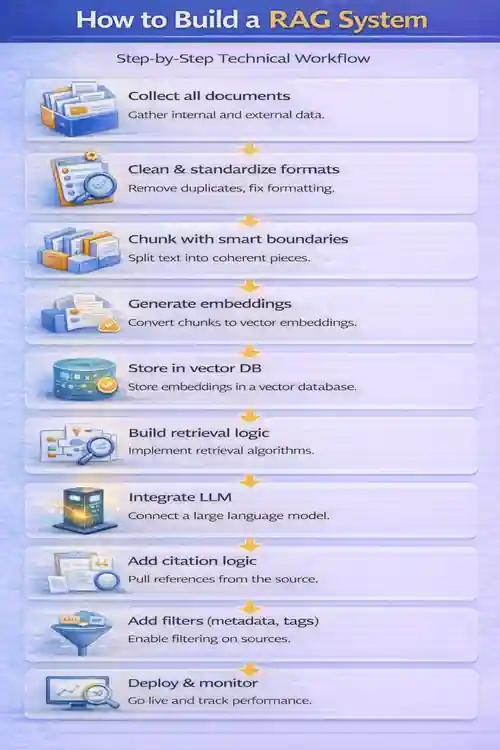
Step-by-Step Technical Workflow
-
Collect all documents
-
Clean & standardize formats
-
Chunk with smart boundaries
-
Generate embeddings
-
Store in vector DB
-
Build retrieval logic
-
Integrate LLM
-
Add citation logic
-
Add filters (metadata, tags)
-
Deploy & monitor
Tools to Use
-
OpenAI – embeddings + generation
-
Pinecone – fast vector search
-
LlamaIndex – retrieval orchestration
-
LangChain – modular pipelines
-
Weaviate / Milvus / Qdrant – vector DB alternatives
Deployment Options
-
Web app chatbot
-
Internal enterprise search
-
Slack/Teams bot
-
API endpoint for product integration
Best Practices for RAG
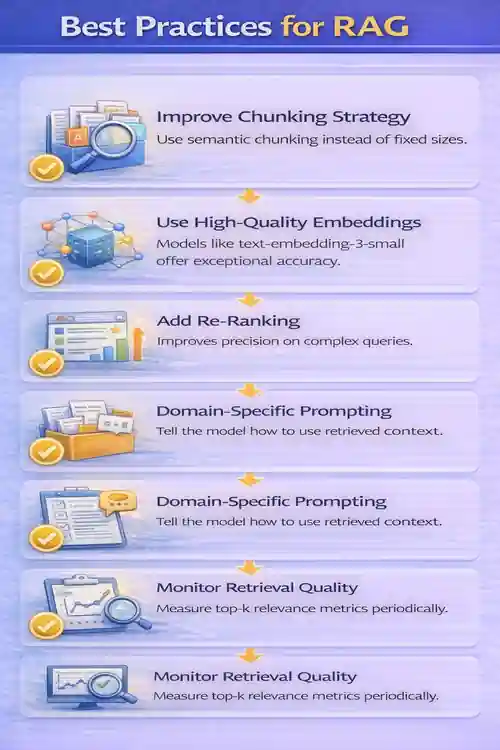
Improve Chunking Strategy
Use semantic chunking instead of fixed sizes.
Use High-Quality Embeddings
Models like text-embedding-3-small offer exceptional accuracy.
Add Re-Ranking
Improves precision on complex queries.
Domain-Specific Prompting
Tell the model how to use retrieved context.
Monitor Retrieval Quality
Measure top-k relevance metrics periodically.
Future of RAG (2025–2030)
RAG 2.0 (Hybrid Search + Memory)
Combines keyword search + vector search + graph relations.
RAG + Agents
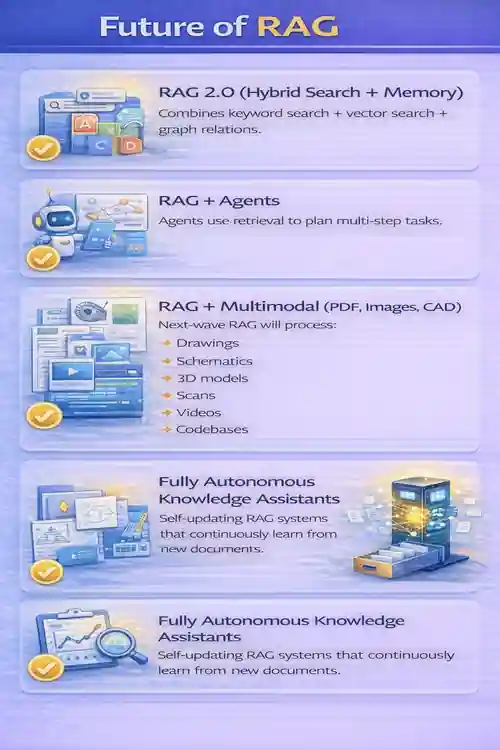
Agents use retrieval to plan multi-step tasks.
RAG + Multimodal (PDF, Images, CAD)
Next-wave RAG will process:
-
Drawings
-
Schematics
-
3D models
-
Scans
-
Videos
-
Codebases
Fully Autonomous Knowledge Assistants
Self-updating RAG systems that continuously learn from new documents.
RAG Pseudocode
# =============================================================
#  RAG SYSTEM — GENERIC PSEUDOCODE WORKFLOW
# =============================================================
#  Author      : Ramu Gopal
#  Website     : https://thetechthinker.com
#  Description : Clean, implementation-agnostic pseudocode for
#                building a Retrieval-Augmented Generation (RAG) system.
#                Written for educational + enterprise AI use cases.
# =============================================================


# -------------------------------------------------------------
# STEP 1 — LOAD KNOWLEDGE BASE
# Load documents from various sources (PDFs, manuals, blogs, wikis)
# -------------------------------------------------------------
documents = load_all_documents(source_paths)


# -------------------------------------------------------------
# STEP 2 — PREPROCESS & CLEAN DOCUMENTS
#  - Extract raw text from each file
#  - Remove noise (headers, footers, duplicates)
#  - Apply OCR when needed
#  - Convert everything to clean, normalized text
# -------------------------------------------------------------
cleaned_docs = []

for doc in documents:
    text = extract_text(doc)            # Parse text or OCR
    text = normalize_text(text)         # Cleanup for consistency
    cleaned_docs.append(text)


# -------------------------------------------------------------
# STEP 3 — PERFORM SMART CHUNKING
# Split long documents into small topic-aware segments.
# Typical chunk size = 200–500 tokens.
# -------------------------------------------------------------
chunks = []

for text in cleaned_docs:
    chunk_blocks = smart_chunk(text, chunk_size=300)
    for block in chunk_blocks:
        chunks.append(block)


# -------------------------------------------------------------
# STEP 4 — GENERATE EMBEDDINGS
# Convert each chunk into a semantic vector for similarity search.
# -------------------------------------------------------------
embeddings = []

for chunk in chunks:
    vector = embedding_model.encode(chunk)   # Produce dense vector
    embeddings.append({
        "chunk": chunk,
        "vector": vector
    })


# -------------------------------------------------------------
# STEP 5 — STORE EMBEDDINGS IN VECTOR DATABASE
# Save vectors + metadata to Pinecone / Qdrant / Weaviate / Milvus.
# -------------------------------------------------------------
vector_db.insert(embeddings)


# =============================================================
#  RUNTIME WORKFLOW — USER QUERY PHASE
# =============================================================

function answer_user_query(query):

    # ---------------------------------------------------------
    # Convert the incoming query into an embedding vector
    # ---------------------------------------------------------
    query_vector = embedding_model.encode(query)


    # ---------------------------------------------------------
    # Retrieve the top-k most relevant chunks via similarity search
    # ---------------------------------------------------------
    retrieved = vector_db.search(query_vector, top_k=5)


    # ---------------------------------------------------------
    # Optional: Re-ranking step to improve accuracy
    # ---------------------------------------------------------
    ranked_chunks = rerank(retrieved, query)


    # ---------------------------------------------------------
    # Combine all selected chunks into a single context bundle
    # ---------------------------------------------------------
    context = combine_chunks(ranked_chunks)


    # ---------------------------------------------------------
    # Send the final prompt to the LLM with question + context
    # ---------------------------------------------------------
    answer = LLM.generate(
        prompt = build_prompt(query, context)
    )


    # ---------------------------------------------------------
    # Return the final grounded answer to the user
    # ---------------------------------------------------------
    return answer


# =============================================================
# END OF FILE
# =============================================================
Conclusion
RAG has become the backbone of modern AI. While LLMs provide intelligence, RAG provides truth, context, and domain expertise. Together, they unlock a new class of applications—from website chatbots to engineering copilots—and push AI into real business workflows with confidence.
For organizations, creators, and engineers, understanding “What is RAG” is no longer optional. It’s the foundation of every reliable AI system built today.
Related Articles
External References
- Meta AI – Retrieval-Augmented Generation (RAG) Paper
- OpenAI – Retrieval & Knowledge Integration Documentation
- Pinecone – RAG Architecture & Vector Search Guide
FAQ on What is RAG?
1. What is rag in AI, and how does it work?
What is rag in AI? It stands for Retrieval-Augmented Generation, a technique where an AI model retrieves relevant information from your documents before creating an answer. It works by taking a user query → converting it into an embedding → retrieving the most similar chunks → and generating a grounded response based on those chunks.
2. What is rag used for in real businesses?
What is rag used for? Businesses use RAG to build chatbots, enterprise search tools, customer support assistants, knowledge discovery systems, compliance checkers, and internal AI helpdesks that answer from their own documents with high accuracy.
3. What is rag vs traditional LLM—what’s the difference?
What is rag compared to a traditional LLM? Traditional LLMs rely only on pre-training, while RAG retrieves your internal documents and feeds them to the LLM, resulting in higher accuracy, fewer hallucinations, and domain-specific answers.
4. What is rag and why does it reduce hallucinations?
What is rag doing to avoid hallucinations? RAG forces the model to answer using retrieved, verified content instead of guessing, which dramatically reduces hallucinated responses.
5. What is rag in a chatbot, and why is it better?
What is rag in chatbot design? It allows chatbots to answer users using your own PDFs, manuals, wiki pages, FAQs, CAD documents, and internal knowledge—making the answers far more reliable than generic LLM responses.
6. What is rag pipeline, step by step?
What is rag pipeline? It includes document collection → cleaning → chunking → embedding → vector storage → retrieval → LLM generation → output formatting. Each step improves accuracy and context relevance.
7. What is rag architecture made of?
What is rag architecture composed of? Core components include a knowledge base, embedding model, vector database, retriever engine, generator LLM, re-ranking layer, and optional caching or metadata filters.
8. What is rag chunking, and what chunk size is best?
What is rag chunking? It is the process of splitting content into smaller text blocks (chunks). The best chunk size for RAG is usually 200–500 tokens, depending on complexity and document type.
9. What is rag embedding, and which embedding model is best?
What is rag embedding? It’s the conversion of each chunk into a semantic vector. The best embedding models include OpenAI text-embedding-3-small/large, Cohere Embed v3, and BGE m3/large.
10. What is rag retrieval, and how does vector search work?
What is rag retrieval? It finds the most relevant chunks using similarity search. Vector search works by comparing the query embedding to stored embeddings and returning the closest matches using cosine or dot-product similarity.
11. What is rag re-ranking, and when do you need it?
What is rag re-ranking? It’s a secondary filtering step where a smaller model re-orders retrieved chunks for higher accuracy. You need it for complex queries, long documents, or when top-k retrieval is noisy.
12. What is rag with hybrid search (keyword + vector)?
What is rag hybrid search? It combines traditional keyword search with semantic vector search to improve recall and precision. Useful when documents contain technical terms, product codes, or structured data.
13. What is rag with metadata filtering, and why is it important?
What is rag metadata filtering? It applies rules like department, document type, version, or tags to ensure retrieval focuses only on the right knowledge source. This boosts accuracy and reduces irrelevant hits.
14. What is rag for PDFs, scans, and images (multimodal rag)?
What is rag multimodal? It extends RAG to process PDFs, images, scanned documents, CAD drawings, videos, and 3D models using multimodal embedding models. This is the future of enterprise AI assistance.
15. What is rag and how do you evaluate retrieval quality (top-k relevance)?
What is rag evaluation? You measure retrieval quality by calculating top-k relevance, checking how many retrieved chunks actually contain the correct information. Metrics like MRR, Precision@k, and Recall@k are commonly used.