Steel detailing software has come a long way over the last decade. What once revolved around faster modeling and cleaner drawings has now expanded into something much broader: how teams collaborate, manage change, and maintain confidence across increasingly complex projects.
As many professionals reassess what defines the best steel detailing software in 2026, the conversation is no longer just about individual features. Instead, the focus has shifted toward workflow stability, connected collaboration, and the ability to adapt without disruption. This is where bocad 2026 feels noticeably different from earlier generations of steel detailing tools.
Rather than positioning itself as a collection of new functions, bocad 2026 introduces a more mature idea — process innovation. It reflects a deeper understanding of how real steel projects are executed today.
Why bocad 2026 Feels Different from Previous Versions
In many software releases, progress is measured by how many new tools are added. In practice, this approach often creates fragmented workflows, steeper learning curves, and more opportunities for error.
bocad 2026 takes a different route.
Instead of layering features on top of existing systems, the platform re-examines the entire lifecycle of a steel project — from early coordination to fabrication and downstream communication. The result is software that feels less like a drafting tool and more like a shared project environment.
This shift becomes clear when you look at the core ideas behind the release:
-
Centralized collaboration instead of scattered files
-
Controlled change management instead of manual repetition
-
Support for evolving construction methods instead of rigid workflows
bocad 2026 is not designed to impress at first glance. It is designed to reduce friction over time.
From Files to Flow – The Philosophy Behind bocad 2026
Most inefficiencies in steel projects do not come from poor modeling skills. They come from disconnected information — files moving between teams, comments living outside models, and changes applied inconsistently.
bocad 2026 places the workflow itself at the center of the system. The goal is simple:
ensure that information moves clearly, remains traceable, and stays reliable as projects evolve.
This philosophy is built on three key pillars:
-
OneProject – shared collaboration
-
Clone – controlled change propagation
-
bocad Hybrid – support for modern, mixed construction methods
Together, these ideas redefine how digital steel construction is handled in practice.
What’s New in bocad 2026 — Feature Highlights
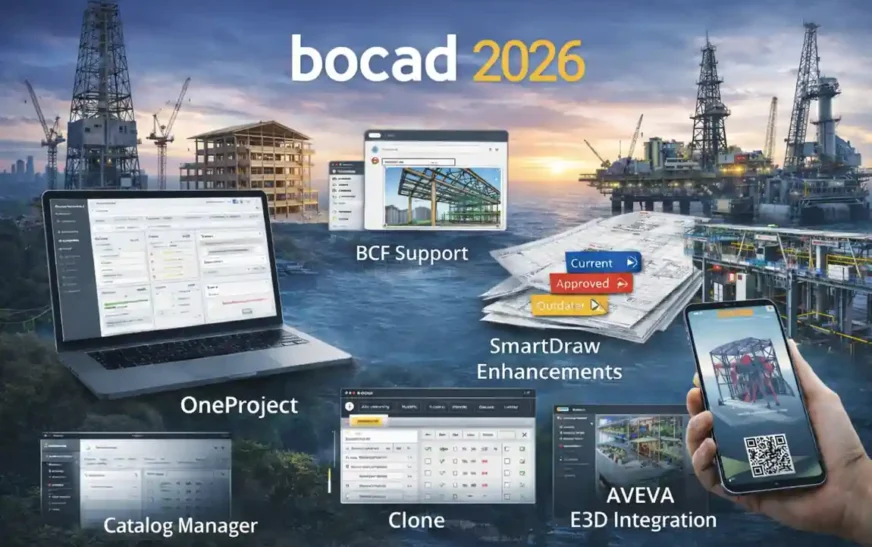
| Feature / Update | What It Does | User Benefit |
|---|---|---|
| OneProject | Central shared project database and collaboration platform | Teams work from one source of truth, reducing version conflicts and improving coordination |
| BCF Support | BIM Collaboration Format communication built into workflow | Model-linked comments and corrections; fewer email threads and clearer change tracking |
| SmartDraw Enhancements | Drawing status transparency and control | Only current fabrication drawings reach the workshop, reducing errors and rework |
| S&C Webviewer | 3D model access via QR on any device (no install) | Stakeholders (site teams, clients) view models easily and independently |
| AVEVA E3D Integration | Save work / get work data exchange with AVEVA’s E3D | Better interdisciplinary coordination with status control and hierarchy mapping |
| Clone Improvements | Intelligent change propagation by element, group, or mark | Fewer manual edits, consistent updates, and reduced change management risk |
| Catalog Manager | Clear profile catalogue overview + custom profile selection | Easier profile management, improved library organization |
| Custom Keyboard Shortcuts | Graphical interface for shortcut configuration | Personalized workflow and faster adoption |
| Support for Hybrid Construction | Tools to facilitate modern and mixed construction methods | Flexibility for sustainable or hybrid structural workflows |
OneProject – A Shared Foundation for Connected Collaboration
The Reality of Collaboration in Steel Projects Today
Modern steel projects rarely exist within a single office or software environment. It is common to see:
-
Detailing teams spread across locations
-
External partners working in parallel
-
Multiple tools contributing to the same outcome
In these conditions, traditional file-based collaboration quickly shows its limits. Version conflicts, lost context, and unclear responsibilities become everyday challenges.
How OneProject Changes the Way Teams Work Together
OneProject introduces a central project database that acts as a shared foundation for everyone involved. Instead of exchanging files, teams work from a single source of truth, regardless of location or hosting setup.
Key advantages include:
-
Consistent access to current project data
-
Improved traceability of changes
-
Clearer coordination between teams and companies
Rather than forcing a new way of working, OneProject quietly removes many of the friction points that teams have learned to tolerate.
Open BIM Communication with BCF – Less Noise, More Clarity
Why Communication Often Breaks Down
In many BIM workflows, communication still happens outside the model:
-
Comments on PDFs
-
Email threads
-
Verbal clarifications
Over time, this separation creates confusion and delays.
Using BCF for Model-Based Communication
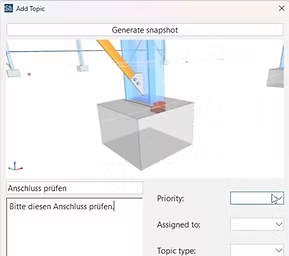
bocad 2026 supports BCF (BIM Collaboration Format) to bring communication back into the model environment. Comments, corrections, and change requests are linked directly to relevant model elements and can be exchanged across different software platforms.
This approach:
-
Reduces misunderstandings
-
Shortens feedback cycles
-
Keeps project discussions contextual and traceable
For interdisciplinary projects, this alone can significantly improve coordination quality.
SmartDraw – Keeping Drawing Control Where It Belongs
The Hidden Risk of Outdated Drawings
Many fabrication errors do not originate from incorrect detailing. They occur when outdated drawings reach the workshop. Once fabrication begins, even small discrepancies can lead to material waste and rework.
How SmartDraw Improves Drawing Reliability
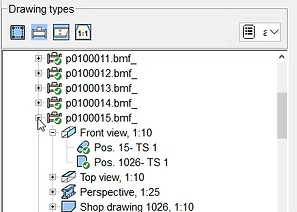
SmartDraw introduces clear status control over fabrication drawings. Teams gain transparency over which drawings are current, approved, or outdated — ensuring that only valid information reaches production.
The result is not just better documentation, but greater trust between detailing and fabrication teams.
S&C Webviewer – Making 3D Models Accessible to Everyone
Why Model Access Should Not Be Limited
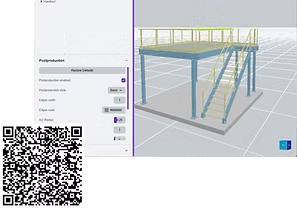
When 3D models are accessible only to specialists, other stakeholders are forced to rely on interpretations of 2D drawings. This often leads to avoidable misunderstandings.
Simple, Device-Independent Access
With the S&C Webviewer, 3D models can be accessed via a QR code, without installing software. Models remain up to date and easy to view on any device.
This opens the door for:
-
Site teams
-
Project managers
-
Clients and reviewers
to engage with the model directly.
Structural Meets Process – AVEVA E3D Integration
Large projects often involve close coordination between structural and process disciplines. Historically, this coordination has been fragile.
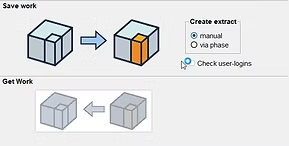
bocad 2026 introduces save work / get work integration with AVEVA’s Unified Engineering and E3D environments. Structural hierarchy, punches, cuts, and special profiles are exchanged with status control, allowing teams to track changes more confidently.
This integration reduces blind spots and supports a more synchronized project workflow.
Clone – Making Large-Scale Changes Manageable
Why Change Is the Riskiest Phase
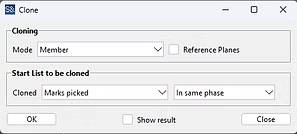
Design changes are inevitable. The challenge lies in applying them consistently across large numbers of elements.
Manual repetition increases the risk of:
-
Missed updates
-
Inconsistent assemblies
-
Costly rework
Applying Changes with Confidence
Clone allows changes to be applied by:
-
Individual elements
-
Assemblies
-
Mark numbers
-
Construction groups
This structured approach improves reliability and makes change management far less disruptive — a key factor when evaluating the best steel detailing software in 2026.
Catalog Manager – Bringing Order to Profile Libraries
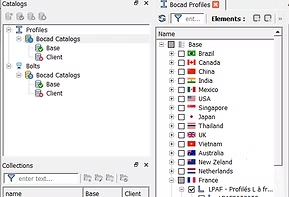
Over time, profile libraries grow complex, especially when custom profiles are introduced. The new Catalog Manager provides a clearer overview of available profiles and allows teams to define project-specific or company-wide selections.
This improves consistency and reduces confusion, particularly in larger organizations.
Keyboard Shortcuts – Small Improvements That Matter Daily
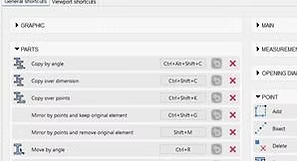
bocad 2026 also acknowledges that efficiency is personal. Keyboard shortcuts can now be customized through a graphical interface, allowing users to adapt the software to their working style.
These refinements may seem small, but they contribute to smoother daily workflows and faster adoption across teams.
Supporting the Shift Toward Hybrid and Sustainable Construction
The construction industry is gradually moving toward hybrid building methods that combine different materials and systems. bocad 2026 supports this transition by accommodating more flexible structural workflows, without forcing a single approach.
Rather than marketing sustainability, the platform enables it through practical support for modern construction methods.
Who bocad 2026 Is Best Suited For
For organizations evaluating the best steel detailing software in 2026, bocad 2026 is particularly well suited to:
-
Steel detailing companies managing multi-team projects
-
Fabrication-focused organizations prioritizing drawing reliability
-
EPC environments requiring interdisciplinary coordination
-
Teams scaling collaboration across locations
It is designed for projects where control and confidence matter more than short-term speed gains.
Final Thoughts – Process Innovation Over Feature Counts
bocad 2026 represents a mature step forward in digital steel construction. Instead of chasing novelty, it focuses on workflow clarity, controlled change, and connected collaboration.
For teams seeking long-term stability rather than short-term convenience, bocad 2026 makes a strong case for being considered among the best steel detailing software solutions in 2026.
Its strength lies not in how loudly it advertises itself — but in how quietly it improves the way steel projects actually work.
External Reference
Related Posts
FAQs – bocad 2026
1. What is bocad 2026?
bocad 2026 is an advanced steel detailing and BIM collaboration software designed to improve workflow efficiency, coordination, and change management across complex construction projects.
2. What’s new in bocad 2026 compared to previous versions?
bocad 2026 introduces workflow-centric improvements such as OneProject collaboration, Clone for intelligent change propagation, enhanced SmartDraw control, BCF communication, and better support for hybrid construction methods.
3. Is bocad 2026 suitable for large steel detailing projects?
Yes. bocad 2026 is built for multi-team, multi-location projects where controlled collaboration, drawing reliability, and structured change management are critical.
4. How does OneProject help in real projects?
OneProject provides a centralized project database that allows teams and partner companies to work from a single source of truth, reducing version conflicts and coordination issues.
5. What is Clone in bocad 2026?
Clone is a feature that allows controlled application of changes across elements, assemblies, mark numbers, or construction groups, reducing manual repetition and errors.
6. Does bocad 2026 support BIM collaboration standards?
Yes. bocad 2026 supports BCF (BIM Collaboration Format), enabling clear, model-based communication between architects, engineers, and construction teams.
7. How does SmartDraw improve fabrication accuracy?
SmartDraw ensures transparency in drawing status and helps guarantee that only current, approved fabrication drawings reach the workshop.
8. Can non-technical users view bocad models?
Yes. With the S&C Webviewer, 3D models can be accessed on any device using a QR code, without installing specialized software.
9. Does bocad 2026 integrate with AVEVA E3D?
Yes. bocad 2026 offers save-work/get-work integration with AVEVA E3D, enabling smooth data exchange between structural and process disciplines.
10. Is bocad 2026 suitable for offshore and industrial projects?
Absolutely. bocad 2026 supports offshore structures, industrial plants, and EPC workflows where interdisciplinary coordination is essential.
11. How does bocad 2026 support hybrid construction?
bocad 2026 supports hybrid construction workflows by enabling flexible modeling approaches for mixed materials and modern building methods.
12. What improvements are available in the Catalog Manager?
The new Catalog Manager provides a clearer overview of standard and custom profiles, allowing better control at project and company levels.
13. Can users customize keyboard shortcuts in bocad 2026?
Yes. bocad 2026 includes a graphical interface for customizing keyboard shortcuts, helping users adapt the software to their working style.
14. Is bocad 2026 considered one of the best steel detailing software in 2026?
For teams prioritizing workflow reliability, collaboration, and controlled change management, bocad 2026 is widely considered among the best steel detailing software solutions in 2026.
15. Who should choose bocad 2026?
bocad 2026 is ideal for steel detailing companies, fabricators, EPC contractors, and organizations managing complex, multi-stakeholder projects.
16. How can I purchase bocad 2026 for my company?
bocad 2026 can be purchased through exclusive authorized partners such as Sravani Infotech, who help organizations choose the right licensing options based on project scope and workflow requirements.
17. Who can help me select the right bocad 2026 license?
Experienced solution partners like Sravani Infotech provide guidance on selecting the appropriate bocad 2026 configuration, ensuring it aligns with company size, project type, and long-term usage.
18. Is training available for teams new to bocad 2026?
Yes. Sravani Infotech offers onboarding guidance and user training support to help teams understand bocad 2026 workflows, collaboration tools, and best practices.
19. Where can I get technical support for bocad 2026 after purchase?
Post-purchase technical support for bocad 2026 is typically provided by the authorized reseller. Sravani Infotech assists customers with installation, configuration, updates, and usage-related queries.
20. Can Sravani Infotech help with migration to bocad 2026?
Yes. Sravani Infotech supports companies migrating from older bocad versions or other steel detailing software, helping ensure a smooth transition with minimal workflow disruption.