Introduction
SolidWorks 2026 API represents a critical evolution in how engineers approach design automation, data management, and intelligent validation systems. While the 2026 release may appear incremental at first glance, the underlying API enhancements unlock powerful opportunities to move beyond traditional CAD workflows.
Today’s engineering environment is no longer limited to manual modeling and drafting. Instead, it is rapidly shifting toward:
- Automation-driven design processes
- Data-centric product lifecycle management (PDM)
- AI-assisted validation and decision-making
The SolidWorks 2026 API sits at the center of this transformation. It enables engineers to programmatically control CAD operations, automate repetitive tasks, and build intelligent systems that integrate CAD, PDM, and AI workflows.
In this guide, we go beyond listing features. We will explore how these APIs actually impact engineering systems, combining insights from official documentation, real-world workflows, and emerging AI integration trends.
What is SolidWorks 2026 API and Why It Matters
The SolidWorks 2026 API is a programmable interface that allows engineers and developers to automate, customize, and extend SolidWorks functionality.
At its core, the API provides access to:
- Parts, assemblies, and drawings
- Feature trees and geometry
- Custom properties and metadata
- PDM vault structures
Why It Matters in 2026
- Engineering complexity is increasing
- Manual workflows are no longer scalable
- Companies demand automation + accuracy
👉 The API transforms SolidWorks from a design tool → engineering platform
Key Capabilities
- Automate repetitive modeling tasks
- Extract and validate design data
- Integrate CAD with PDM systems
- Enable enterprise-level automation
Key Enhancements in SolidWorks 2026 API
The SolidWorks 2026 API adds a small number of targeted improvements, but they matter because they strengthen three layers of modern engineering automation:
- visual intelligence
- feature-level structure
- workflow responsiveness
That combination is far more valuable than a long release list. Instead of giving developers only another set of methods, the 2026 release improves how automation systems can inspect product data, control configurations, and respond to engineering events in real time.
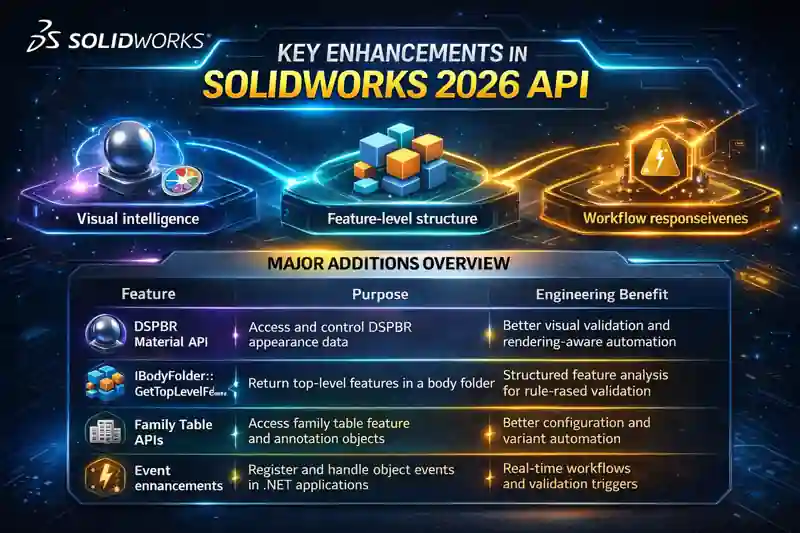
Major additions overview
| Feature | Purpose | Engineering Benefit |
|---|---|---|
| DSPBR Material API | Access and control DSPBR appearance data | Better visual validation and rendering-aware automation |
IBodyFolder::GetTopLevelFeatures |
Return top-level features in a body folder | Structured feature analysis for rule-based validation |
| Family Table APIs | Access family table feature and annotation objects | Better configuration and variant automation |
| Event enhancements | Register and handle object events in .NET applications | Real-time workflows and validation triggers |
1) DSPBR Material API — visual validation becomes programmable
The new IDSPBRMaterial interface gives API-level access to DSPBR material objects. The 2026 help also shows specific material properties such as EmissionColor, SheenColor, SpecularTintColor, FlakeRoughness, and EmissionEnergyNormalization, which makes this more than a cosmetic addition. It gives developers structured access to modern appearance parameters. DSPBR meaning is-Dassault Systèmes Physically Based Rendering.
Why this matters in engineering
In many teams, appearance settings are treated as presentation-only. That is too narrow. In real workflows, material appearance can support:
- design review consistency
- customer-facing rendering approval
- automated appearance compliance checks
- downstream visualization pipelines
For products where finish, coating, sheen, or emissive behavior matters, programmable access helps teams standardize design intent earlier. That is especially useful in consumer products, lighting, automotive interiors, and premium industrial equipment.
Example code snippet (C# — illustrative)
using SolidWorks.Interop.sldworks;

public void InspectDSPBRMaterial(object appearanceObj)
{
    IDSPBRMaterial dspbr = appearanceObj as IDSPBRMaterial;
    if (dspbr == null) return;

    int emissionColor = dspbr.EmissionColor;
    int sheenColor = dspbr.SheenColor;
    int specularTint = dspbr.SpecularTintColor;
    double flakeRoughness = dspbr.FlakeRoughness;
    double emissionNorm = dspbr.EmissionEnergyNormalization;

    System.Diagnostics.Debug.WriteLine("DSPBR Material Found");
    System.Diagnostics.Debug.WriteLine($"EmissionColor: {emissionColor}");
    System.Diagnostics.Debug.WriteLine($"SheenColor: {sheenColor}");
    System.Diagnostics.Debug.WriteLine($"SpecularTintColor: {specularTint}");
    System.Diagnostics.Debug.WriteLine($"FlakeRoughness: {flakeRoughness}");
    System.Diagnostics.Debug.WriteLine($"EmissionEnergyNormalization: {emissionNorm}");
}
Real use-case diagram
Designer applies appearance
        ↓
API reads DSPBR material properties
        ↓
Validation rule checks:
- approved finish?
- approved sheen range?
- emissive values allowed?
        ↓
Pass / warning / reject
        ↓
Design review becomes standardized
2) IBodyFolder::GetTopLevelFeatures — better structure for feature-driven automation
The 2026 API Help explicitly adds GetTopLevelFeatures to IBodyFolder, and the interface members page also lists a count-oriented companion for top-level features. The body-folder documentation explains that IBodyFolder is used to access bodies in solid, surface, and weldment body folders.
Why this matters
This is one of the most important additions in the release for serious automation developers.
A lot of engineering validation depends on understanding feature structure, not just final geometry. If your system can identify top-level features within a body folder, it becomes easier to build: 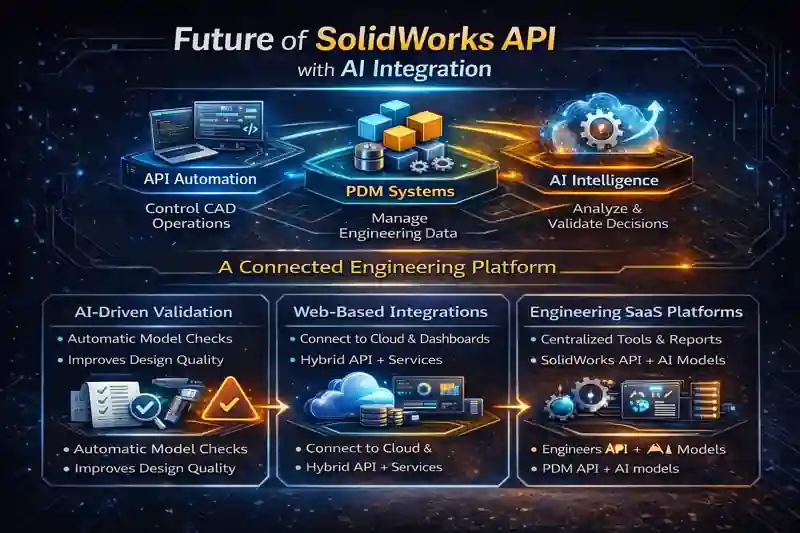
- feature audit tools
- sheet metal validation logic
- weldment processing checks
- body-based compliance rules
- structured manufacturing-prep automation
Instead of treating the model as a black box, the API gives more organized access to how that body was built.
Example code snippet (VBA — illustrative)
Dim swFeat As SldWorks.Feature
Dim swBodyFolder As SldWorks.BodyFolder
Dim vTopFeats As Variant
Dim i As Long

Set swFeat = swModel.FirstFeature

Do While Not swFeat Is Nothing
    If swFeat.GetTypeName2 = "SolidBodyFolder" Then
        Set swBodyFolder = swFeat.GetSpecificFeature2
        vTopFeats = swBodyFolder.GetTopLevelFeatures

        If Not IsEmpty(vTopFeats) Then
            For i = LBound(vTopFeats) To UBound(vTopFeats)
                Debug.Print "Top-level feature: " & vTopFeats(i).Name
            Next i
        End If
    End If

    Set swFeat = swFeat.GetNextFeature
Loop
Real use-case diagram
Open part
↓
Traverse body folders
↓
Read top-level features
↓
Classify by rule:
– sheet metal?
– weldment?
– imported body?
– missing required parent feature?
↓
Generate validation report
This is the kind of method that can support a future drawing checker, sheet metal checker, or manufacturing-readiness engine. It is much more meaningful than a plain “what’s new” bullet because it supports real inspection systems.
3) Family Table APIs — configuration control becomes more manageable
The 2026 Help includes IFamilyTableFeature and IFamilyTableAnnotation. The members page for IFamilyTableFeature shows methods like GetFeature, GetFollowConfigTreeOrder, and related family-table controls, while IFamilyTableAnnotation includes access back to the family table feature.
Why this matters
Configuration-heavy products are common in engineering: size variants, material variants, frame options, mounting styles, and regional options. APIs around family tables improve how developers can inspect and automate those variant structures.
That creates value in areas such as:
- product configurators
- variant validation
- table-driven release checks
- configuration-order consistency
- drawing-table automation
This is especially relevant for organizations that manage large option trees and want to reduce manual mistakes in configuration handling.
Example code snippet (C# — illustrative)
using SolidWorks.Interop.sldworks;

public void InspectFamilyTable(IFamilyTableFeature ftFeature)
{
    if (ftFeature == null) return;

    bool followTreeOrder = ftFeature.GetFollowConfigTreeOrder();
    Feature parentFeat = ftFeature.GetFeature();

    System.Diagnostics.Debug.WriteLine("Family Table Feature");
    System.Diagnostics.Debug.WriteLine($"Follow Config Tree Order: {followTreeOrder}");
    System.Diagnostics.Debug.WriteLine($"Parent Feature: {parentFeat?.Name}");
}
Real use-case diagram
Configuration-rich product model
          ↓
API reads family table feature
          ↓
Check rules:
- required variants present?
- configuration order correct?
- release table aligned with design tree?
          ↓
Flag missing or inconsistent variants
          ↓
Cleaner product release workflow
This is where CAD automation starts touching product-platform engineering. The benefit is not merely “table access.” It is the ability to bring order and validation to configurable products.
4) Event enhancements — from passive automation to responsive systems
The official 2026 programming guide states that to receive events, applications must register for events by object type and for each instance, and the API Help notes that .NET implementations use delegates. The ISldWorks interface page also points out that add-in wizards automatically create the ISldWorks object and that events are implemented with delegates in the .NET Framework.
Why this matters
A script that runs only when a user clicks a button is useful. But an event-driven add-in is much more powerful.
It can react automatically when:
- a file opens
- a file saves
- a drawing changes
- a document activates
- a state transition happens in a connected workflow
That moves your system from “automation tool” to “engineering control layer.”
Example code snippet (C# — illustrative event hook pattern)
using SolidWorks.Interop.sldworks;

public class SwEventHandler
{
    private SldWorks swApp;

    public void Connect(SldWorks app)
    {
        swApp = app;
        swApp.ActiveDocChangeNotify += OnActiveDocChangeNotify;
    }

    public int OnActiveDocChangeNotify()
    {
        System.Diagnostics.Debug.WriteLine("Active document changed.");
        // Place validation, logging, or routing logic here
        return 0;
    }
}
Real use-case diagram
User saves drawing
      ↓
Event fires automatically
      ↓
Add-in runs validation rules
      ↓
Check title block / custom props / sheet state
      ↓
Show pass-fail panel
      ↓
Errors caught before release
This is the bridge between CAD and quality systems. Event logic is what enables real-time compliance, guided engineering workflows, and high-value add-ins.
Why these four enhancements matter together
Individually, each improvement looks manageable. Together, they create a much stronger platform for building engineering systems:
- DSPBR Material API supports programmable visual standards.
GetTopLevelFeaturessupports feature-aware validation.- Family Table APIs support configuration intelligence.
- Event handling supports real-time enforcement and automation.
That combination is exactly why the SolidWorks 2026 API should not be dismissed as a minor release. It is a practical release for developers who build validation tools, product configurators, workflow add-ins, and future AI-assisted engineering systems.
combined system diagram
Model / Drawing / Configurations
             ↓
   API enhancement layer
   - DSPBR material access
   - top-level feature access
   - family table access
   - event subscriptions
             ↓
   Rule engine / validator
             ↓
   Outputs:
   - warnings
   - compliance results
   - release checks
   - automation actions
             ↓
   Future layer:
   AI + RAG engineering assistant
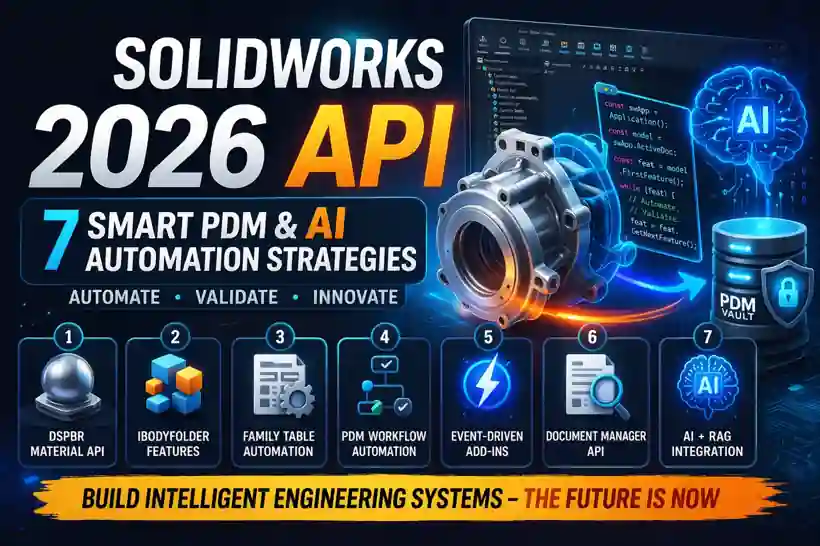
7 Smart PDM & AI Automation Strategies Using SolidWorks 2026 API
1. DSPBR Material API for Visual Validation
The DSPBR Material API enables control over physically based rendering materials.
Why it matters:
- Realistic visualization of products
- Improved communication with stakeholders
- Early detection of design issues
👉 Engineering Insight:
Visual validation reduces costly late-stage design changes.
2. Feature-Level Automation with IBodyFolder
The IBodyFolder::GetTopLevelFeatures method allows extraction of feature hierarchy in multi-body parts.
Use cases:
- Sheet metal validation
- Feature auditing
- Design rule enforcement
👉 This becomes the foundation for automated validation systems.
3. Family Table API for Configuration Automation
Family Table APIs enable programmatic handling of configurations.
Benefits:
- Automate product variants
- Reduce manual configuration errors
- Enable product configurators
👉 Ideal for industries with multiple design variations.
4. PDM API for Workflow Automation
The SolidWorks PDM API allows deep interaction with vaults, workflows, and file states.
Automation possibilities:
- Approval workflows
- Revision control
- Ownership management
👉 Engineers can build fully automated lifecycle systems.
5. Event-Driven Add-ins for Real-Time Automation
Event-driven architecture allows actions to trigger automatically.
Examples:
- On file save → validation check
- On state change → approval logic
- On open → metadata verification
👉 This enables real-time engineering intelligence.
6. Document Manager API for Offline Automation
The Document Manager API allows access to SolidWorks files without opening SolidWorks.
Key capabilities:
- Read custom properties
- Extract BOM data
- Analyze file references
👉 Huge advantage:
Automation without requiring SolidWorks installation.
7. AI + RAG Integration for Intelligent Engineering Systems
This is where the future lies.
Concept:
- Extract data using API
- Validate using AI (RAG)
- Compare with engineering standards
Example workflow:
| Step | Action |
|---|---|
| 1 | Extract drawing data |
| 2 | Send to RAG system |
| 3 | Validate against standards |
| 4 | Return errors/suggestions |
👉 This transforms automation into intelligent decision-making systems.
SolidWorks 2026 API Architecture Explained
The API follows a hierarchical object model:
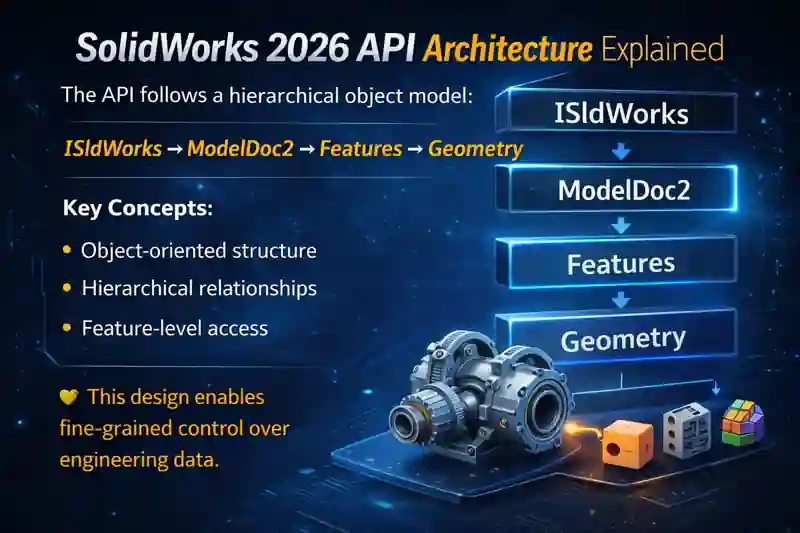
Key Concepts:
- Object-oriented structure
- Hierarchical relationships
- Feature-level access
👉 This design enables fine-grained control over engineering data.
Real-World Use Cases of SolidWorks 2026 API
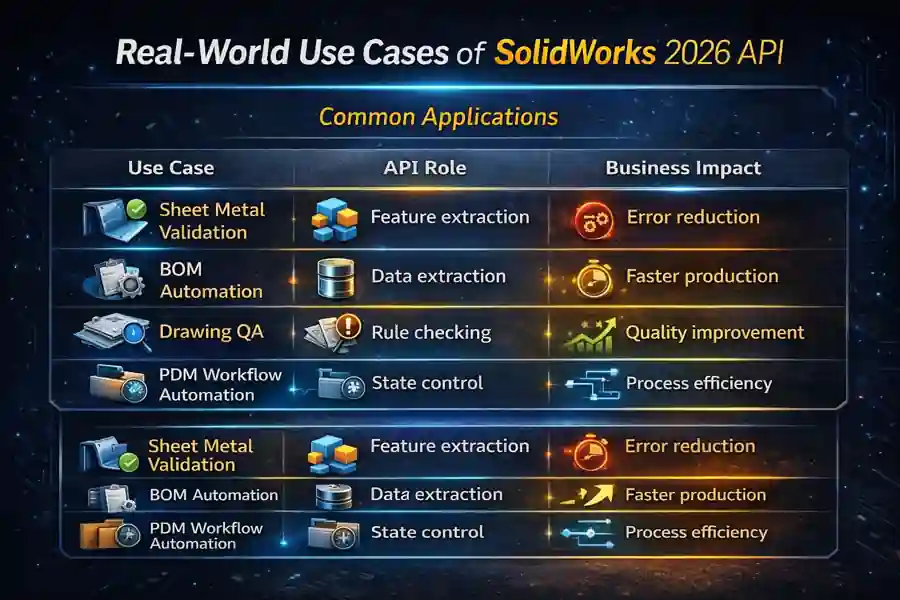
Common Applications
| Use Case | API Role | Business Impact |
|---|---|---|
| Sheet Metal Validation | Feature extraction | Error reduction |
| BOM Automation | Data extraction | Faster production |
| Drawing QA | Rule checking | Quality improvement |
| PDM Workflow Automation | State control | Process efficiency |
Limitations and Challenges of SolidWorks 2026 API
Despite its power, the SolidWorks 2026 API comes with a few structural limitations that engineers must understand before building automation systems.
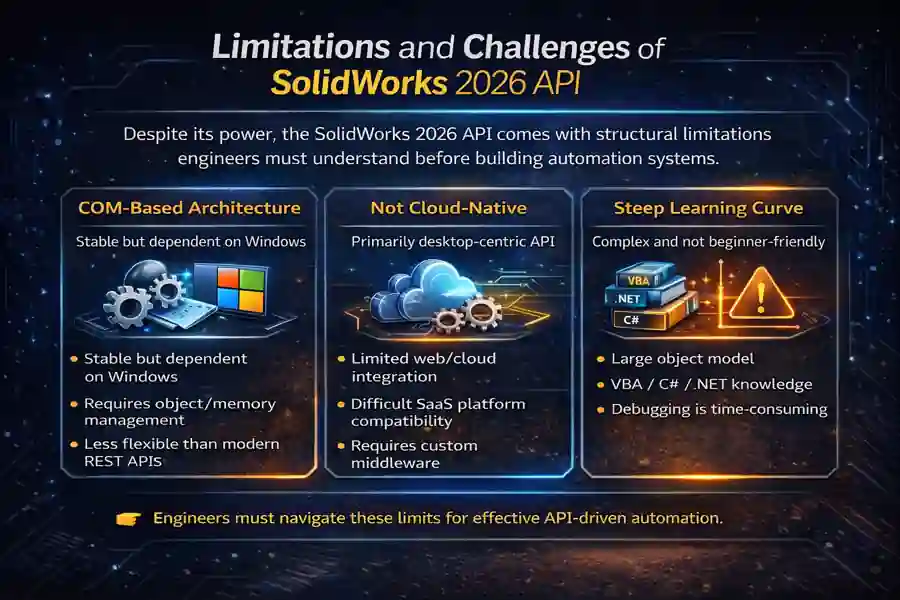
COM-Based Architecture
The API is built on a COM (Component Object Model) framework, which is stable and deeply integrated with Windows.
Impact:
- Tight dependency on Windows environment
- Requires proper object handling and memory management
- Less flexible compared to modern REST-based APIs
While COM provides deep control, it also makes integration with modern cloud systems more complex.
Not Cloud-Native
The SolidWorks API is primarily designed for local or desktop-based execution.
Impact:
- Limited direct support for web or cloud applications
- Difficult to integrate with SaaS platforms without intermediate layers
- Requires custom solutions (e.g., services, middleware) for remote workflows
👉 This becomes a challenge for companies moving toward cloud-based engineering ecosystems.
Steep Learning Curve
The API is powerful, but not beginner-friendly. Anyway We have to…………
Challenges:
- Large object model to understand
- Requires knowledge of:
- VBA / C# / .NET
- SolidWorks internal structure
- Debugging and testing can be time-consuming
Engineers must invest time to move from basic scripting → system-level automation.
Engineering Perspective
These limitations do not reduce the value of the API—they define how it should be used.
- COM → best for deep desktop automation
- Non-cloud → requires hybrid architecture thinking
- Learning curve → demands structured development approach
Key Takeaway
The SolidWorks 2026 API is extremely powerful, but it rewards engineers who treat it as a system platform, not just a scripting tool.
With proper design, these constraints can be managed to build scalable, reliable engineering automation solutions.
Future of SolidWorks API with AI Integration
The future of the SolidWorks 2026 API lies in combining three powerful layers:
- API automation → controlling CAD operations programmatically
- PDM systems → managing data, workflows, and lifecycle
- AI intelligence → analyzing, validating, and assisting decisions
When these three work together, SolidWorks moves beyond a design tool into a connected engineering platform.
What This Means in Practice
Instead of using the API only for automation (macros, batch tasks), engineers can build systems that:
- Understand design intent
- Validate models against standards
- Suggest improvements
- Assist decision-making
This is where engineering shifts from execution → intelligence
Emerging Trends
AI-Driven Validation
- Automatic checking of:
- Drawings
- Dimensions
- Standards
- Reduces human errors
- Improves design quality
Web-Based Integrations
- Connecting SolidWorks data to:
- Dashboards
- Web apps
- Cloud systems
- Requires hybrid architecture (API + services)
Engineering SaaS Platforms
- Centralized tools for:
- Validation
- Automation
- Reporting
- Built using:
- SolidWorks API
- PDM API
- AI models
- RAG
Real Engineering Workflow (Future Vision)
CAD Model / Drawing
        ↓
SolidWorks API extracts data
        ↓
PDM manages lifecycle & states
        ↓
AI system (RAG / LLM) validates:
- Standards
- Design rules
- Compliance
        ↓
Output:
- Errors
- Suggestions
- Auto corrections
Key Takeaway
The role of the SolidWorks 2026 API is evolving:
- From → simple automation scripts
- To → integrated engineering systems
Final Insight
The next phase is not just faster automation—it is smarter engineering systems.
Automation → Intelligent Engineering Systems
This is where the real competitive advantage will be built in the coming years.
Conclusion
The SolidWorks 2026 API is not just a set of programming tools—it is the foundation for modern engineering systems.
By combining:
- API automation
- PDM workflows
- AI-driven validation
Engineers can move beyond manual processes and build intelligent, scalable engineering solutions.
This guide on SolidWorks 2026 API is based on real engineering workflows, API documentation, and practical automation system design principles.
Explore more CAD Automation and SolidWorks API guides on The Tech Thinker to build intelligent engineering systems.
FAQs on SolidWorks 2026 API
1. What is SolidWorks 2026 API?
The SolidWorks 2026 API is a programmable interface that allows engineers to automate design tasks, access model data, and build custom tools using languages like VBA and C#.
2. What are the new features in SolidWorks 2026 API?
The SolidWorks 2026 API introduces enhancements such as DSPBR Material API, IBodyFolder feature access, Family Table APIs, and improved event handling for automation.
3. How is SolidWorks 2026 API used for automation?
The SolidWorks 2026 API enables automation of repetitive tasks like feature creation, drawing generation, BOM extraction, and workflow validation.
4. What is SolidWorks PDM API and how does it work?
The SolidWorks PDM API allows developers to interact with vault data, automate workflows, manage revisions, and control file states within the Product Data Management system.
5. Can SolidWorks 2026 API work without SolidWorks installed?
Yes, certain functionalities of the SolidWorks 2026 API, such as the Document Manager API, allow access to file properties and metadata without opening SolidWorks.
6. What programming languages are supported by SolidWorks API?
The SolidWorks 2026 API supports multiple languages including VBA, VB.NET, C#, and C++, making it flexible for different development environments.
7. What is the role of AI in SolidWorks API automation?
AI enhances the SolidWorks 2026 API by enabling intelligent validation, rule-based checking, and automated decision-making using techniques like RAG and LLM models.
8. How does SolidWorks API help in engineering validation?
The SolidWorks 2026 API can extract design data and validate it against predefined rules, helping engineers identify errors and ensure compliance before production.
9. What is IBodyFolder in SolidWorks API?
In the SolidWorks 2026 API, IBodyFolder provides access to body structures and allows developers to retrieve top-level features for structured automation and validation.
10. What is DSPBR Material API in SolidWorks 2026?
The DSPBR Material API in SolidWorks 2026 provides access to advanced rendering properties, enabling realistic visualization and material validation.
11. How does SolidWorks API support configuration management?
The SolidWorks 2026 API supports configuration automation through Family Table APIs, allowing engineers to manage product variants programmatically.
12. What are the limitations of SolidWorks 2026 API?
The SolidWorks 2026 API has limitations such as COM-based architecture, lack of cloud-native support, and a steep learning curve for beginners.
13. What is event-driven automation in SolidWorks API?
Event-driven automation in the SolidWorks 2026 API allows actions to trigger automatically based on events like file save, open, or workflow changes.
14. How can SolidWorks API be integrated with RAG systems?
The SolidWorks 2026 API can extract model and drawing data, which can then be processed by RAG systems to validate against engineering standards and documents.
15. What is the future of SolidWorks API in engineering?
The future of the SolidWorks 2026 API lies in combining automation, PDM systems, and AI intelligence to build intelligent engineering systems and SaaS platforms.
Related Articles
- Getting Started with SolidWorks VBA Macro: #1 Best Guide
- Overview of the SolidWorks VBA Macro Object Library & Model
- SolidWorks Add-in Creation: #1 Powerful Guide for Engineers
- SolidWorks API Functions: 20 Expert Commands You Must Know
- SolidWorks Automation: 15 Powerful Ways to Save Hours
- Common SolidWorks VBA Errors and Fixes: 21 Best Solutions