Tool Overview
SolidWorks Custom Properties Manager is a lightweight CAD automation tool designed to simplify the management of custom properties across multiple SolidWorks models.
Developed by Ramu Gopal (The Tech Thinker), the tool allows engineers to export custom properties from PART and ASM files, edit them efficiently in Excel, and re-import the updated data back into the models.
Instead of manually opening each file and editing metadata individually, this tool enables a fast batch workflow, significantly reducing repetitive engineering tasks.
The tool is built using the SolidWorks API and VBA, making it easy to run directly inside a SolidWorks environment.
Why This Tool Was Created
In many engineering teams, managing model metadata such as:
-
Title
-
Description
-
Material
-
Vendor
-
Revision
can become time-consuming when working with large batches of models.
Opening each file individually to update properties can slow down engineering workflows.
The SolidWorks Custom Properties Manager solves this problem by introducing an Excel-driven batch editing workflow.
Key Features
- Batch export of SolidWorks custom properties
- Excel-based editing of metadata
- Bulk import back into models
- Supports PART (.SLDPRT) and ASM (.SLDASM) files
- Folder-level batch processing
- Property preview and selection system
- Error logging and processing report
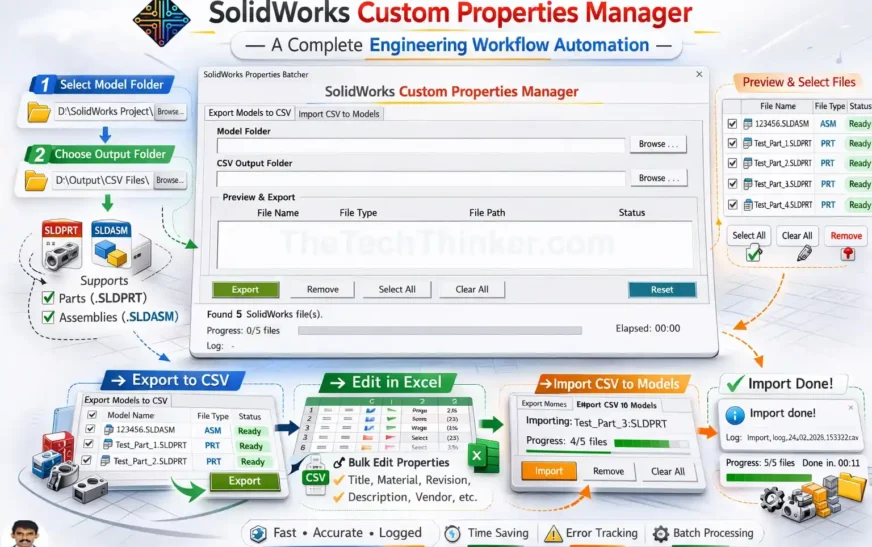
How the Tool Works
The workflow is simple and efficient.
Step 1 — Select Model Folder
Choose the folder containing SolidWorks PART and ASM files.
Step 2 — Export Custom Properties
The tool scans the selected files and exports custom properties into a CSV file.
Step 3 — Edit Properties in Excel
Open the CSV file in Excel and update values such as:
-
Title
-
Material
-
Revision
-
Description
-
Vendor information
Step 4 — Import Back to Models
Re-import the updated CSV file and automatically apply the changes to the selected models.
Supported File Types
The tool works with:
-
SolidWorks Part Files (.SLDPRT)
-
SolidWorks Assembly Files (.SLDASM)
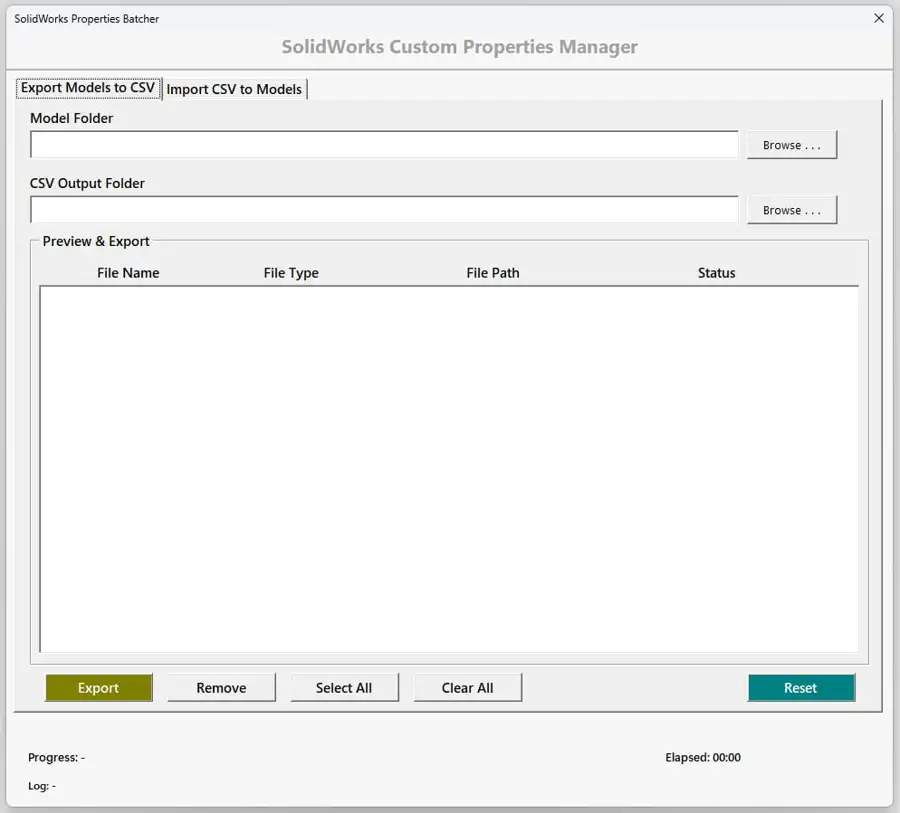
Tool User Interface
Download Source Code
The source code for this tool is available on GitHub.
Download the macro and run it inside SolidWorks to start using the automation workflow.
Note:
This tool requires a valid SolidWorks installation to execute the macro.
Installation Steps
-
Download the macro file from GitHub
-
Open SolidWorks
-
Navigate to Tools → Macro → Run
-
Select the macro file
-
Choose the model folder to begin the batch process
Use Cases
This automation tool is useful for:
- Engineering metadata standardization
- BOM data preparation
- Vendor property updates
- Revision updates across multiple files
- CAD data cleanup and migration
Technology Stack
The tool is built using the following technologies.
| Component | Technology |
|---|---|
| CAD Platform | SolidWorks |
| Programming Language | VBA |
| API | SolidWorks API |
| Data Editing | Excel / CSV |
| Automation Type | Batch Processing |
Developer
SolidWorks Custom Properties Manager – CAD Automation Tool

SolidWorks Custom Properties Manager Developed by Ramu Gopal, founder of The Tech Thinker, as part of engineering automation research. is a CAD automation tool that allows engineers to batch export, edit, and re-import SolidWorks custom properties using an Excel-based workflow powered by the SolidWorks API and VBA.
Price Currency: USD
Operating System: Windows
Application Category: EngineeringApplication
Pros
- Batch editing of SolidWorks custom properties
- Excel-based metadata editing workflow
- Automates property updates for hundreds of CAD files
- Uses SolidWorks API for reliable automation
- Improves engineering productivity
Cons
- Requires SolidWorks installed
- Basic knowledge of macros recommended
- Excel required for metadata editing
FAQ – SolidWorks Custom Properties Manager
1. What is the SolidWorks Custom Properties Manager tool?
The SolidWorks Custom Properties Manager is a CAD automation tool that helps engineers export, edit, and update metadata across multiple SolidWorks models.
✔ Batch property management
✔ Faster metadata updates
✔ Reduced manual editing
2. Why should engineers use the SolidWorks Custom Properties Manager?
The SolidWorks Custom Properties Manager simplifies repetitive metadata tasks that normally require opening each model individually.
✔ Saves engineering time
✔ Improves workflow efficiency
✔ Reduces manual errors
3. What types of properties can the SolidWorks Custom Properties Manager manage?
The SolidWorks Custom Properties Manager can manage many metadata fields including:
✔ Title
✔ Description
✔ Material
✔ Vendor
✔ Revision
4. How does the SolidWorks Custom Properties Manager improve CAD data consistency?
The SolidWorks Custom Properties Manager ensures that property values remain consistent across multiple files during batch updates.
✔ Standardized metadata
✔ Cleaner engineering documentation
✔ Reliable BOM information
5. Can the SolidWorks Custom Properties Manager process multiple models at once?
Yes, the SolidWorks Custom Properties Manager supports batch processing of multiple SolidWorks models in a single workflow.
✔ Folder-level automation
✔ Multi-file processing
✔ Faster updates
6. Is the SolidWorks Custom Properties Manager easy for engineers to use?
Yes, the SolidWorks Custom Properties Manager uses a simple interface and an Excel-based editing workflow.
✔ User-friendly design
✔ Clear preview system
✔ Minimal learning curve
7. What workflow does the SolidWorks Custom Properties Manager follow?
The SolidWorks Custom Properties Manager follows a simple automation workflow:
✔ Select model folder
✔ Export properties to CSV
✔ Edit values in Excel
✔ Import updated data back to models
8. Can the SolidWorks Custom Properties Manager help clean up CAD metadata?
Yes, the SolidWorks Custom Properties Manager can quickly update inconsistent or missing metadata across many files.
✔ Legacy file cleanup
✔ Property standardization
✔ Faster CAD data management
9. Does the SolidWorks Custom Properties Manager provide file previews?
Yes, the SolidWorks Custom Properties Manager provides a preview grid where users can review and select files before processing.
✔ File selection control
✔ Clear status indicators
✔ Flexible workflow
10. Is the SolidWorks Custom Properties Manager useful for engineering documentation?
Yes, the SolidWorks Custom Properties Manager helps maintain accurate metadata used in engineering drawings and documentation.
✔ Reliable property values
✔ Improved documentation accuracy
✔ Better design traceability
11. Can the SolidWorks Custom Property Manager help standardize company property templates?
Yes, the SolidWorks Custom Property Manager can enforce consistent metadata structures across multiple projects.
✔ Template-based workflows
✔ Consistent property naming
✔ Improved CAD governance
12. Does the SolidWorks Custom Property Manager support engineering workflow automation?
Yes, the SolidWorks Custom Property Manager is designed specifically to automate repetitive CAD metadata tasks.
✔ Automated batch updates
✔ Reduced engineering workload
✔ Efficient design operations
13. Who developed the SolidWorks Custom Property Manager?
The SolidWorks Custom Property Manager was developed by Ramu Gopal, founder of The Tech Thinker, as part of engineering automation research.
✔ Independent development
✔ Engineering productivity focus
✔ CAD automation innovation
14. What technologies power the SolidWorks Custom Property Manager?
The SolidWorks Custom Property Manager is built using technologies including:
✔ SolidWorks API
✔ VBA automation
✔ Excel CSV workflows
15. Where can I download the SolidWorks Custom Property Manager?
The SolidWorks Custom Property Manager source code and macro file are available through the project repository.
✔ Download macro files
✔ View source code
✔ Run inside SolidWorks
Related Links
For a complete guide explaining the concept and development of this tool, read the detailed article:
SolidWorks Custom Properties Manager: Engineering Workflow Automation Guide
Medium Article
Tool Presentation
https://www.scribd.com/document/1005551258/SolidWorks-Custom-Property-Manger-by-the-Tech-Thinker