What is DNS?: Why You Must Understand DNS (Domain Name System) in 2025
The Domain Name System (DNS) is the foundation of the modern internet. Without DNS, users would need to memorize IP addresses like 172.67.154.32 just to visit a website. In 2025, whether you’re a blogger, business owner, developer, or IT pro — understanding DNS is critical.
Why? Because it powers your site’s performance, discoverability, and security.
This complete guide takes you from DNS basics to advanced configurations. You’ll explore every DNS record type, walk through real-world examples, and learn how to manage, secure, and troubleshoot DNS like a pro.
By the end, you’ll know exactly how to set up, optimize, and protect your domain’s DNS — whether you’re running a blog, eCommerce store, SaaS platform, or corporate website.
What is DNS?
The Domain Name System Explained
DNS is a hierarchical, decentralized naming system that translates human-friendly domain names into machine-readable IP addresses.
When you type a domain like thetechthinker.com into your browser, DNS returns the IP address of the server where the site is hosted. It’s like asking your phone to call “Mom” — DNS dials the real number behind the name.
Why DNS Exists:
- IP addresses are hard to remember; DNS makes browsing easy.
- IPs can change due to server migration or scaling — DNS keeps your domain stable.
- Billions of users depend on DNS for email, streaming, apps, and every digital interaction.
DNS in Everyday Life
- Visiting websites
- Sending/receiving emails
- Streaming Netflix or YouTube
- Using mobile apps that talk to cloud servers
Real-World Analogy
DNS is like your phone’s contacts list: You tap a name, it dials the number — DNS works the same for domains.
Why DNS Matters in 2025
1. Speed = Performance = Better SEO
DNS lookup is the first step in your site loading. A slow DNS can increase Time to First Byte (TTFB), hurting Core Web Vitals and Google rankings.
Check DNS speed worldwide at DNSPerf (DoFollow)
2. Reliability = Uptime = Trust
Poor DNS setup can make your site unreachable, damage your reputation, or block emails. In 2025, users expect lightning-fast, always-on experiences.
3. Security = Protection from Spoofing & Hijacking
DNS is a major attack target. Tools like DNSSEC, CAA, SPF, and DKIM protect your digital presence.
4. Global Reach = User Experience
CDNs, edge servers, and global routing rely on smart DNS to serve fast, local versions of your site.
5. Business Intelligence
DNS logs help detect suspicious activity, broken subdomains, or unauthorized access attempts.
How DNS Works: Step-by-Step Lookup Process
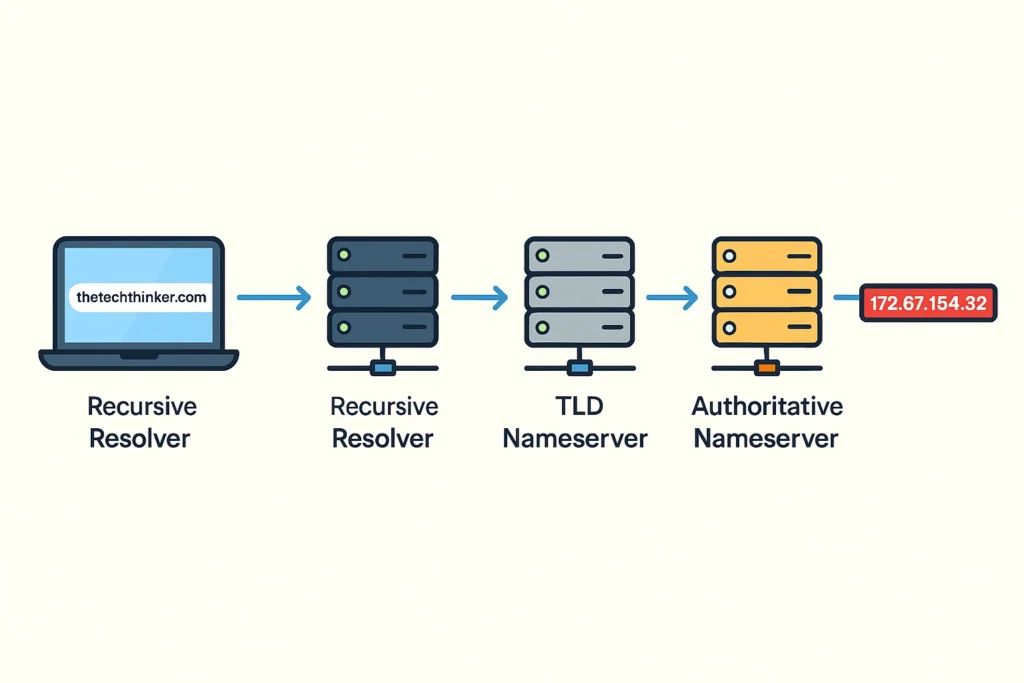
- You type
thetechthinker.cominto your browser. - Browser checks its cache → OS cache → Router cache.
- If not cached, it asks the Recursive Resolver (often from your ISP).
- The resolver queries a Root Nameserver.
- Root points to a TLD Server (like
.com). - TLD points to the Authoritative Nameserver.
- That server returns the correct IP address.
- Browser connects to the server — and your site loads.
Key DNS Components
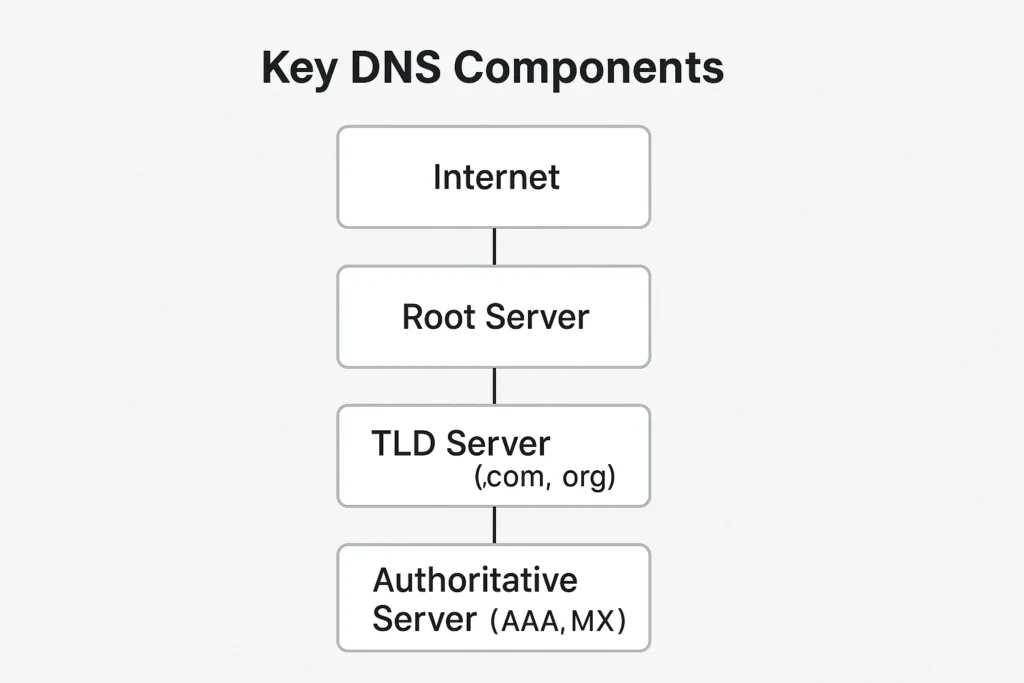
🧠 Recursive Resolver
The one doing the work — asks around to find the answer.
🌍 Root Server
Top of the DNS chain. Knows where .com, .org, .in servers live.
🔧 TLD Server
Manages domain extensions and routes lookups to authoritative sources.
📂 Authoritative Nameserver
The final boss. Stores your domain’s DNS records like A, MX, TXT, etc.
DNS Record Types: Complete Breakdown
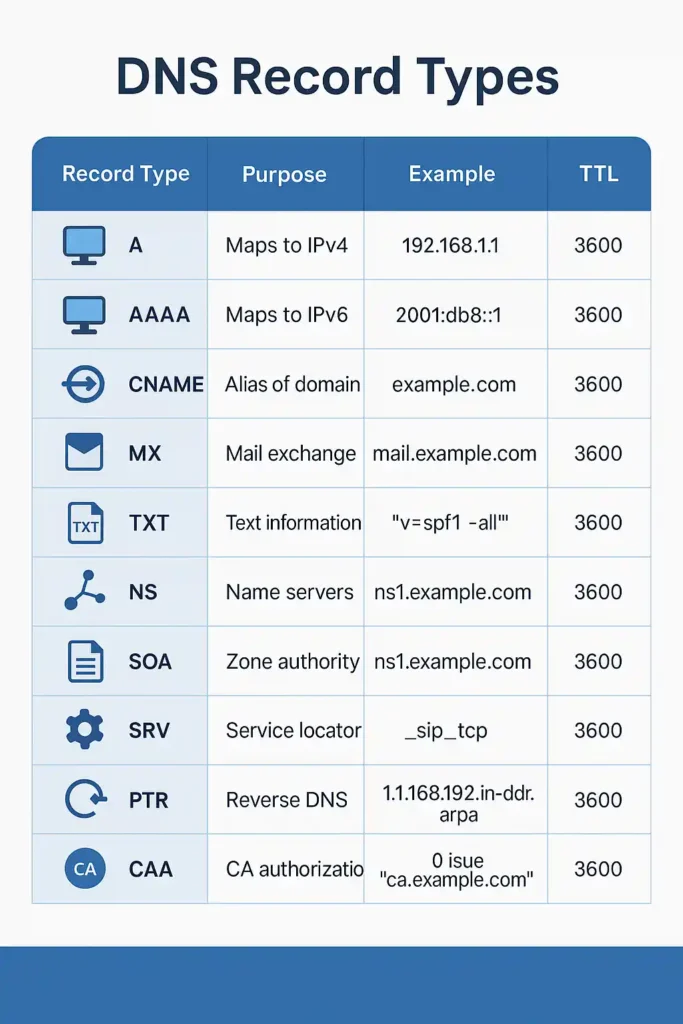
Each DNS record serves a unique purpose. Here’s a deep dive:
🔹 A Record (IPv4 Address)
- Maps domain to IPv4 address
- Example:
thetechthinker.com A 172.67.154.32 - Use: Hosting websites
- Tip: IPv4 is limited — migrate to IPv6 when possible
🔹 AAAA Record (IPv6 Address)
- Maps domain to IPv6 address
- Example:
thetechthinker.com AAAA 2606:4700:3036::ac43:9a20 - Future-ready networking
🔹 CNAME Record (Alias)
- Points subdomains to main domain
- Example:
www CNAME thetechthinker.com - Don’t use CNAME on root domain
🔹 MX Record (Mail Exchange)
- Routes email traffic
- Example:
@ MX 10 mx.zoho.com - Higher priority = lower number
🔹 TXT Record (Text, Security & Verification)
- Use for SPF, DKIM, DMARC, Google/Bing verification
- Example:
@ TXT “v=spf1 include:_spf.google.com ~all”
🔹 NS Record (Name Server)
- Specifies which nameservers control DNS
- Example:
@ NS ns1.namecheap.com
🔹 SOA Record (Start of Authority)
- Stores zone metadata: refresh, retry, TTL
- Managed by provider
🔹 SRV Record (Service)
- Points to services like SIP, MS Teams
- Example:
_sip._tcp SRV 0 5 5060 sipserver.example.com
🔹 PTR Record (Reverse DNS)
- IP → Domain
- Used by email servers to prevent spam
🔹 CAA Record (SSL Control)
- Controls which CA can issue certificates
- Example:
@ CAA 0 issue “letsencrypt.org”
🔹 DNSKEY / DS (DNSSEC)
- Security keys for DNS verification
- Automatically managed
🔹 NAPTR Record (Telecom)
- Used in ENUM systems for VoIP
🔹 TLSA Record (DANE)
- Binds TLS certs to domain via DNS
📌 Use our visual DNS Record Cheat Sheet to reinforce learning.
DNS Propagation
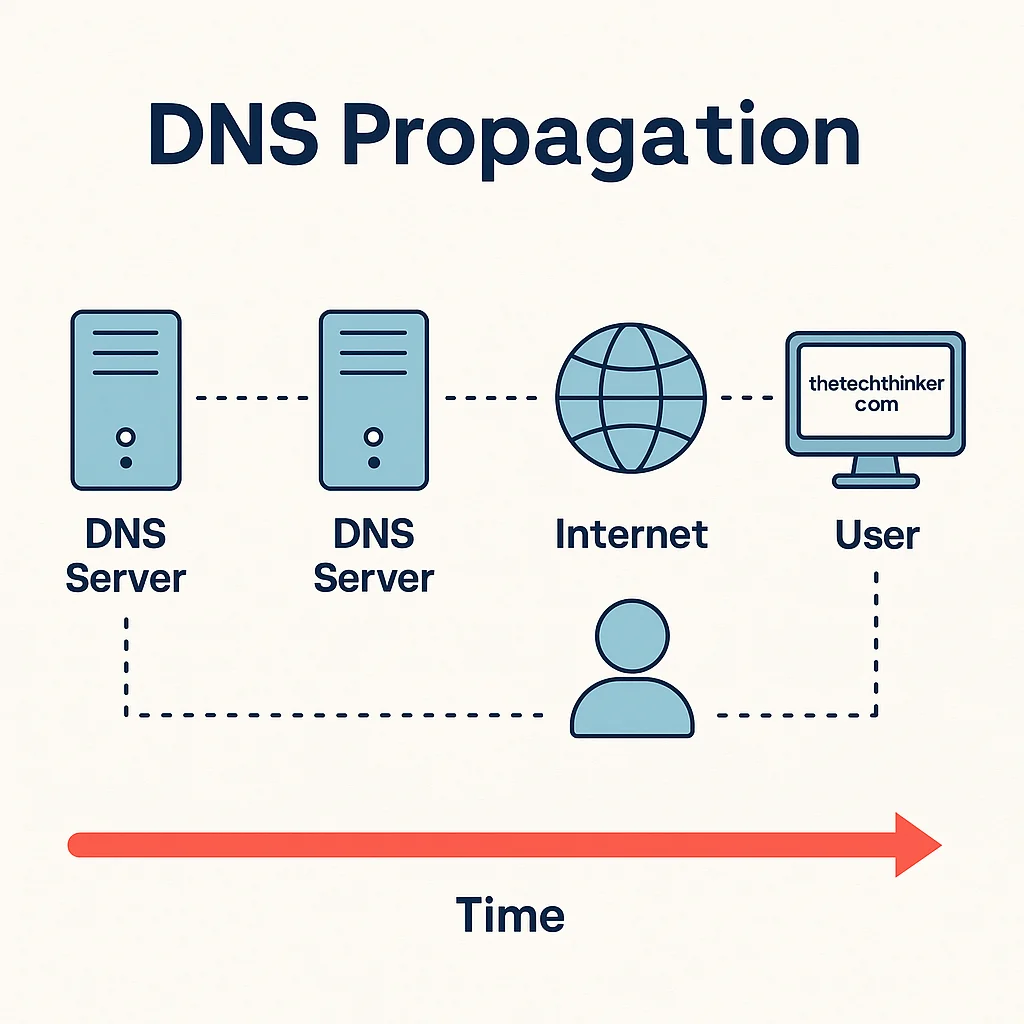
Explained
When you change a DNS record, the update must spread to servers worldwide. That’s propagation.
🕓 Why It Takes Time:
- TTL values (high = slower update)
- ISP resolver cache
- Global DNS sync latency
⚙️ Best Practices:
- Set TTL to 300 before updates
- Test with
dnschecker.orgorwhatsmydns.net
How to Manage DNS Records
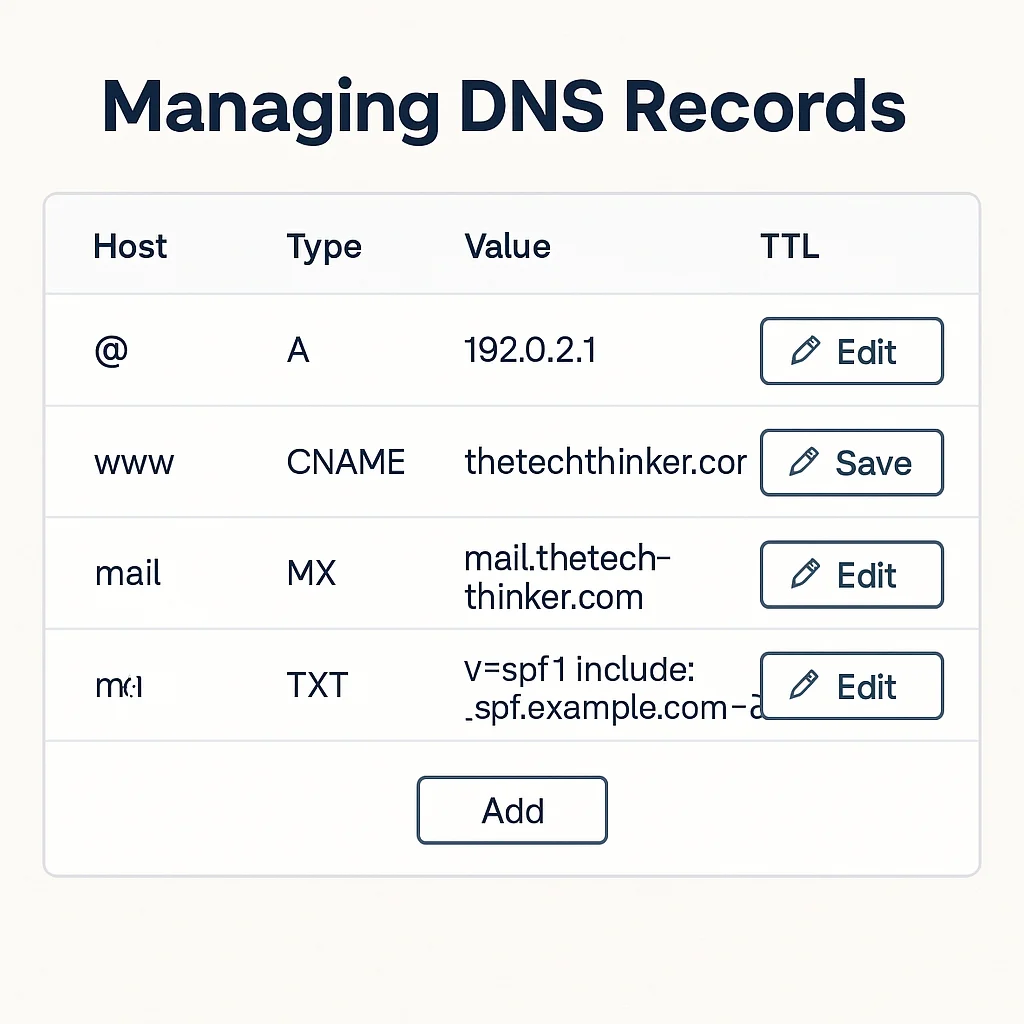
🔧 Common Platforms
- Cloudflare DNS Panel
- cPanel Zone Editor
- GoDaddy, Namecheap, Google Domains
🧩 Best Practices
- Backup zone file before changes
- Use descriptive subdomains
- Test using
dig,nslookup, or online tools - Use 2FA on registrar account
DNS Security Best Practices
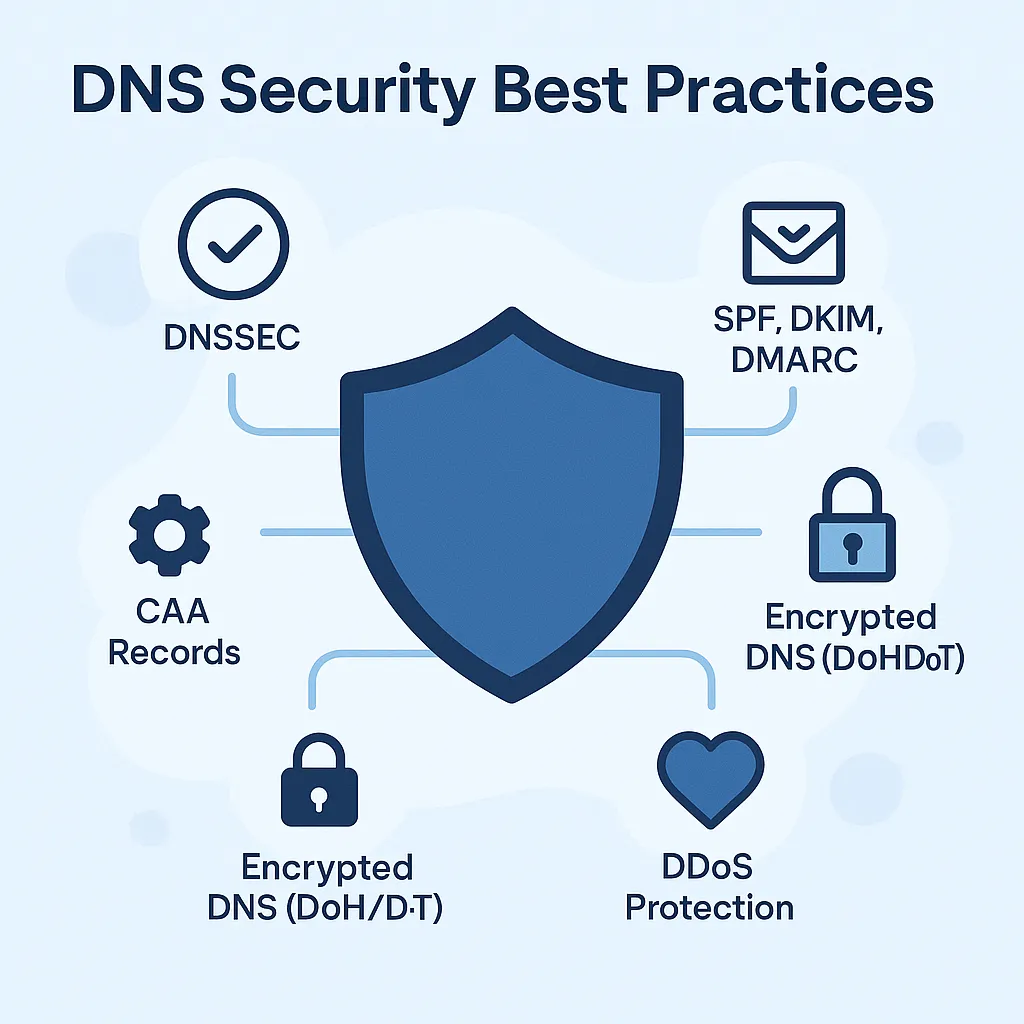
🔐 Enable DNSSEC – Sign records and prevent forgery
🛡️ Set up SPF, DKIM, DMARC – Stop email spoofing
📋 Add CAA Records – Authorize SSL issuers
📶 Use Anycast DNS & DDoS protection – With Cloudflare, QUIC.cloud
🔒 Adopt Encrypted DNS protocols – DoH (DNS over HTTPS), DoT, Private DNS
Advanced DNS Configurations
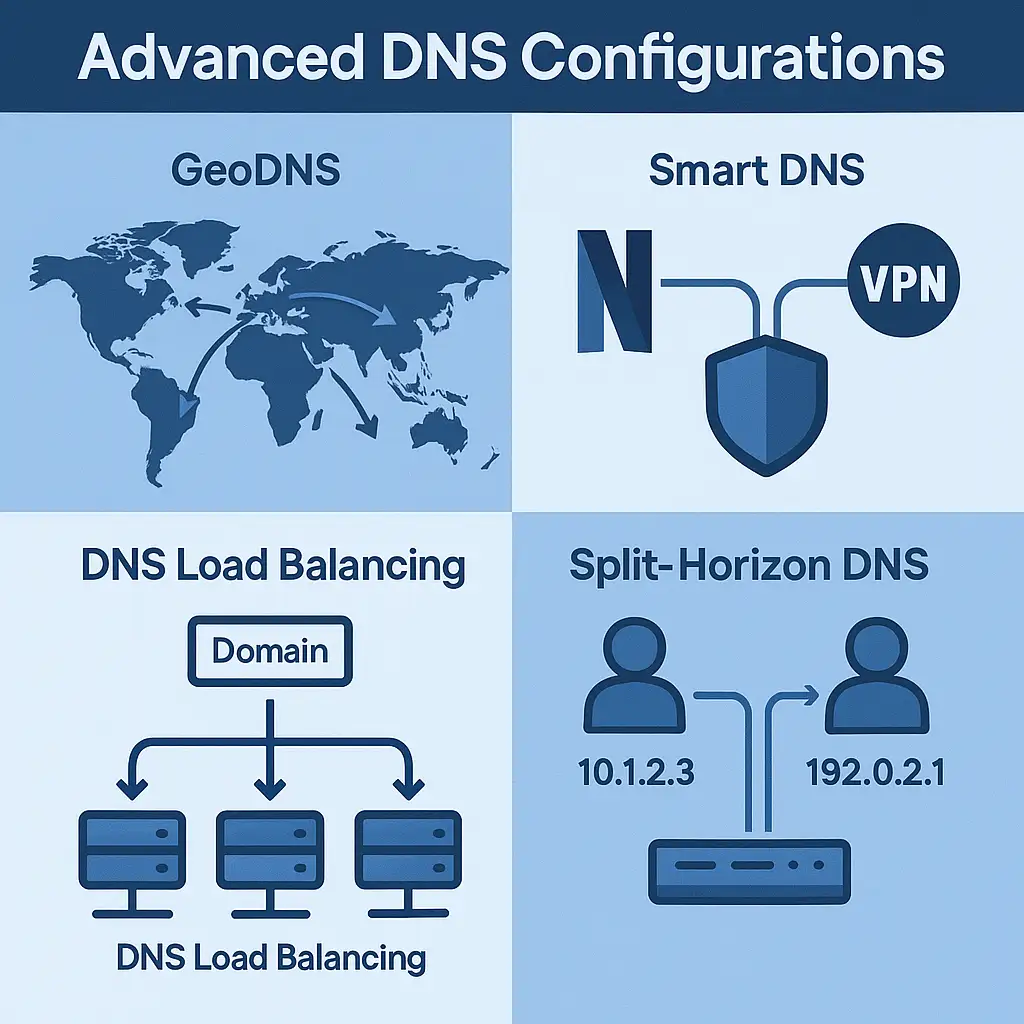
🌎 GeoDNS
Route users to closest regional server — improve latency & SEO
🧠 Smart DNS
Bypass geo-blocks for streaming — used by VPN-like services
🔁 DNS Load Balancing
Multiple IPs = scalable, redundant infrastructure
🔄 Split-Horizon DNS
Serve different records inside vs outside the network
🧾 DNS Record Types – Quick Reference Table
| Record Type | Purpose | Example | Usage in 2025 | TTL Range |
|---|---|---|---|---|
| A | Maps to IPv4 | example.com → 192.0.2.1 |
Hosting | 300–86400 |
| AAAA | Maps to IPv6 | example.com → 2001:db8::1 |
Future-proof hosting | 300–86400 |
| CNAME | Alias | www → example.com |
Subdomain pointing | 300–43200 |
| MX | 10 mail.zoho.com |
Email routing | 600–86400 | |
| TXT | Security | SPF, DKIM, DMARC |
Verification | 300–86400 |
| NS | DNS authority | ns1.namecheap.com |
Domain control | 86400 |
| SOA | Metadata | N/A | DNS replication | 3600–86400 |
| SRV | Services | _sip._tcp SRV |
VoIP | 300–43200 |
| PTR | Reverse DNS | IP → domain |
Email trust | Set by host |
| CAA | SSL authority | letsencrypt.org |
SSL control | 86400 |
| DNSKEY / DS | DNSSEC | Auto-managed | Security | 3600 |
| NAPTR | Regex | Telecom ENUM | VoIP | 3600 |
| TLSA | TLS binding | With DANE | Cert validation | 300–3600 |
Frequently Asked Questions About DNS (2025)
1. What is DNS and how does it work?
DNS (Domain Name System) is the internet’s phonebook. It translates domain names like example.com into IP addresses like 192.0.2.1, enabling browsers to load websites. When a user types a domain, the DNS lookup begins and queries various servers to find the correct IP address.
2. Why is DNS important for websites?
Without DNS, users would have to remember IP addresses instead of names. DNS also affects site speed, uptime, SEO, and email delivery. A well-configured DNS improves security and trust.
3. What are the most common DNS record types?
The most common types are:
-
A (IPv4 Address)
-
AAAA (IPv6 Address)
-
MX (Mail Exchange)
-
CNAME (Alias)
-
TXT (SPF, DKIM, DMARC)
-
NS (Name Server)
4. How long does DNS propagation take?
DNS propagation can take 5 minutes to 48 hours, depending on your TTL (Time To Live) settings and global DNS cache refresh intervals.
5. What is TTL in DNS settings?
TTL (Time To Live) defines how long DNS records are cached before refreshing. Lower TTLs (e.g., 300s) are useful for changes; higher TTLs improve performance.
6. What is a recursive DNS resolver?
It’s a server (usually from your ISP) that performs the full DNS lookup process for your browser — from root servers to the authoritative name server.
7. What is the difference between A and CNAME records?
-
A Record: Maps a domain to an IP address
-
CNAME Record: Creates an alias to another domain name
You can’t use both on the same hostname.
8. Can DNS affect website speed?
Yes. A slow DNS resolution increases TTFB (Time To First Byte), impacting Core Web Vitals and overall user experience. Fast DNS = faster load times.
9. How does DNS improve email deliverability?
DNS records like SPF, DKIM, and DMARC authenticate email sources, helping prevent spoofing and improving inbox delivery rates.
10. What is DNSSEC and do I need it?
DNSSEC (Domain Name System Security Extensions) signs DNS data cryptographically to prevent tampering. It’s recommended for all domains, especially business sites.
11. How do I check my DNS records?
You can use:
-
digornslookup(command line tools)
12. Can I have multiple A records for one domain?
Yes. This is known as round-robin DNS, and it’s used for load balancing across multiple servers.
13. What is a DNS Zone File?
It’s a file that contains all your DNS records for a domain, including A, MX, CNAME, and TXT. You manage this through your hosting or DNS provider panel.
14. Can DNS errors affect SEO rankings?
Absolutely. If your domain doesn’t resolve due to a DNS issue, it results in downtime, higher bounce rates, and loss of crawlability — all of which negatively impact SEO.
15. How do I make my DNS more secure?
-
Enable DNSSEC
-
Use CAA records
-
Configure SPF, DKIM, and DMARC
-
Choose a trusted DNS provider (Cloudflare, Route 53)
DNS Record Types – Frequently Asked Questions
1. What is an A Record in DNS?
-
Maps a domain to an IPv4 address (e.g.,
192.0.2.1) -
Required for every website hosted on a server
-
Used to load the website in a browser
-
Most fundamental DNS record
2. What is an AAAA Record in DNS?
-
Maps a domain to an IPv6 address (e.g.,
2001:db8::1) -
Used for modern IPv6-enabled networks
-
Supports dual-stack setups (IPv4 + IPv6)
-
Helps future-proof your website
3. What is a CNAME Record used for?
-
Creates an alias from one domain to another
-
Example:
www.example.com → example.com -
Useful for pointing subdomains to a main domain
-
Not allowed on root domains
4. What is an MX Record in DNS?
-
Stands for Mail Exchange
-
Directs email traffic to your mail server
-
Uses a priority system (lower = higher priority)
-
Essential for services like Gmail, Zoho, Outlook
5. What is a TXT Record in DNS?
-
Holds plain text data
-
Used for:
-
SPF – Prevent email spoofing
-
DKIM – Email signature validation
-
DMARC – Policy for email authentication
-
Google/Bing domain verification
-
-
Can have multiple TXT records per domain
6. What does an NS Record do?
-
Points your domain to the authoritative nameservers
-
Tells the internet where to find your DNS zone
-
Critical for DNS resolution to work
-
Set at your domain registrar or DNS provider
7. What is an SOA Record in DNS?
-
Stands for Start of Authority
-
Stores meta info about the zone:
-
Serial number (for versioning)
-
Refresh/retry/expire intervals
-
Default TTL
-
-
Automatically created by your DNS host
8. What is an SRV Record and when is it used?
-
Specifies service, protocol, port, and server
-
Format:
_service._protocol.domain SRV priority weight port target -
Used in:
-
Microsoft Office 365
-
SIP/VoIP setups (Skype, Teams)
-
LDAP
-
9. What is a PTR Record (Reverse DNS)?
-
Resolves an IP address back to a domain name
-
Mostly used by mail servers
-
Required for email deliverability
-
Managed by your hosting provider, not in your DNS zone
10. What is a CAA Record in DNS?
-
Controls which Certificate Authorities (CAs) can issue SSL certificates
-
Example:
0 issue "letsencrypt.org" -
Helps prevent rogue or unauthorized certificate issuance
11. What are DNSKEY and DS Records?
-
Used with DNSSEC
-
DNSKEY stores the public key used to sign DNS records
-
DS (Delegation Signer) validates it at the parent zone
-
Enables cryptographic DNS validation
12. What is a NAPTR Record?
-
Allows for regex-based redirection
-
Common in VoIP and ENUM systems
-
Works with SRV for advanced routing
13. What is a TLSA Record?
-
Used with DANE (DNS-based Authentication of Named Entities)
-
Associates a domain’s TLS/SSL certificate directly via DNS
-
Alternative to traditional CA-based validation
Conclusion: Mastering DNS for a Faster, Safer Internet
DNS is not just a tech checkbox — it’s the gateway to your entire digital identity. It affects everything from site speed to security, SEO to email reliability.
Own your DNS. Optimize it. Secure it.
📌 Bookmark this guide. Refer before every domain launch, SSL change, or email issue.
Need help? Drop your questions in the comments or contact us directly at thetechthinker.com/contact.
Related Articles: