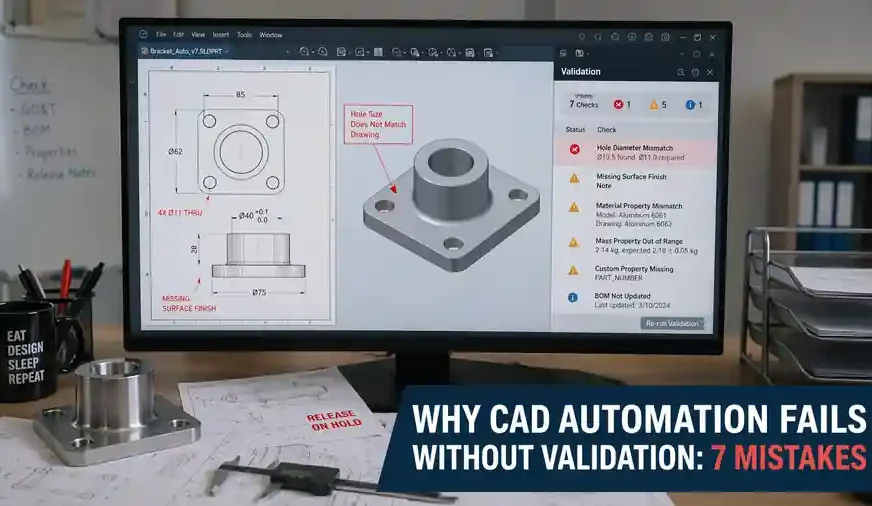
Introduction
Why CAD Automation Fails is a question many engineering teams ask only after they have already invested time, tools, and effort into building scripts, macros, rule-based workflows, or API-driven utilities. On the surface, automation looks like a clear win. It promises speed, repeatability, reduced manual work, and better engineering productivity. Yet in many real-world environments, CAD automation does not deliver the expected long-term value.
The problem is not automation itself.
The deeper issue is that many teams automate tasks without building a proper validation layer around them. A script may run successfully. A macro may generate output. A tool may complete the intended function. But if the input is unreliable, the engineering rules are weak, the workflow context is ignored, or the output is not verified, the automation becomes dangerous rather than useful.
That is the hidden reason Why CAD Automation Fails in so many organizations.
CAD automation is not just about writing code that works. It is about building engineering systems that produce trustworthy results under real production conditions. That means validation must exist at every critical stage: data, rules, workflow, exceptions, and outputs. Without that, even a technically impressive automation initiative can collapse under daily engineering reality.
This article explains Why CAD Automation Fails without validation and breaks the problem into 7 critical mistakes that engineers, managers, and automation developers must avoid. It also introduces a practical framework to help teams move from script-based automation to validation-driven engineering systems.
Why CAD Automation Fails in Real Engineering Workflows
The gap between automation and engineering reality
One of the biggest reasons Why CAD Automation Fails is that teams often build automation in a controlled or ideal environment, but deploy it in a messy, inconsistent, high-pressure engineering workflow. A tool may work perfectly on the developer’s test files and still fail in actual production use.
Real engineering environments contain:
- legacy files with inconsistent structure
- missing or incorrect metadata
- uncontrolled naming practices
- user-to-user modeling variation
- outdated templates
- special cases and one-off exceptions
- incomplete release discipline
- downstream dependencies involving BOM, drawings, manufacturing, and revision control
Automation that ignores this reality may appear successful in early demonstrations, but it struggles under operational complexity.
Why tools alone do not solve workflow problems
Many teams assume that once they have access to the SolidWorks API, a macro platform, a PDM workflow, or a custom script, they automatically have the foundation for successful automation. That assumption is dangerous.
Tools enable automation. They do not guarantee engineering correctness.
A CAD automation solution can still fail because of:
- poor process mapping
- weak rule ownership
- unclear validation logic
- missing exception handling
- lack of output verification
- no adoption strategy across users
- no visibility into failure patterns
This is precisely Why CAD Automation Fails even in companies that invest in good software and technical talent.
Why CAD Automation Fails when validation is ignored
When validation is ignored, automation becomes blind. It executes instructions without understanding whether the conditions are valid. This creates hidden engineering risk.
A successful automation system should not only ask, “Can this run?” It should also ask:
- Is the input correct?
- Are the rules applicable?
- Is the workflow stage appropriate?
- Is the result complete and reliable?
- Can the output be trusted without manual repair?
If those questions are not built into the design, failure is only a matter of time.
What Validation Really Means in CAD Automation
Validation in CAD automation is often misunderstood. Some teams treat validation as a final manual review after the automation has already finished. That is too late. Proper validation is a layered engineering discipline that begins before execution and continues after deployment.
Input validation
Input validation checks whether the source data is suitable for automation.
This includes:
- file naming consistency
- template correctness
- custom property completeness
- feature structure reliability
- geometry readiness
- reference stability
- unit consistency
- part or assembly eligibility
Without strong input validation, the tool begins with uncertainty.
Rule validation
Rule validation checks whether the engineering logic behind the automation is correct.
Examples include:
- whether the formulas are valid
- whether the condition paths match engineering standards
- whether pass/fail logic exists
- whether constraint conflicts are handled
- whether the rule assumptions are documented
Weak rule validation is one of the core reasons Why CAD Automation Fails after initial success.
Process validation
Process validation checks whether the automation fits the broader workflow.
That includes alignment with:
- design review stages
- drawing release flow
- BOM generation
- revision practices
- approval systems
- production handoff
- downstream data usage
A task can be automated correctly and still be wrong for the workflow.
Output validation
Output validation checks whether the result is accurate, complete, and usable.
This can include:
- geometry correctness
- metadata accuracy
- BOM consistency
- drawing compliance
- flat pattern integrity
- file generation completeness
- release-readiness
In mature engineering systems, output validation is not optional. It is the final confidence layer.
The V-CORE Framework for Reliable CAD Automation
To understand Why CAD Automation Fails, it helps to use a structured model. A practical way to think about this is the V-CORE Framework:
- V – Validate Inputs
- C – Control Rules
- O – Observe Workflow Impact
- R – Review Outputs
- E – Evolve Through Feedback
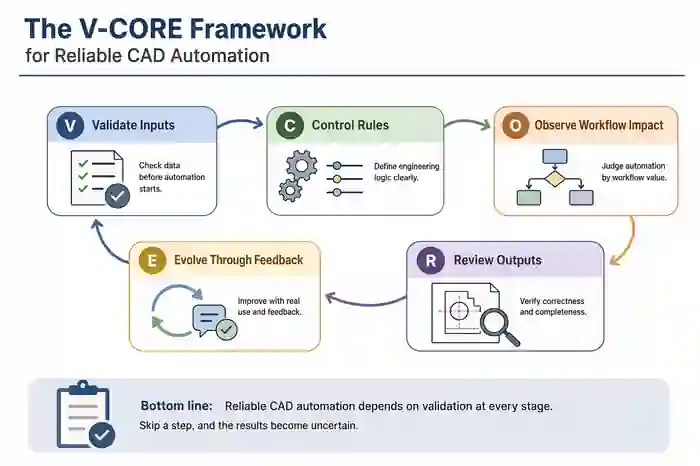
Validate Inputs
Never trust source data by default. Validate the conditions before the automation starts.
Control Rules
Define engineering logic clearly. Rule control is more important than script cleverness.
Observe Workflow Impact
Automation must be judged by workflow value, not by isolated task completion.
Review Outputs
Outputs must be checked for correctness, completeness, and engineering trust.
Evolve Through Feedback
Good automation improves through usage, failure logging, correction loops, and real user learning.
This framework helps explain Why CAD Automation Fails in many teams: one or more of these layers is missing.
Mistake 1: Automating Dirty or Uncontrolled Input Data
The first major reason Why CAD Automation Fails is simple: the input is bad.
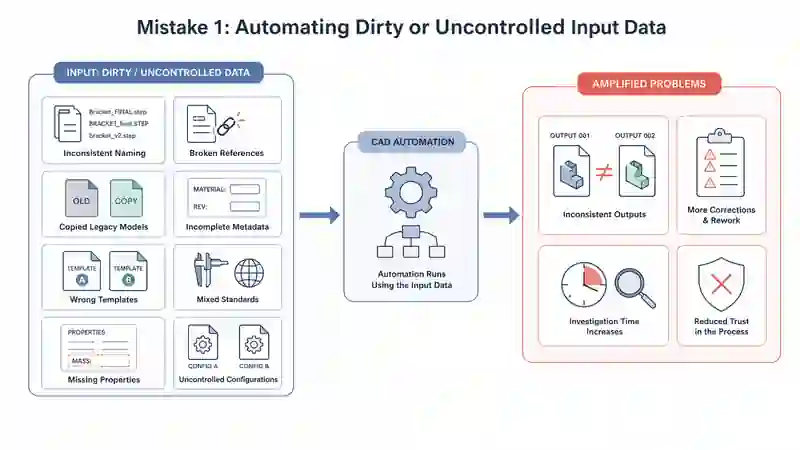
Teams often automate on top of:
- inconsistent naming
- broken references
- copied legacy models
- incomplete metadata
- wrong templates
- mixed standards
- missing properties
- uncontrolled configurations
Automation does not magically clean poor engineering data. It amplifies it.
When dirty data is automated, the result is faster inconsistency. Instead of saving time, the team spends more time correcting outputs, investigating errors, and rebuilding trust.
Mistake 2: Ignoring Engineering Rule Validation
A script can be technically functional and still be wrong at the engineering level.
This happens when teams automate decisions without clearly defining:
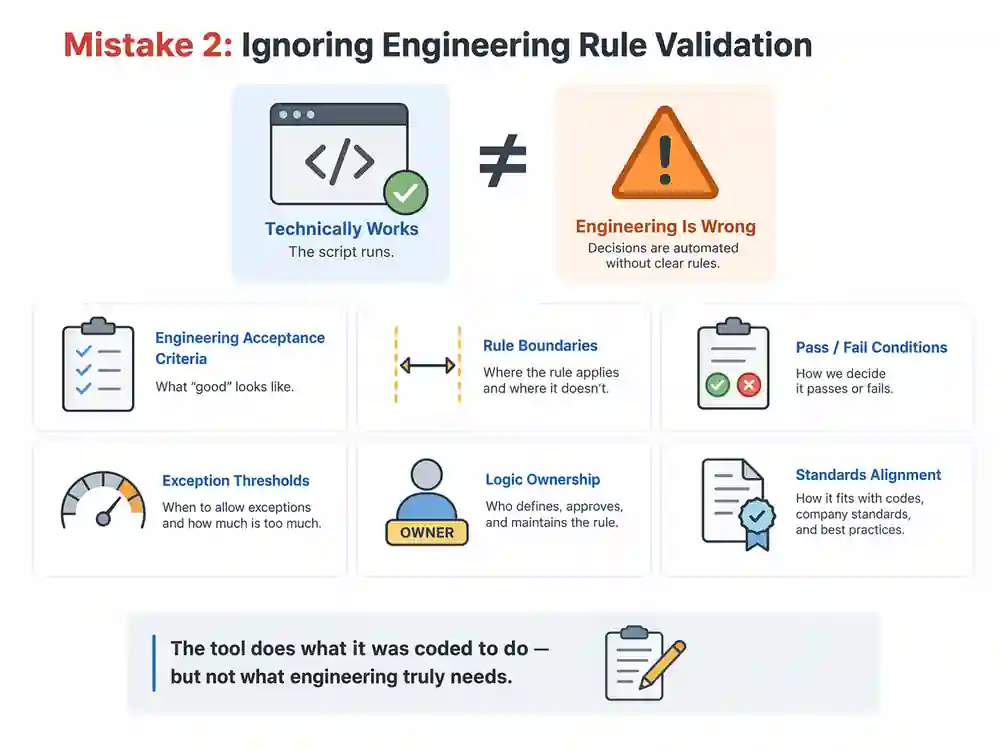
- engineering acceptance criteria
- rule boundaries
- pass/fail conditions
- exception thresholds
- logic ownership
- standards alignment
This is a major reason Why CAD Automation Fails after deployment. The tool does what it was coded to do, but not what engineering truly needs.
Mistake 3: Prioritizing Speed Over Accuracy
One of the most common automation traps is celebrating time savings too early.
Fast output is useless if it introduces downstream rework. In fact, fast wrong output is often worse than slow manual work because it creates false confidence.
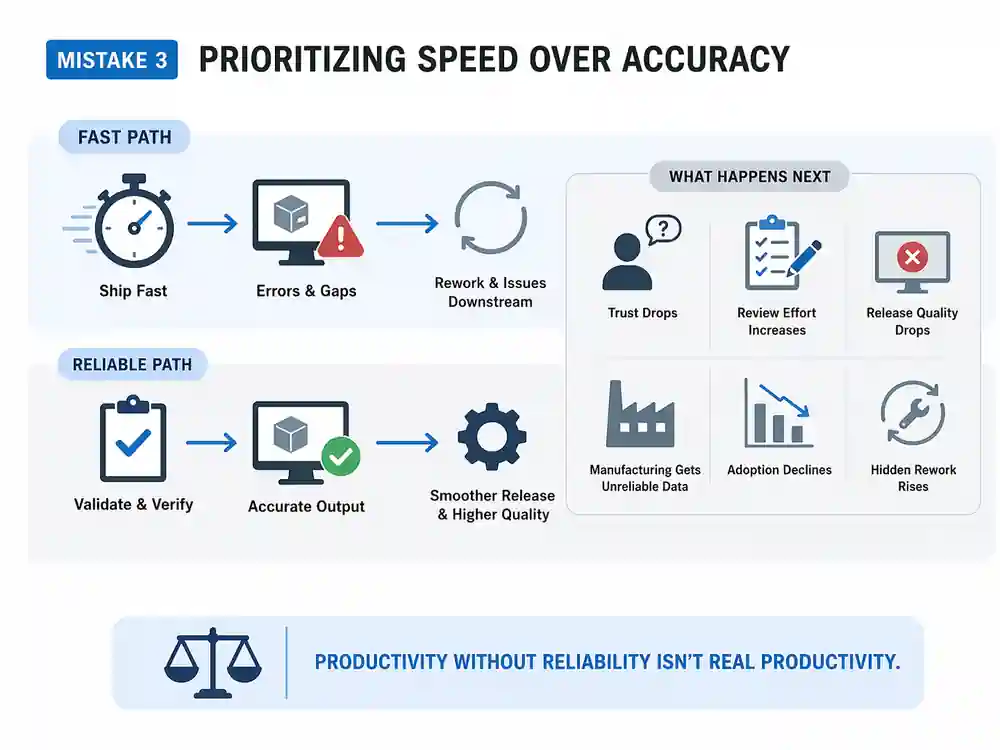
Typical symptoms include:
- engineers stop trusting the tool
- review effort increases
- release quality drops
- manufacturing receives unreliable data
- tool adoption declines
- hidden rework rises
This is another reason Why CAD Automation Fails in practical environments. Productivity without reliability is not real productivity.
Mistake 4: Automating Isolated Tasks Without Workflow Context
Some tools automate a single task very well, but ignore what happens before and after that task.
For example, a tool may update custom properties or generate a BOM successfully, but fail to consider:
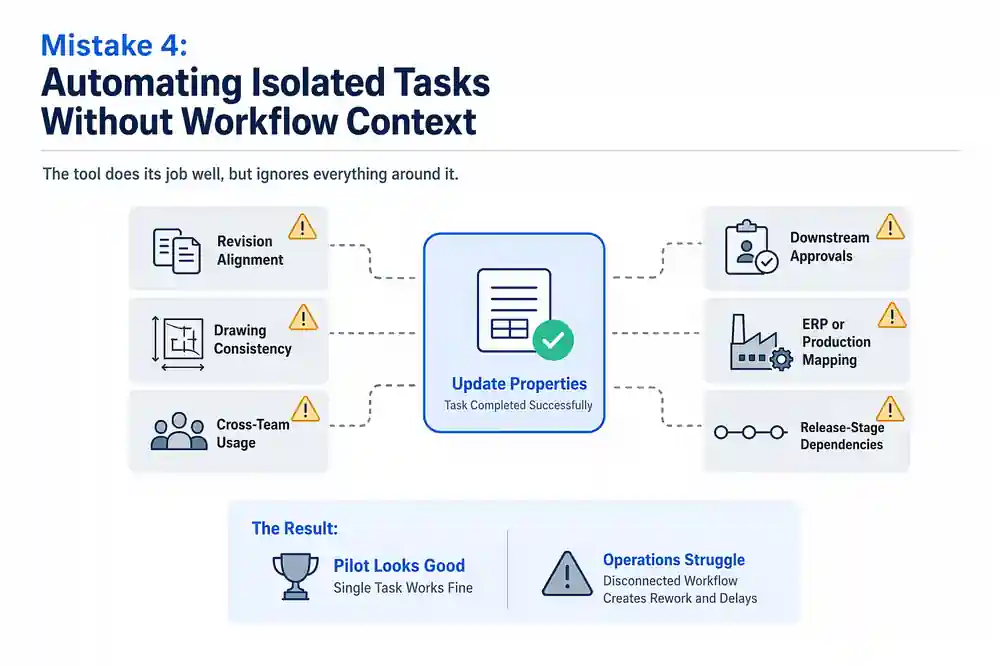
- revision alignment
- drawing consistency
- downstream approvals
- ERP or production mapping
- release-stage dependencies
- cross-team usage
That disconnect explains Why CAD Automation Fails between pilot success and operational value. Real engineering workflows are connected systems, not isolated screens.
Mistake 5: Failing to Handle Exceptions and Edge Cases
Real projects are never perfectly clean.
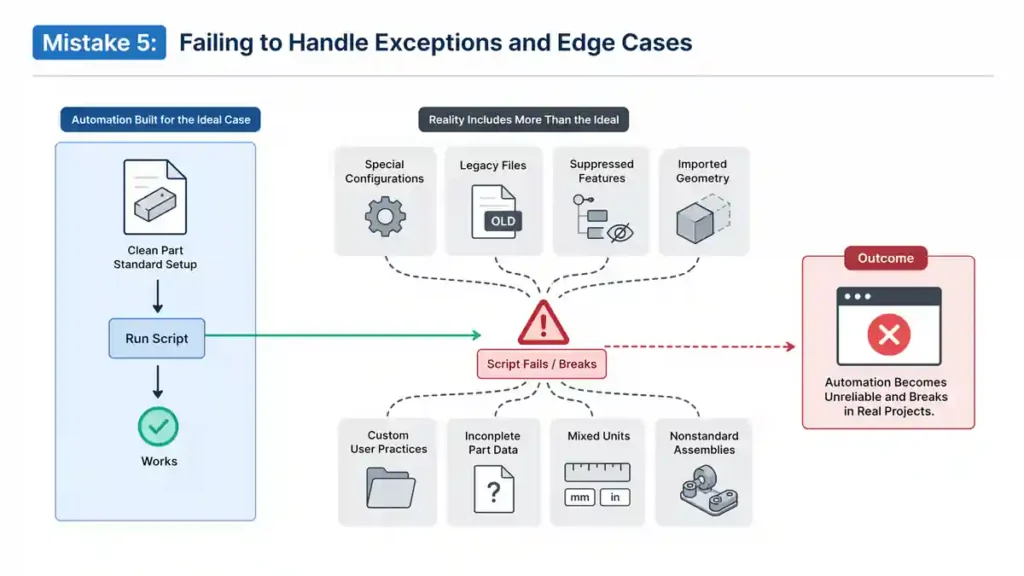
Engineering teams deal with:
- special configurations
- legacy files
- suppressed features
- imported geometry
- custom user practices
- incomplete part data
- mixed-unit conditions
- nonstandard assemblies
If the automation is built only for ideal cases, it will break as soon as real-world complexity appears. This is a critical explanation for Why CAD Automation Fails in growing organizations.
Mistake 6: Deploying Without a Feedback and Audit Loop
Some teams treat deployment as the finish line. It is not. Deployment is where learning begins.
Without a feedback loop, the team has no visibility into:
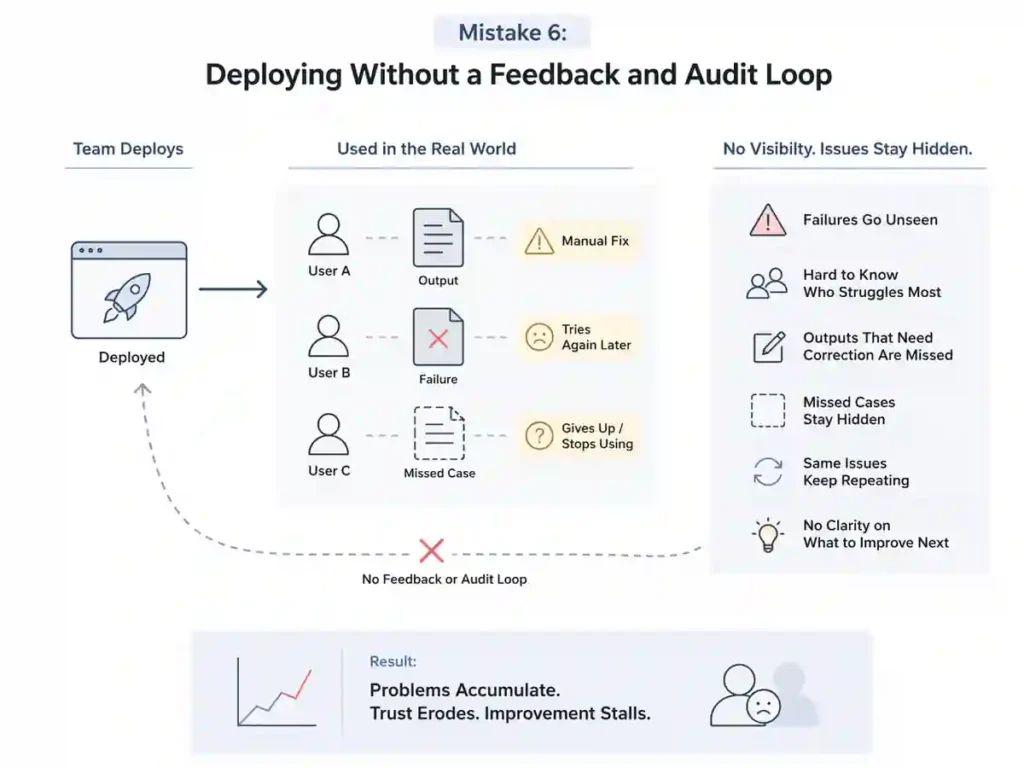
- where failures occur
- which users struggle most
- which outputs need correction
- what cases were missed
- what patterns repeat
- what should be improved next
This is one more reason Why CAD Automation Fails silently. The failure may not be dramatic at first. It shows up as small manual fixes, quiet distrust, and gradual abandonment.
Mistake 7: Treating CAD Automation as a Coding Shortcut Instead of an Engineering System
This may be the deepest reason Why CAD Automation Fails.
CAD automation is not merely a programming exercise. It is an engineering system design problem. It needs:
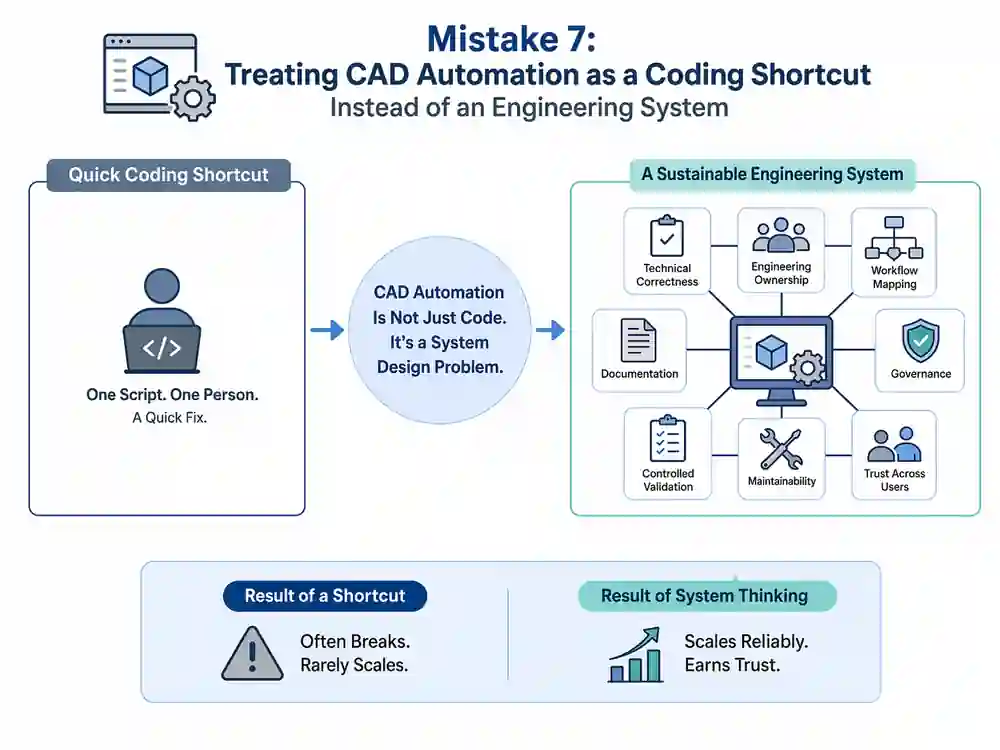
- technical correctness
- engineering ownership
- workflow mapping
- documentation
- governance
- controlled validation
- maintainability
- trust across users
When automation is treated as a one-person shortcut or a quick coding task, it rarely scales well. Sustainable automation requires system thinking.
Why CAD Automation Fails More Often as Teams Scale
Team size changes everything.
A script that works for one expert user may fail for a ten-person or fifty-person engineering team because scaling introduces variation:
- different modeling habits
- inconsistent user discipline
- mixed file quality
- conflicting assumptions
- more exceptions
- higher downstream exposure
This is why Why CAD Automation Fails often becomes visible only after expansion. The tool may not actually become worse. The environment simply becomes more demanding.
As teams scale, standardization becomes more important than raw scripting ability. Without common standards, validation, and process control, automation becomes fragile.
Warning Signs That Show Why CAD Automation Fails Early
Many failures send signals before they become serious. Teams should watch for early warning signs such as:
- repeated manual correction after each automation run
- mismatch between drawings, properties, and BOM data
- frequent rechecking before release
- user complaints about inconsistent output
- growing dependence on the original tool developer
- exceptions being handled outside the system
- no record of recurring failure cases
- engineers using the tool only partially
- low trust despite technical success
- silent workarounds appearing across teams
These symptoms often reveal Why CAD Automation Fails long before management recognizes the deeper issue.
Why CAD Automation Fails vs Validation-Driven CAD Automation
A useful way to understand the difference is through comparison.
| Area | Failing CAD Automation | Validation-Driven CAD Automation |
|---|---|---|
| Input handling | Assumes data is clean | Verifies readiness before execution |
| Rules | Hidden in code | Clearly defined and controlled |
| Workflow fit | Task-focused only | Aligned with full engineering process |
| Outputs | Generated quickly | Verified for reliability |
| Exception handling | Weak or missing | Built into the design |
| Team adoption | Fragile | More trustworthy and scalable |
| Rework risk | High | Reduced through checks |
| Governance | Informal | Structured and documented |
| Long-term value | Declines over time | Improves through feedback |
This table captures the core reason Why CAD Automation Fails in immature systems and why validation-driven systems perform better over time.
A Practical Mini Case: When Automation Works but Engineering Still Fails
Consider a simple example.
A team builds a tool to auto-populate custom properties and export BOM data from assemblies. The script runs correctly, saves time, and appears successful. Early feedback is positive.
But after wider use, problems emerge:
- some legacy models contain wrong material metadata
- copied assemblies carry outdated properties
- special configurations are not handled properly
- exported BOM data does not always match the released drawing
- engineers start correcting outputs manually
Technically, the automation still works. Yet the engineering workflow suffers.
This is exactly Why CAD Automation Fails without validation. The execution succeeded, but the engineering system failed because inputs, rules, and outputs were not validated deeply enough.
How to Prevent Why CAD Automation Fails in Future Projects
The solution is not to avoid automation. The solution is to build better automation.
Best practices for long-term reliability
- standardize file naming, metadata, and templates before automation
- define engineering rules before writing code
- separate input, rule, process, and output validation
- test with real production files, not only clean sample files
- design for edge cases and special conditions
- provide visible pass/fail messages to users
- create a correction and feedback loop
- document what the automation covers and what it does not cover
- track repeated failure patterns
- review adoption based on trust, not just usage count
- keep engineering ownership involved after deployment
- improve the tool iteratively based on real workflow outcomes
These practices directly reduce the conditions that explain Why CAD Automation Fails in real-world teams.
The Future Is Smarter Validation, Not Just More Automation
The next stage of engineering automation is not simply more scripts, more macros, or more API features. The real evolution is toward smarter validation-driven systems.
That means:
- automation with rule visibility
- engineering-aware pass/fail logic
- workflow-connected decision-making
- exception-sensitive processing
- traceable outputs
- feedback-driven improvement
In other words, the future answer to Why CAD Automation Fails is not “write more code.” It is “build better engineering intelligence around the code.”
This shift matters because modern engineering teams need more than convenience. They need automation they can trust under real design, review, release, and production conditions.
Key Lessons Engineers Should Remember
Before concluding, it is worth making the core lessons explicit:
- automation is not value unless the output is trustworthy
- validation turns scripts into engineering systems
- speed without correctness increases risk
- dirty input data will damage even strong automation
- unclear rules lead to hidden failure
- workflow context matters more than isolated task success
- scaling exposes weaknesses that pilot projects hide
- exception handling is not optional
- user trust is one of the most important KPIs
- feedback loops make automation stronger over time
- governance matters for long-term maintainability
- reliable CAD automation is built, tested, reviewed, and evolved
These are the practical lessons behind Why CAD Automation Fails in many organizations.
Conclusion
Why CAD Automation Fails is rarely just a software issue. More often, it is the result of missing validation, weak standards, unclear rules, poor workflow alignment, and low system maturity. A macro or API tool can run perfectly and still fail as an engineering solution.
That is why validation must be treated as the foundation, not the final checkpoint.
Teams that validate inputs, control rules, observe workflow impact, review outputs, and evolve through feedback build automation that is more trustworthy, scalable, and valuable. Teams that ignore these layers may achieve short-term speed, but they often pay for it through rework, low adoption, and growing engineering risk.
The lesson is clear: if you want CAD automation to succeed in the real world, do not build script-first systems. Build validation-driven engineering systems.
Related Articles
- AI-Powered Engineering Systems
- CAD Automation Systems
- Bend Allowance Calculator
- Engineering Drawing Change Detection
External References
- MBE PMI Validation and Conformance Testing Project | NIST
- Y14.41-2019 – Digital Product Definition Data Practices | ASME
- Digital Thread for Manufacturing | NIST
- SOLIDWORKS API Help 2025 – Getting Started Overview
FAQs –Why CAD Automation Fails Without Validation: 7 Mistakes
1. Why CAD Automation Fails in many engineering teams?
Why CAD Automation Fails in many engineering teams is usually not because automation tools are weak. The bigger problem is missing validation, inconsistent input data, unclear engineering rules, and poor workflow integration. A script may work technically, but if the surrounding design process is unstable, the automation will produce unreliable results.
- bad input data causes unreliable output
- missing validation creates hidden engineering risk
- poor workflow mapping reduces automation value
- unclear rules lead to inconsistent results
- lack of trust reduces user adoption
2. What is the biggest reason Why CAD Automation Fails?
The biggest reason Why CAD Automation Fails is the absence of a validation layer. Many teams automate actions, but they do not validate inputs, engineering rules, process conditions, exceptions, or outputs. As a result, the automation runs, but the result does not match real engineering needs.
Quick answer table
| Area | What Goes Wrong |
|---|---|
| Inputs | bad data enters the system |
| Rules | engineering logic is unclear |
| Workflow | automation is disconnected |
| Output | wrong results are accepted |
| Adoption | users lose trust |
3. Can validation reduce CAD automation failure?
Yes. Validation can significantly reduce CAD automation failure because it checks whether the automation should run, how it should run, and whether the result can be trusted. Validation improves reliability, reduces rework, supports scale, and increases engineering confidence.
- validation catches bad inputs early
- validation improves output quality
- validation supports repeatability
- validation reduces manual correction
- validation increases trust across teams
4. Why CAD Automation Fails even when the script works?
A script can work correctly from a programming point of view and still fail at the engineering level. This happens when the automation executes logic as coded, but the logic does not reflect engineering standards, approval flow, edge cases, or workflow requirements. Technical success does not always mean engineering success.
| Technical View | Engineering View |
|---|---|
| script runs | result must be correct |
| no code error | no workflow error |
| task completed | output must be usable |
| function works | process must still fit |
5. Why CAD Automation Fails during scaling?
Why CAD Automation Fails becomes more visible during scaling because more users, more file types, more exceptions, and more workflow variations expose weaknesses that were hidden during pilot use. A tool that works for one user or one clean dataset may fail when used across larger teams and mixed engineering conditions.
- team growth introduces variation
- standards become harder to enforce
- exceptions increase over time
- inconsistent user behavior exposes weak assumptions
- pilot success does not guarantee operational success
6. Is CAD automation useful without validation?
CAD automation can still provide short-term value without validation for very limited and low-risk tasks. However, in real engineering environments, automation without validation is risky because it can create silent errors, inconsistent outputs, and downstream rework. Validation is what turns automation into a reliable engineering system.
Quick comparison
| Without Validation | With Validation |
|---|---|
| faster output | reliable output |
| hidden risk | controlled risk |
| more rework | fewer corrections |
| low trust | stronger adoption |
7. What are the warning signs that show Why CAD Automation Fails early?
Early warning signs of Why CAD Automation Fails include repeated manual fixes, engineers rechecking outputs every time, inconsistent BOM or drawing data, growing user frustration, low trust in the tool, and poor adoption across teams. These signs usually appear before full automation breakdown happens.
- manual correction keeps increasing
- outputs need repeated review
- downstream teams report mismatches
- users stop depending on the tool
- adoption drops quietly over time
8. How can engineers prevent Why CAD Automation Fails problems?
Engineers can prevent Why CAD Automation Fails problems by standardizing inputs, defining engineering rules clearly, validating outputs, handling edge cases, documenting scope, and building feedback loops after deployment. Reliable automation needs system thinking, not only scripting effort.
Best-practice points
- clean data before automation
- define pass/fail rules early
- map workflow before coding
- test with real files, not ideal files
- handle exceptions explicitly
- track corrections and failure patterns
- improve the tool continuously
9. What makes CAD automation reliable in production?
Reliable CAD automation in production depends on technical correctness, engineering ownership, workflow compatibility, documented rules, exception handling, controlled validation, and user trust. Production-ready automation must support real files, real users, and real downstream dependencies.
Reliability checklist
- validated inputs
- rule control
- workflow mapping
- output review
- audit trail
- maintainability
- cross-team trust
10. What is validation-driven CAD automation?
Validation-driven CAD automation is an approach where automation is built around controlled checks, engineering rules, workflow fit, and output review rather than only code execution. In this model, automation is treated as an engineering system, not just a macro or shortcut. This approach reduces failure risk and improves long-term adoption.
Simple definition table
| Term | Meaning |
|---|---|
| automation | task execution |
| validation | checking correctness |
| validation-driven automation | execution with engineering control |
| engineering system thinking | building for scale, trust, and workflow fit |