SolidWorks Custom Property Manager: 7 Automation Benefits for Modern Engineering Teams
Managing metadata inside CAD files sounds simple… until you’ve worked in a real engineering environment.
Different customers.
Different naming rules.
Different templates.
Different SolidWorks versions.
Hundreds of PART and ASM files to update — sometimes overnight.
Manual property editing quickly becomes the slowest, most repetitive, and error-prone part of the engineering workflow.
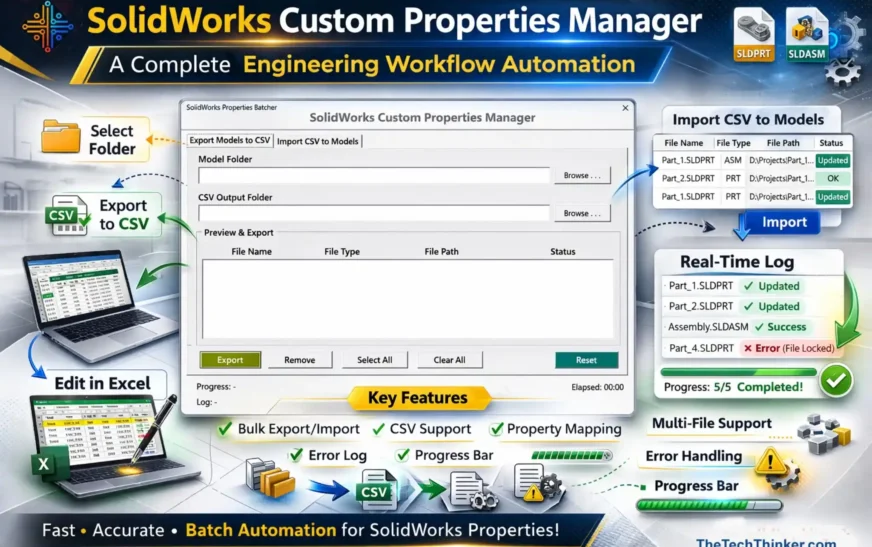
The SolidWorks Custom Properties Manager automation tool, developed by The Tech Thinker, solves this bottleneck by fully automating the export, edit, and import cycle for PART and ASM metadata — without opening files one by one.
This article explains the tool end-to-end:
-
how it works
-
why metadata management matters
-
real engineering use cases
-
comparison tables
-
workflow screenshots
-
and a future roadmap for automation improvements
It is written to educate engineers, CAD managers, QA leads, and PDM administrators who deal with property inconsistency, file migrations, template rollouts, and customer-specific deliverables.
Introduction: Why Engineering Teams Need Smarter Property Management
Most CAD teams lose hours every week updating properties manually.
Typical tasks include:
-
Updating Description fields
-
Correcting Part Numbers
-
Changing Material definitions
-
Fixing Finish values
-
Editing Vendor or Project properties
-
Managing Revision and ECO fields
-
Ensuring consistency before a PDM/PLM migration
One incorrect Description or Material value can create serious downstream problems:
❌ Break a BOM
❌ Fail a PDM check-in
❌ Generate incorrect manufacturing data
❌ Confuse procurement or vendor teams
❌ Cause revision mismatches across assemblies
And when this must be done for 20, 50, or even 500 files, manual editing becomes practically impossible.
This is where a dedicated SolidWorks Custom Properties Manager automation solution becomes essential.
What Is the SolidWorks Custom Property Manager?
The SolidWorks Custom Properties Manager is a custom CAD automation tool developed by The Tech Thinker.com to simplify metadata management across SolidWorks PART and ASM files.
The tool was designed specifically to address common engineering challenges such as:
-
large-scale property updates
-
metadata cleanup before PDM migration
-
template standardization across projects
-
batch editing of properties for legacy CAD libraries
Unlike traditional macro scripts or manual workflows, the tool focuses on simplicity, reliability, and practical engineering use cases rather than complex configuration or software dependencies.
Future versions of the tool may include:
-
deeper SolidWorks API integrations
-
validation rules for property consistency
-
expanded automation capabilities for enterprise CAD environments
The tool is particularly valuable for CAD teams seeking:
✔ Faster metadata updates
✔ Improved data accuracy
✔ Standardized engineering templates
✔ Repeatable automation workflows
✔ Clean metadata for PDM/PLM integration
Unlike many built-in SolidWorks functionalities, the SolidWorks Custom Properties Manager is designed for high-volume, multi-file automation, allowing engineers to manage metadata across entire project folders with near-zero manual effort.
Why Metadata Matters in Engineering Workflows
Metadata (custom properties) is not just “text inside files.”
It controls the entire downstream engineering lifecycle.
Here’s why it matters:
1. BOM Accuracy
Fields like:
-
Part Number
-
Material
-
Description
-
Weight
-
Finish
Directly influence BOMs, costing, manufacturing planning, and assembly reports.
2. Revision Traceability
Properties such as REV, ECN, or Approved By must stay consistent for auditing.
3. Template Independence
Different customers = different metadata rules.
4. PDM Card Mapping
PDM workflows depend heavily on clean, standardized metadata.
5. Vendor/Supplier Deliverables
Different suppliers require different naming and metadata formats.
6. Multi-version Compatibility
Revision-controlled changes across older and newer SolidWorks files need safe, repeatable updates.
Rich snippet points (SEO-friendly):
✔ Reduces manual property editing
✔ Eliminates typing mistakes
✔ Improves manufacturing communication
✔ Enables faster ECO handling
✔ Ensures BOM & drawing consistency
✔ Prevents PDM check-in errors
✔ Supports customer-specific metadata mapping
7 Automation Benefits for Engineering Teams
This section is the heart of the article — and heavily optimized around your focus keyword.
1. Batch Export Properties to CSV (5–500 Files)
The tool scans an entire folder and instantly extracts properties from:
-
PART (.SLDPRT)
-
ASM (.SLDASM)
Exporting metadata normally requires opening each file.
This tool does it in seconds, along with:
✔ File type
✔ File path
✔ Property count
✔ Export logs
✔ Ready/Exported statuses
Perfect for:
-
Customer migrations
-
Legacy data cleanup
-
BOM audits
-
PDM onboarding
2. Import Properties Back Without Opening Models
This is one of the biggest advantages.
The SolidWorks Custom Property Manager updates metadata inside PART and ASM files without:
-
Manually opening them
-
Breaking mates
-
Touching geometry
-
Altering design history
Engineers simply edit a CSV and import it back.
Ideal for:
-
ECO updates
-
Property corrections
-
Customer-specific formatting
-
Template conversions
3. Standardizes Property Names and Values Automatically
Organizations often inherit messy legacy data:
| Incorrect/Old | Should Be | Example |
|---|---|---|
| MAT | Material | ALUMINIUM 6061 |
| FINISH_TYPE | Finish | Powder Coat |
| DWGNO | Drawing Number | FAB-12034 |
| Weight_kg | Weight | 2.45 kg |
This tool makes it easy to apply standard naming conventions across entire assemblies.
Benefits:
✔ Cleaner BOM
✔ PDM card alignment
✔ Zero duplicate property names
✔ Consistent templates
4. Multi-Version Property Transfer Across SolidWorks Releases
You specifically asked for this — and it’s a huge real-world advantage.
Property migration is essential when updating from:
-
SolidWorks 2018 → 2022 → 2024
-
Customer formats → Supplier formats
-
Older projects → New templates
Manual editing breaks easily.
This automation ensures smooth metadata transfer between versions.
5. Ideal for New Template Rollouts
When a company introduces:
-
New title block rules
-
Updated naming conventions
-
Cross-department property standards
-
ERP/PDM integrations
Hundreds of CAD files may require metadata updates.
Perfect use case for this tool.
6. Faster ECO & Revision Updates
Updating:
-
REV
-
ECN No
-
Change Description
-
Approved by
-
Checked By
-
Released Date
across large assemblies is usually a nightmare.
The tool handles it in minutes.
7. PDM-Ready Metadata Structure
Clean metadata is the foundation of any PDM implementation.
This tool helps ensure:
✔ Proper naming conventions
✔ No illegal characters
✔ No empty critical fields
✔ PDM card fields align with model metadata
This significantly reduces PDM onboarding issues.
Feature Overview of SolidWorks Custom Property Manager
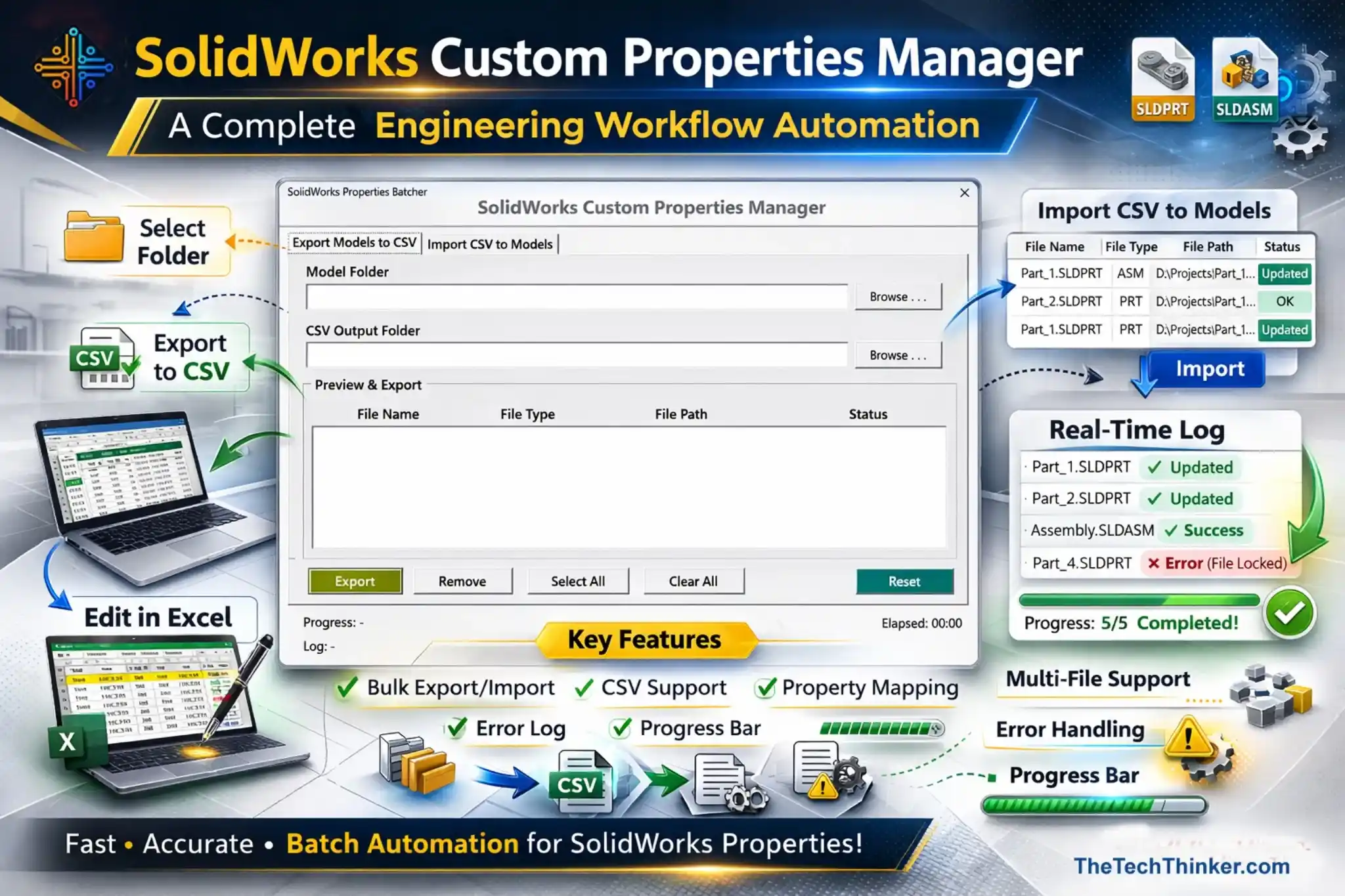
Include:
-
Home screen
-
Folder selection
-
Export panel
-
Progress logs
-
Import workflow
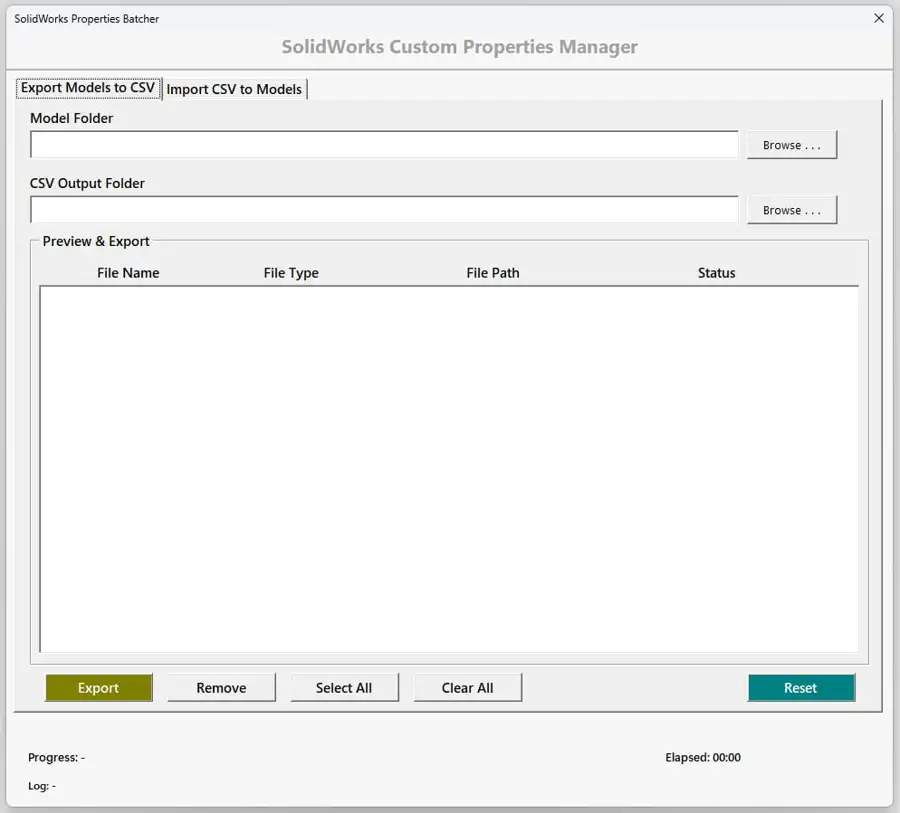
How the Workflow Works -SolidWorks Custom Property Manager
Home Page-Export Tab
Select the Model & CSV Folders
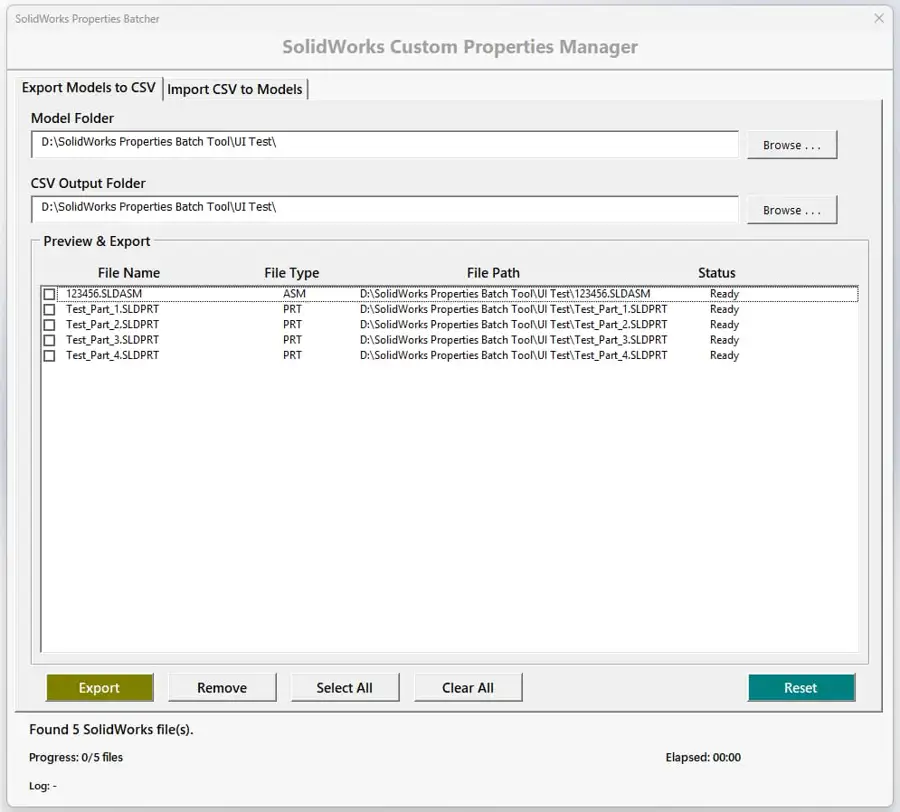
Select the Models whichever Properties need to Export
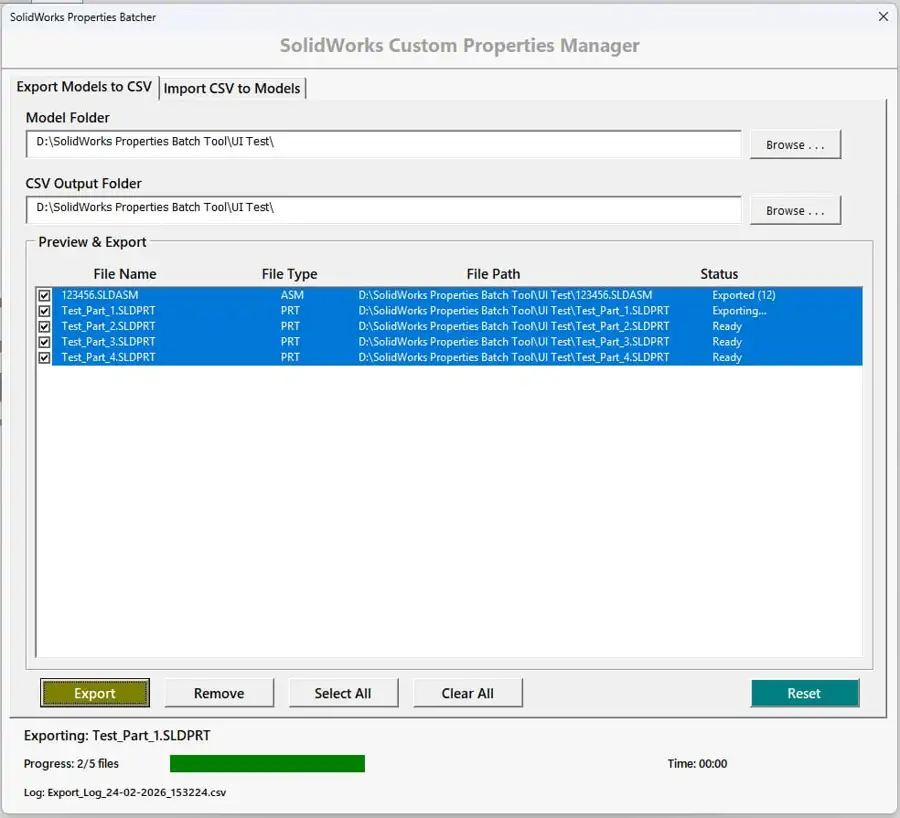
Export done for selected models
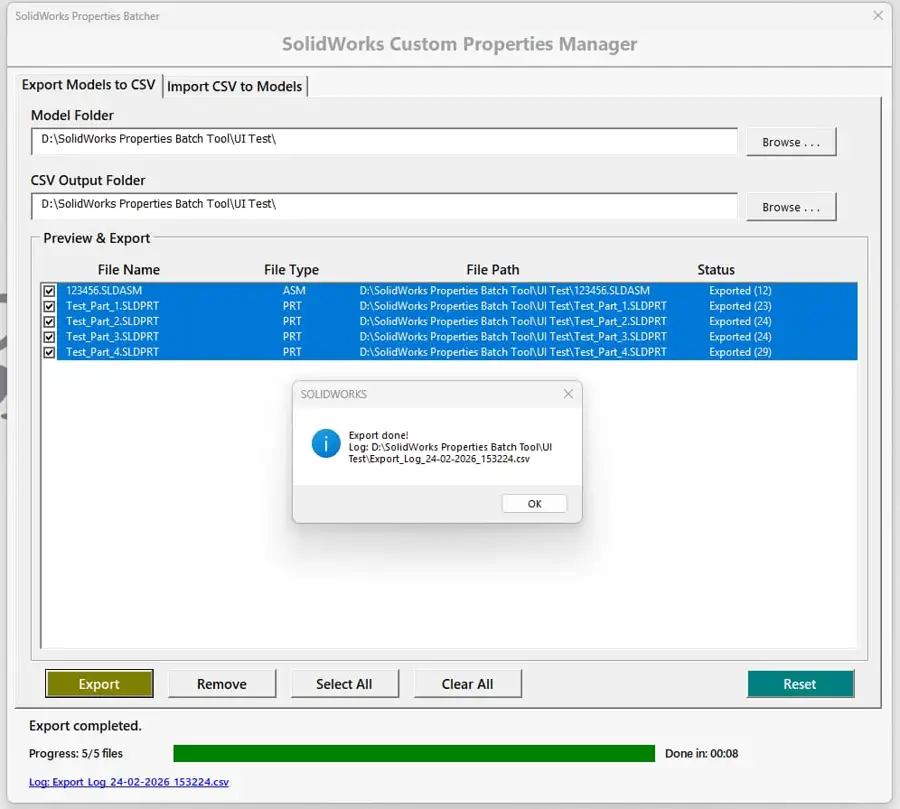
Import Tab-Load Model & CSV Folders
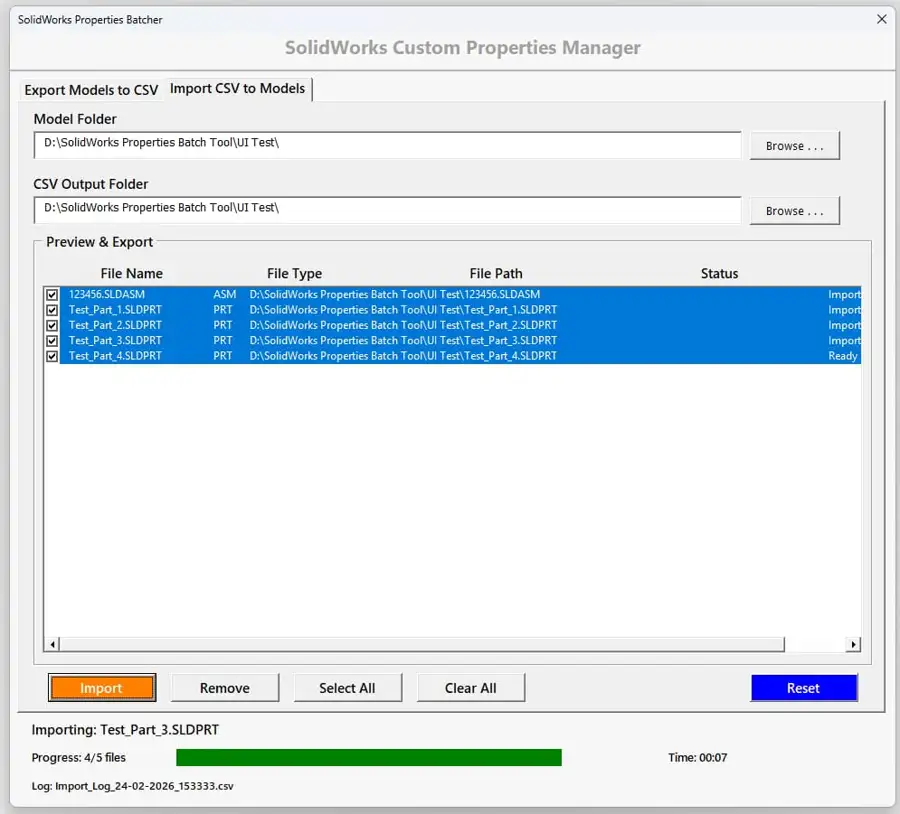
Select models whichever Properties need to Import
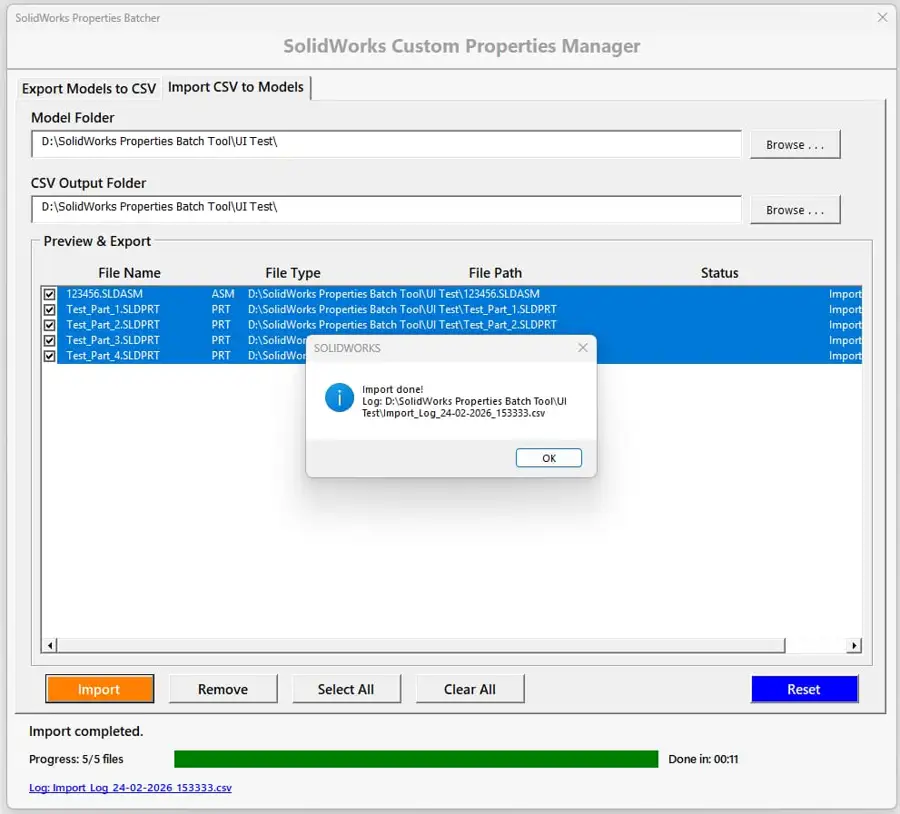
Step 1: Export Models to CSV
The tool:
-
Loads selected folder
-
Identifies PART/ASM
-
Reads metadata
-
Exports to a clean CSV
-
Updates log
Benefits:
✔ No manual opening of files
✔ No lag
✔ Works on hundreds of files
Step 2: Review & Edit Metadata in Excel
Engineers can modify:
-
Part Number
-
Description
-
Material
-
Finish
-
Vendor
-
Tolerances
-
Revision
-
ECO fields
Advantages:
✔ Easy bulk changes
✔ Excel formulas for mass corrections
✔ Zero SolidWorks load time
Step 3: Import CSV Back Into Models
The tool:
-
Reads updated metadata
-
Writes properties into each file
-
Displays live status updates
-
Logs results
Benefits:
✔ Fast
✔ Repeatable
✔ Fully traceable
Manual vs Automated Workflow
| Parameter | Manual Editing | Using Custom Properties Manager |
|---|---|---|
| Time | Slow (minutes per file) | Seconds per batch |
| Accuracy | User-dependent | Highly consistent |
| Multi-file update | Difficult | One-click |
| Version compatibility | Risk of corruption | Safe & batch stable |
| Standardization | Hard to enforce | Easy to enforce |
| PDM readiness | Often inconsistent | Clean structured properties |
Supported Engineering Use Cases
This tool fits into multiple real-world workflows:
✔ Customer deliverables with their metadata rules
✔ Supplier format conversion
✔ ERP/PDM integration preparation
✔ Template upgrades
✔ Legacy file cleanup
✔ ECO/Revision updates
✔ Multi-version migrations
✔ Outsourced engineering file standardization
It solves problems that engineering teams face on a weekly basis.
Compatibility & Integrations
Supported Model Types
-
PART (.SLDPRT)
-
ASSEMBLY (.SLDASM)
Supported Tasks
-
Standard property updates
-
Create new properties
-
Fix duplicate fields
-
Standardize naming conventions
Possible Future Integrations
-
PDM card mapping
-
PLM metadata export
-
ERP item master sync
-
Excel template mapping
-
Mass renaming engine
Tech Stack Used for the SolidWorks Custom Property Manager
The SolidWorks Custom Property Manager is built using a lean, stable, and highly compatible engineering tech stack. The focus is on reliability, batch performance, and seamless integration with existing SolidWorks environments.
Below is the complete technology stack used to build and operate the tool.
1. SolidWorks API (Application Programming Interface)
The core automation relies on the official SolidWorks API, which provides access to:
-
Model documents (Parts, Assemblies)
-
Custom property functions
-
Configuration-level metadata
-
File open/save operations
-
Error handling and diagnostics
The API ensures safe interaction with SolidWorks models without disrupting native data structures.
2. VBA (Visual Basic for Applications)
The logic is implemented using Visual Basic for Applications (VBA), chosen for its:
-
Native integration with SolidWorks
-
Lightweight runtime
-
Easy deployment inside existing CAD environments
-
Fast execution for batch operations
-
Zero installation complexity
VBA remains one of the most reliable solutions for quick, CAD-connected engineering automations.
3. Windows COM Automation Layer
The tool communicates with SolidWorks via COM-based automation, enabling:
-
Direct access to SolidWorks sessions
-
Fast property read/write operations
-
Smooth file traversal
-
Multi-file processing without UI overhead
This ensures compatibility with all Windows-based SolidWorks installations.
4. CSV / Excel Data Layer
For import/export operations, the tool uses standard CSV format because it is:
-
Lightweight
-
Human-readable
-
Excel-friendly
-
System-independent
-
Easy for batch metadata processing
This makes it ideal for revision work, template mapping, and legacy file cleanup.
5. File System I/O (Windows File Operations)
The tool performs fast folder-level processing using Windows File I/O, enabling:
-
Multi-file batch scanning
-
Directory-based selection
-
Auto-detection of SLDPRT/SLDASM files
-
Log generation and storage
This keeps performance high even with large model libraries.
6. Custom UI Framework
The interface is built using VBA , providing:
-
Multi-tab UI (Home, Export, Import)
-
Progress bars
-
Preview tables
-
Status panels
-
Log viewers
UserForms ensure a clean, desktop-app-like experience inside a lightweight environment.
7. Internal Validation & Error-Handling Framework
The tool includes:
-
Safe property reads
-
Write-protection checks
-
PDM lock checks (if applicable)
-
Missing property detection
-
Skip logic for failed operations
This makes the automation stable even in inconsistent or legacy CAD folders.
Summary of the Stack
| Layer | Technology | Purpose |
|---|---|---|
| Automation | SolidWorks API | Property read/write, model access |
| Programming | VBA | Logic, workflow, error handling |
| Integration | COM Automation | Linking tool ↔ SolidWorks |
| Data Layer | CSV/Excel | Import/export metadata |
| UI Layer | VBA UserForms | Dashboard, file preview, progress |
| System Layer | Windows File I/O | Folder scanning, logs, file ops |
Future Enhancements Roadmap
-
Smart Templates for property validation
-
AI-based metadata cleanup
-
PDM integration for auto-check-in updates
-
ERP field mapping
-
CSV diff viewer
-
Model preview panel
-
Change-tracking dashboard
Software Details
Name: SolidWorks Custom Properties Manager
Developer: Ramu Gopal
Version: v1.0
Platform: SolidWorks
Language: VBA
License: MIT
Download: GitHub
Source Code
The SolidWorks Custom Properties Manager automation tool is available on GitHub.
https://github.com/ramugopal92/solidworks-custom-properties-manager
Conclusion
Property management is one of the most underrated, yet most important parts of engineering workflows.
The SolidWorks Custom Property Manager solves a real industry problem:
managing metadata for hundreds of CAD files quickly, safely, and consistently.
It delivers:
✔ Engineering speed
✔ Metadata accuracy
✔ Standardization
✔ Multi-version compatibility
✔ PDM/PLM readiness
✔ Complete traceability
✔ Zero manual repetitive work
This is not just a productivity improvement —
it is the foundation of clean, scalable CAD data.
Keeep read The Tech Thinker, i will be releasing many tools on SolidWorks Engineering Automation
FAQs on SolidWorks Custom Property Manager by The Tech Thinker
1. What is the SolidWorks Custom Property Manager used for?
The SolidWorks Custom Properties Manager is a workflow automation tool that handles metadata export, import, and standardization.
It helps engineers update properties quickly, accurately, and in bulk.
✔ Reduces manual edits ✔ Ensures consistency ✔ Boosts speed
2. How does the SolidWorks Custom Property Manager save engineering time?
The SolidWorks Custom Properties Manager automates repetitive property tasks and eliminates manual entry.
It reduces errors and speeds up large-scale updates.
✔ Faster workflows ✔ Standardized metadata ✔ Less rework
3. Can the SolidWorks Custom Property Manager export properties to CSV?
Yes, the SolidWorks Custom Properties Manager supports one-click export of part and assembly properties to CSV.
CSV makes editing easy in Excel or other tools.
✔ Clean format ✔ Batch export ✔ Real-time logs
4. Does the SolidWorks Custom Property Manager support CSV import back into models?
Yes, the SolidWorks Custom Properties Manager maps each CSV column back into SolidWorks custom properties.
It updates multiple models in seconds.
✔ Bulk import ✔ Error detection ✔ Property mapping
5. Which SolidWorks file types are supported by the SolidWorks Custom Properties Manager?
The SolidWorks Custom Properties Manager supports:
-
SLDPRT (Parts)
-
SLDASM (Assemblies)
It is optimized for batch operations and scalable workflows.
6. Can I edit exported data from the SolidWorks Custom Property Manager in Excel?
Yes. The SolidWorks Custom Properties Manager exports editable CSV files for bulk updates.
Excel or Google Sheets can be used for property modifications.
✔ Easy editing ✔ Fast reviews ✔ Clean structure
7. Does the SolidWorks Custom Property Manager support batch processing?
Batch automation is a core feature of the SolidWorks Custom Properties Manager.
It processes dozens of files in one click.
✔ Multi-file support ✔ Instant updates ✔ No manual opening of models
8. Does the SolidWorks Custom Property Manager generate log files?
Yes, the SolidWorks Custom Properties Manager generates detailed CSV logs after every export or import.
Logs include file status, errors, and time taken.
✔ Transparent auditing ✔ Troubleshooting ✔ Traceability
9. How does the SolidWorks Custom Property Manager handle errors?
The SolidWorks Custom Properties Manager flags issues like locked files, missing properties, and write-access failures.
All errors are recorded in the log.
✔ Clear warnings ✔ Error logs ✔ Safe updates
10. Can the SolidWorks Custom Properties Manager replace manual property editing?
Yes, the SolidWorks Custom Properties Manager removes 80–90% of manual editing work.
Only rare edge cases require manual touch-ups.
✔ Consistency ✔ Precision ✔ Time savings
11. Is the SolidWorks Custom Property Manager an official SolidWorks feature?
No, the SolidWorks Custom Properties Manager is a custom-developed automation solution, not an inbuilt tool.
It works seamlessly with existing SolidWorks installations.
✔ Tailored ✔ Engineering-grade ✔ Extendable
12. Can the SolidWorks Custom Property Manager work with PDM files?
Yes, the SolidWorks Custom Properties Manager can work with PDM-managed files, if they are checked out.
Write access is required for updates.
Future versions may integrate with PDM APIs.
13. Can different templates be handled by the SolidWorks Custom Property Manager?
Yes, the SolidWorks Custom Properties Manager supports multiple CSV templates.
This helps maintain customer- or project-wise metadata styles.
✔ Flexible ✔ Template-agnostic ✔ Scalable
14. How fast is the SolidWorks Custom Property Manager?
The SolidWorks Custom Properties Manager performs exports at 5–10 files per second in typical systems.
Imports may take slightly longer due to property updates.
✔ Fast ✔ Responsive ✔ Optimized
15. Does the SolidWorks Custom Property Manager support complex assemblies?
Yes, the SolidWorks Custom Properties Manager works on assemblies and selected subcomponents.
You can choose which files to process.
✔ Selective control ✔ Clean preview ✔ Efficient
16. Can I select specific models inside the SolidWorks Custom Property Manager?
Yes, the SolidWorks Custom Property Manager provides a preview grid to:
✔ Select individual files
✔ Select All
✔ Remove unwanted files
17. Does the SolidWorks Custom Property Manager overwrite existing values?
The SolidWorks Custom Properties Manager only updates mapped CSV columns.
Unmapped properties remain unchanged.
✔ Safe updates ✔ Controlled changes ✔ Zero overwrites
18. Can the SolidWorks Custom Property Manager help standardize legacy CAD files?
Yes, the SolidWorks Custom Properties Manager is ideal for metadata cleanup and legacy standardization.
It updates missing or inconsistent properties in bulk.
✔ Legacy cleanup ✔ Revision updates ✔ Naming consistency
19. Does the SolidWorks Custom Property Manager support revision workflows?
Yes, the SolidWorks Custom Properties Manager supports metadata operations used in revision, ECO/ECR, and documentation workflows.
✔ Update revisions
✔ Apply batch ECO changes
✔ Maintain traceability
20. Can production and documentation teams benefit from the SolidWorks Custom Property Manager?
Yes, the SolidWorks Custom Property Manager keeps metadata consistent across Design, PDM, Manufacturing, and Documentation.
✔ Fewer release errors
✔ Better downstream accuracy
✔ Faster documentation cycles
Related Posts
- Get Virtual Parts in SolidWorks Using VBA
- Link Drawing Views to BOM in SolidWorks
- Common SolidWorks VBA Errors
External References
- SOLIDWORKS Official Documentation — Custom Properties
- SOLIDWORKS API Help — Custom Property Manager Interface
- SOLIDWORKS Forum – Custom Properties Discussions
SolidWorks Custom Properties Manager – CAD Automation Tool
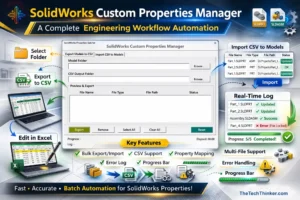
SolidWorks Custom Properties Manager by The Tech Thinker is a CAD automation tool that allows engineers to batch export, edit, and re-import SolidWorks custom properties using an Excel-based workflow powered by the SolidWorks API and VBA.
Price Currency: USD
Operating System: Windows
Application Category: EngineeringApplication
Pros
- Batch editing of SolidWorks custom properties
- Excel-based metadata editing workflow
- Automates property updates for hundreds of CAD files
- Uses SolidWorks API for reliable automation
- Improves engineering productivity
Cons
- Requires SolidWorks installed
- Basic knowledge of macros recommended
- Excel required for metadata editing